

GeoStamp Live Camera
APP TEAM · Photo & Video
Independent analytics for this App Store listing. AppTracker is not affiliated with APP TEAM.
Chart standing · US
What changed · US
Listing changes AppTracker has observed for this app in this storefront — new versions, price moves, rating shifts, and store copy.
We’re always working to make your experience better! This update brings improved performance, smoother functionality, bug fixes, and a few behind-the-scenes enhancements. Thanks for being with us and continuing to use our app!
Screenshots




About
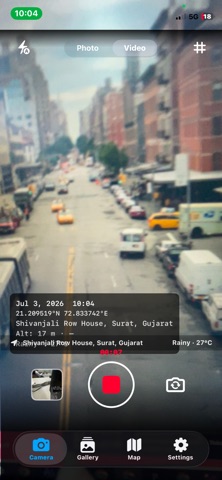
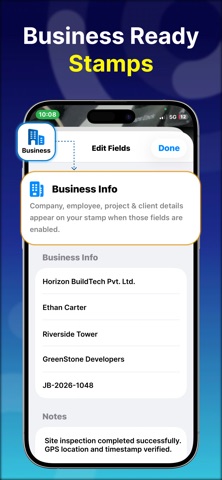
GeoStamp turns your iPhone into a professional geo-tagging camera. Every photo and video you capture is automatically stamped with GPS coordinates, address, date, time, altitude, speed, and live weather — right on the image itself. No more guessing where a photo was taken. No more manual notes. Just point, shoot, and your location data is burned into the image forever. -> LIVE GPS STAMP ON EVERY SHOT • GPS coordinates (latitude & longitude) stamped on photo • Full street address auto-resolved from GPS • Date & time in your preferred format • Altitude and speed (great for field work and travel) • Live weather: temperature, humidity, weather condition • Compass direction overlay • Map thumbnail embedded in stamp -> PROFESSIONAL STAMP TEMPLATES Choose from 5 ready-made templates — or build your own: • Professional — clean black stamp with company & employee info • Inspection — full business details: company, employee, project, client, job number, notes • Work Proof — green-accented stamp for field workers and contractors • Travel — weather, altitude, speed, and address for adventurers • Minimal — just date and GPS coordinates, nothing more Every template is fully customizable: position (top/bottom/left/right/center), font size, background opacity, border, accent color, and watermark text. -> BUILT FOR BUSINESS & FIELD WORK GeoStamp is the go-to tool for: • Construction & site inspection teams • Real estate agents documenting properties • Insurance adjusters capturing evidence • Field service technicians proving job completion • Delivery drivers confirming drop-off locations • Contractors showing work-in-progress • Property managers recording site conditions Add your company name, employee name, project name, client name, and job number to every photo. Generate PDF reports from your geo-tagged media library. -> PHOTO & VIDEO — BOTH SUPPORTED • Full-resolution photo capture with live stamp overlay • Video recording with GPS stamp • Tap-to-focus with focus ring • Flash control (auto / on / off) • Front & rear camera switching • Rule-of-thirds grid overlay • Front camera selfie support -> MAP VIEW & GALLERY • Interactive Apple Maps view showing all your geo-tagged media • Tap any pin to view the photo or video taken at that location • Gallery with grid view, search, filter, and sort • Filter by: All, Photos, Videos, Favorites • Sort by: Date, Location, Project • Batch export and share multiple files at once • Pull-to-refresh gallery -> PRIVACY FIRST — NO CLOUD • All data stays on your device — always • No account required • No cloud uploads, no servers, no tracking • Your photos, your GPS data, your control -> WIDGETS • Home Screen widget showing your latest geo-tagged photo -> GEOSTAMP PREMIUM Upgrade to unlock the full power of geo-tagged documentation: - Unlimited photo & video export (free: 10 exports) - Watermark-free export - Batch processing — export multiple files at once - Map thumbnail stamp on every photo - Weather stamp (temperature, humidity) - Altitude & speed stamp - Custom templates — create and save your own - Logo stamp — add your company logo - Ad-free experience Plans available: Weekly, Monthly, Yearly (Best Value) PERFECT FOR: Field workers • Inspectors • Contractors • Real estate agents • Insurance adjusters • Travelers • Photographers • Property managers • Delivery drivers • Construction teams • Site surveyors • Journalists Download GeoStamp and start capturing location-verified photos and videos today. Privacy Policy : https://sites.google.com/view/geocameratc/home Apple Terms of Use : https://www.apple.com/legal/internet-services/itunes/dev/stdeula/
What's new · 1.3
We’re always working to make your experience better! This update brings improved performance, smoother functionality, bug fixes, and a few behind-the-scenes enhancements. Thanks for being with us and continuing to use our app!
Details