

PhotoSelect: AI Photo Culling
RIVERSHIP · Photo & Video
Independent analytics for this App Store listing. AppTracker is not affiliated with RIVERSHIP.
Chart standing · US
What changed · US
Listing changes AppTracker has observed for this app in this storefront — new versions, price moves, rating shifts, and store copy.
• Best shot from video: pick the single best frame of a video and save it as a photo (free: up to 3 saves in total, unlimited with Pro). Analysis runs on your device. • "Years ago today": when you have photos taken on this date in past years, a card appears at the top of the Home tab. Tap it to swipe through just that day. Allow notifications to get one morning reminder. • Favorites are protected: photos you marked as Favorites in the Photos app are always kept by the AI suggestions (shown with a heart). • Resume swipe cleaning: your delete candidates and position are saved, so you can pick up where you left off. • You will now see an in-app notice when a new version is available.
In-app purchases · US
What this app sells inside itself, grouped by kind and priced for this storefront.
Screenshots



About
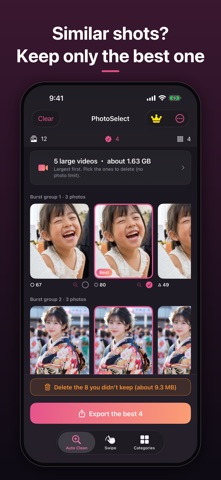
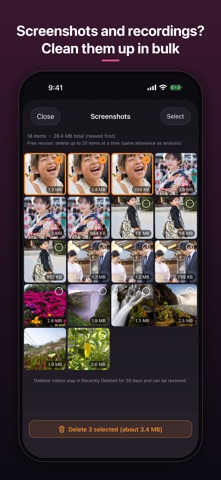
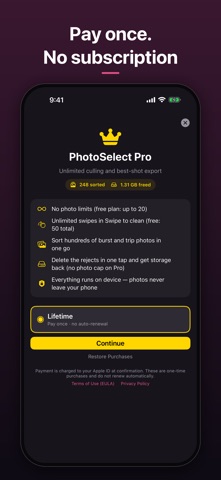
PhotoSelect is an iPhone photo cleaner that uses on-device AI to find similar photos, bursts and blurry shots, keep the best one, and delete the rest. It is made for anyone whose iPhone storage is full after hundreds of photos from a trip, a kid's event or a sports day. Nothing is uploaded and no account is needed. Try it free. Unlock everything with a one-time purchase, no subscription. WHAT PHOTOSELECT DOES - Delete blurry photos: finds out-of-focus and shaky shots - Remove similar photos and bursts: groups them and suggests the best one in each group - Find closed eyes: flags photos where someone blinked - Best shot from video: scores focus, faces, open eyes and exposure to pick the single best frame of a video and saves it as a photo (the video is left untouched) - Swipe to clean: go largest-first or newest-first, swipe left to delete and right to keep - Years ago today: when you have photos taken on this date in past years, a card appears at the top of the Auto Clean tab so you can swipe through just that day - Favorites always kept: photos you marked as Favorites in the Photos app are always suggested as keepers - Pick up where you left off: swipe cleaning saves your delete candidates and position, so you can resume next time - Clean up screenshots and screen recordings in bulk - Find and delete large videos: listed by size so you can remove the biggest first - Free up iPhone storage: see exactly how much space you freed after every delete HOW IT WORKS 1. Open Auto Clean, or pick photos yourself (the tabs are Auto Clean, Swipe and Categories) 2. The AI suggests which photos to keep 3. Export the keepers and delete the rest. Deleted photos stay in Recently Deleted for 30 days. PRIVACY All analysis runs on your iPhone or iPad. Your photos are never sent to a server. FREE AND PRO Free: try the AI culling and deleting on up to 20 photos, swipe cleaning up to 50 times, and up to 3 saves from videos. PhotoSelect Pro: no photo limit, your whole library in one go, and unlimited saves from videos. It is a single one-time purchase with no auto-renewal. The price is shown in the app. If you already have an active subscription, it keeps working as before. FAQ Is PhotoSelect a subscription app? No. Pro is a one-time purchase. Does PhotoSelect upload my photos? No. The analysis runs on your device. Can I get deleted photos back? Yes, for 30 days from Recently Deleted. Which photos does the AI suggest deleting? Blurry and out-of-focus shots, photos with closed eyes, poor exposure, and near-duplicates in a burst or similar group. The AI only suggests; deleting is always your action. Terms (EULA): https://www.apple.com/legal/internet-services/itunes/dev/stdeula/ Privacy Policy: https://rivership.org/privacy
What's new · 1.0.18
• Best shot from video: pick the single best frame of a video and save it as a photo (free: up to 3 saves in total, unlimited with Pro). Analysis runs on your device. • "Years ago today": when you have photos taken on this date in past years, a card appears at the top of the Home tab. Tap it to swipe through just that day. Allow notifications to get one morning reminder. • Favorites are protected: photos you marked as Favorites in the Photos app are always kept by the AI suggestions (shown with a heart). • Resume swipe cleaning: your delete candidates and position are saved, so you can pick up where you left off. • You will now see an in-app notice when a new version is available.
Details