

Metadata Remover Photo & Video
Amandeep Singh · Utilities
Independent analytics for this App Store listing. AppTracker is not affiliated with Amandeep Singh.
Chart standing · US
What changed · US
Listing changes AppTracker has observed for this app in this storefront — new versions, price moves, rating shifts, and store copy.
New in 1.4: - Pixel-perfect cleaning: photos and videos are no longer re-encoded. The metadata is cut out of the file and everything else stays exactly as it was - same pixels, same quality, with HDR, depth, Portrait and Spatial layers, Photographic Styles and every video track intact. - Cinematic, slo-mo and edited photos and videos keep their effects and stay editable after cleaning (with photo library access). - Share from Photos: select photos or videos, tap Share and choose Metadata Remover. The app opens with them ready to clean, and Live Photos stay Live. - Hidden copies of your location and device that iPhone videos keep inside the file are now removed too. - Save to Album: put cleaned photos and videos straight into one of your albums, or create a new one. - Cleaning Options: see and change what will be removed right before you strip. - Clearer results: one Verification card for privacy, video and quality - tap any line for the details. - Share now works right away, before you save. As always: everything happens 100% on your device. No uploads, no tracking.
Price & rating history · US
Reconstructed from the listing changes AppTracker has observed in this storefront. A field is charted once it has changed more than once, and each line starts at the value it moved from.
Average rating · ★ 4.33 now · 6 changes on record
Ratings breakdown · US
The star breakdown behind this app's rating in this storefront.
Screenshots



About
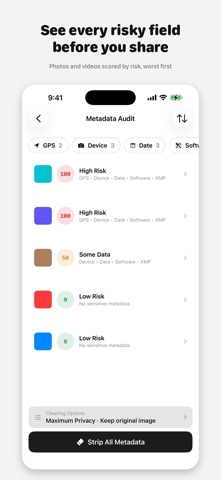
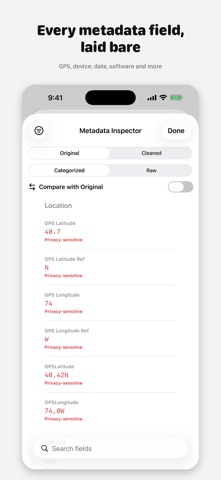
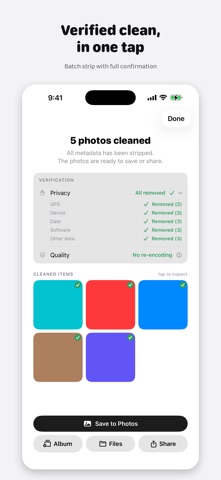
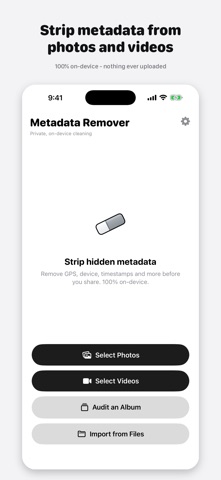
Metadata Remover strips hidden data from your photos and videos - GPS location, device model, timestamps, and more - so you can share without revealing where you were or what you used. Everything runs 100% on-device. Unlike tools that only clean basic JPEG properties, Metadata Remover handles HEIC, RAW, PNG, animated GIFs, videos, and Live Photos, and can clean a whole album at once. WHAT IT REMOVES - GPS coordinates and geotags - Device and camera model - Date and time stamps - Camera settings, lens, and exposure - Software and edit history - Content Credentials (C2PA) and other provenance data - XMP, IPTC, and other embedded data (RAW files: GPS and XMP only - see FAQ for why) HOW IT WORKS 1. Add a photo or video, pick a whole album, or share straight from the Photos app 2. Audit it to see exactly what is hidden inside, with a 0-100 risk score 3. Tap once to strip the metadata 4. Save a clean copy to Photos, an album or Files, or share it - your original is never touched FREE METADATA INSPECTOR View every embedded field for any photo or video - categorized or raw, with file size and format details - and compare original vs. cleaned side by side. Videos get a Media Integrity check confirming duration, resolution, frame rate, codec, and HDR were preserved. Free, even without Pro. LOSSLESS BY DESIGN Photos and videos are cleaned without re-encoding: the metadata is cut out and everything else stays exactly as it was - same pixels, same quality, with HDR, depth, Portrait and Spatial layers and Photographic Styles intact. Every video track is kept, so Dolby Vision, HDR, Cinematic, slo-mo and Spatial video keep full quality, and Live Photos stay paired. With photo library access, Cinematic, slo-mo and edited items stay editable after cleaning. 100% ON-DEVICE PRIVACY Your photos never leave your phone. There are no uploads, no cloud, and no account. The app contains no analytics, no telemetry, and no tracking SDKs of any kind. It works completely offline. FREE AND PRO Clean one photo or video at a time for free, and audit entire albums at no cost. Pro unlocks batch cleaning, whole-album stripping, ready-made Privacy Profiles (Maximum Privacy, Remove Location Only, Personal Privacy, Social Sharing, Professional), and custom keep-rules for photos and videos alike - yearly or one-time lifetime purchase. FREQUENTLY ASKED QUESTIONS Can I remove only GPS and keep everything else? Yes, for both photos and videos - use the Remove Location Only profile or a custom keep-rule (Pro). Does it verify metadata was actually removed? Yes, against the exported file itself, not just the processing step. If a property can't be conclusively verified, it shows "Unable to verify" rather than a false guarantee. What does the risk score mean? A 0-100 score weighted by sensitivity - GPS counts most, then device, dates, software, and provenance data. Does it keep my original files? Yes. A separate cleaned copy is created; your original stays untouched unless you choose to delete it. Does it work with HEIC and RAW photos? Yes, plus JPEG, PNG, and GIFs. RAW files require special handling: to preserve the original RAW data, Metadata Remover strips supported GPS and XMP metadata losslessly. Device and date information may remain. Can it remove metadata from videos? Yes, including Dolby Vision, HDR, Cinematic, slo-mo and Spatial video, with no loss of quality. Every track is kept. Does it preserve Live Photos? Yes. Cleaning a Live Photo keeps the still and video paired together - it stays a real Live Photo, not a plain still. Will it reduce my photo quality? No. Photos are cleaned without re-encoding - same pixels, same quality. The few files that can't be edited this way, like some files from other cameras or apps, are re-encoded instead, and the app tells you. Share your moments, not your metadata. Privacy Policy: https://amanghuman.com/privacy?app=metadataremover Terms of Use (EULA): https://amanghuman.com/eula?app=metadataremover
What's new · 1.4.0
New in 1.4: - Pixel-perfect cleaning: photos and videos are no longer re-encoded. The metadata is cut out of the file and everything else stays exactly as it was - same pixels, same quality, with HDR, depth, Portrait and Spatial layers, Photographic Styles and every video track intact. - Cinematic, slo-mo and edited photos and videos keep their effects and stay editable after cleaning (with photo library access). - Share from Photos: select photos or videos, tap Share and choose Metadata Remover. The app opens with them ready to clean, and Live Photos stay Live. - Hidden copies of your location and device that iPhone videos keep inside the file are now removed too. - Save to Album: put cleaned photos and videos straight into one of your albums, or create a new one. - Cleaning Options: see and change what will be removed right before you strip. - Clearer results: one Verification card for privacy, video and quality - tap any line for the details. - Share now works right away, before you save. As always: everything happens 100% on your device. No uploads, no tracking.
Details