

Moshroom
ALVARO NICOLAS FRANZ OROZCO · Developer Tools
Independent analytics for this App Store listing. AppTracker is not affiliated with ALVARO NICOLAS FRANZ OROZCO.
Chart standing · US
What changed · US
Listing changes AppTracker has observed for this app in this storefront — new versions, price moves, rating shifts, and store copy.
Improved reconnection experience for lost SSH connections.
Screenshots



About
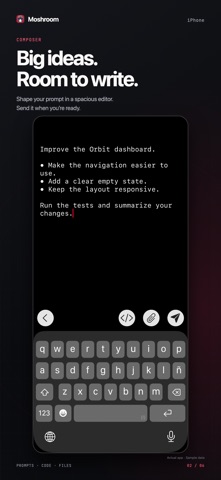
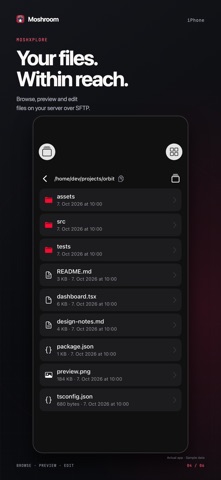
Your terminal. Your servers. Wherever you are. Moshroom brings SSH, Mosh, remote files, and your everyday developer tools together on iPhone, iPad, and Mac. Connect to the machines you already run, manage a project, work with an AI coding agent on your server, or fire off a quick command from your phone. TYPE YOUR WAY • Direct: type straight into the terminal for commands, shortcuts, and interactive programs. • Composer: write longer prompts in a spacious editor, revise before sending, and add files right where you need them. Your unsent draft stays there when you close it. • Automatic: use Direct with a hardware keyboard and Composer with the on-screen keyboard. Composer is the default. Switch modes in Settings and open the composer whenever you need more room. YOUR REMOTE WORKSPACE • Quick Connect: choose SSH or Mosh and tap a saved host to connect. • Hosts and projects: save a server once, then give each project its own folder, startup command, and tab. Use tmux sessions when available to return to work between connections. • Inline attachments: add a photo, PDF, log, or code file to your message. When you send, Moshroom uploads it over SFTP and inserts its remote path. Images are resized on your device before upload. • Remote files: browse folders, preview images and code, edit files in place, and save copies to Files or Finder over SFTP. • Terminal keys: keep Esc, Tab, Ctrl, and arrow keys close at hand. Use keyboard shortcuts on Mac and with a hardware keyboard. • Copy and paste: select terminal text with touch or a pointer. Compatible remote programs can send text to your clipboard through OSC 52. • Tabs: keep servers, projects, and tools in separate tabs so you can move between tasks. • Saved snippets: keep frequently used commands and prompts ready to insert into the composer. • Passwords and 2FA: keep credentials and verification codes in the built-in vault. • Music: play music stored on your server while you work. ACROSS YOUR DEVICES Enable iCloud sync to bring your hosts, projects, snippets, passwords, and 2FA codes across your devices. Secrets and syncable SSH keys use end-to-end-encrypted iCloud Keychain. Secure Enclave keys stay on the device where they were created. GET STARTED AT YOUR OWN PACE The welcome tour explains hosts, projects, connection options, and typing modes. Reopen it from Settings whenever you need a refresher. BRING YOUR OWN SERVER Moshroom connects to your existing SSH service. Mosh connections also require mosh-server and an allowed UDP port on the server. tmux is optional and can keep sessions running between connections; it is not required to use Mosh. No proprietary Moshroom server agent is needed. Your command-line tools and AI agents run on your own machines. Moshroom is the terminal you use to reach them. Moshroom is open-source software under the GNU GPLv3 license.
What's new · 1.0.9
Improved reconnection experience for lost SSH connections.
Details