

Sonement
Jonathan Clegg · Music
Independent analytics for this App Store listing. AppTracker is not affiliated with Jonathan Clegg.
Chart standing · US
What changed · US
Listing changes AppTracker has observed for this app in this storefront — new versions, price moves, rating shifts, and store copy.
Sonement is now free to download. Try everything for 7 days, then unlock it once, with no subscription. If you already bought Sonement, every device recognises your purchase automatically and there's nothing more to unlock. Sonement is ready for the foldable iPhone. Closed, it works like the iPhone you know, with the tab circles and your controls moved to the side of the screen so the music gets the full height. Open it and every page uses the room: Home shows your shortcuts beside what's playing, Rooms shows the list beside the room you chose, a room shows its speakers beside its queue, and albums, artists and playlists keep their artwork in view while you scroll the tracks. Fold it halfway and everything settles on either side of the hinge; the player, the queue and your shortcuts never land on the crease. Search keeps your recent searches on one side and results on the other, and the full player opens as a card with the artwork beside the controls. iPad now works like the Mac. One header carries your room, Settings, Search and the Inspector on every page, and each page keeps its own actions on the page. The sidebar shows every room's name in full with what's playing beneath it, and the Inspector is a column you show or hide beside the page, with the queue, playlists and audio settings in one place. The player is the only thing floating over your music, and opening the app shows one clear state while it finds your speakers. Every room's Speakers card is now the same on iPhone and iPad: the group, its volume, Match Volumes and each speaker, in one place. Buttons never wrap onto two lines, however narrow the screen. Library Insights fits every screen size, and the Favourites and Playlists lists match History. Lyrics stay in time. Sonement now matches lyrics to the exact version of the track that's playing, follows the music between position updates, and lets you nudge the timing a quarter second at a time if a track still runs early or late — each track remembers its own setting. Also: tapping a playlist, album or song on a music service page always opens it; songs open their album with the track highlighted; service pages load from top to bottom without tiles moving; playing a service collection uses the same path on every device, so it plays in order. Announce now shows how your voice note is doing on every speaker — sending, scheduled, playing or played — and if it finishes after you close Announce, a short note tells you how it went.
Price & rating history · US
Reconstructed from the listing changes AppTracker has observed in this storefront. A field is charted once it has changed more than once, and each line starts at the value it moved from.
Price · Free now · 2 changes on record
In-app purchases · US
What this app sells inside itself, grouped by kind and priced for this storefront.
Screenshots




Similar apps
Competitors and close alternatives, as estimated by AppTracker.
 Sonority for Sonos
Casper Verswijvelt
Sonority for Sonos
Casper Verswijvelt
 Sonos
Sonos, Inc.
Sonos
Sonos, Inc.
 Clic for Sonos
Nick Hayward
Clic for Sonos
Nick Hayward
 Soro - For Sonos
Laszlo Gergely
Soro - For Sonos
Laszlo Gergely
 Bops: Music for Sonos
ur computering pal, LLC
Bops: Music for Sonos
ur computering pal, LLC
 SonoPhone for Sonos
Stefan Hansel Solutions UG (haftungsbeschraenkt)
SonoPhone for Sonos
Stefan Hansel Solutions UG (haftungsbeschraenkt)
 Serento - UPnP Control Point
Dusty Enterprise SRL
Serento - UPnP Control Point
Dusty Enterprise SRL
 Remote for Sonos
Dariusz Niklewicz
Remote for Sonos
Dariusz Niklewicz
About
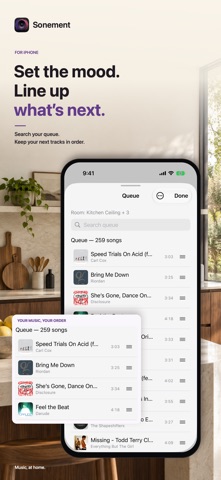
Your Sonos system can do a lot. Sonement gives you a powerful, beautifully native way to control it. Search across your music sources in one place. Control every room and group. Browse your Apple Music library. Then take the same experience to your iPhone, iPad, Mac, Apple TV and Apple Watch. No Sonement account. No cloud service between you and your speakers. No data collection. ONE SEARCH, ALL YOUR MUSIC Search once and see music from your connected sources together — songs, albums, artists, playlists, stations and more. Results show where they came from, and source filters let you narrow the search whenever you want. WHOLE-HOME CONTROL See what's playing throughout your home at a glance. • Control individual rooms and groups • Group and ungroup speakers • Adjust individual and group volume • Pause the whole house • Save frequently used speaker combinations as Zones • Pin favourite rooms and listening shortcuts for quick access APPLE MUSIC, NATIVELY Browse your Apple Music library directly inside Sonement, including artists, albums, songs and playlists, then play your selection through your Sonos speakers. MADE FOR YOUR APPLE DEVICES Sonement isn't simply stretched across different screens. On iPhone, you get a focused controller with Home, Music, Rooms and Search, plus Lock Screen and Dynamic Island controls. On iPad, the experience expands into a desktop-style layout with persistent playback controls, queue management and room audio settings. On Mac, Sonement becomes a full desktop controller for your home, with music browsing, search, rooms, queue and playback always close at hand. On Apple TV, browse music and control playback from the biggest screen in your home. And Apple Watch keeps essential playback and volume controls on your wrist. MORE THAN PLAY AND PAUSE • Reorder and manage the queue • Save queues as playlists • Sleep timers and household alarms • Timed lyrics • Listening history by room • Announce to a room using your voice • Bass, treble and other speaker audio controls • Light and dark appearance • Widgets and Live Activities TRY IT WITHOUT SPEAKERS Demo Mode creates a sample household so you can explore Sonement even when you're away from your Sonos system. PRIVATE BY DESIGN Sonement communicates directly with your speakers on your home network. There's no Sonement account to create and Sonement does not collect your data. One purchase. Your whole Sonos home. Across your Apple devices. Sonement is an independent app and is not affiliated with, endorsed by, or sponsored by Sonos, Inc. Sonos is a registered trademark of Sonos, Inc. Apple Music, Apple TV and Apple Watch are trademarks of Apple Inc. All other trademarks are the property of their respective owners.
What's new · 3.2
Sonement is now free to download. Try everything for 7 days, then unlock it once, with no subscription. If you already bought Sonement, every device recognises your purchase automatically and there's nothing more to unlock. Sonement is ready for the foldable iPhone. Closed, it works like the iPhone you know, with the tab circles and your controls moved to the side of the screen so the music gets the full height. Open it and every page uses the room: Home shows your shortcuts beside what's playing, Rooms shows the list beside the room you chose, a room shows its speakers beside its queue, and albums, artists and playlists keep their artwork in view while you scroll the tracks. Fold it halfway and everything settles on either side of the hinge; the player, the queue and your shortcuts never land on the crease. Search keeps your recent searches on one side and results on the other, and the full player opens as a card with the artwork beside the controls. iPad now works like the Mac. One header carries your room, Settings, Search and the Inspector on every page, and each page keeps its own actions on the page. The sidebar shows every room's name in full with what's playing beneath it, and the Inspector is a column you show or hide beside the page, with the queue, playlists and audio settings in one place. The player is the only thing floating over your music, and opening the app shows one clear state while it finds your speakers. Every room's Speakers card is now the same on iPhone and iPad: the group, its volume, Match Volumes and each speaker, in one place. Buttons never wrap onto two lines, however narrow the screen. Library Insights fits every screen size, and the Favourites and Playlists lists match History. Lyrics stay in time. Sonement now matches lyrics to the exact version of the track that's playing, follows the music between position updates, and lets you nudge the timing a quarter second at a time if a track still runs early or late — each track remembers its own setting. Also: tapping a playlist, album or song on a music service page always opens it; songs open their album with the track highlighted; service pages load from top to bottom without tiles moving; playing a service collection uses the same path on every device, so it plays in order. Announce now shows how your voice note is doing on every speaker — sending, scheduled, playing or played — and if it finishes after you close Announce, a short note tells you how it went.
Details