

Volume: Books Read Aloud
Structured Fun, LLC · Books
Independent analytics for this App Store listing. AppTracker is not affiliated with Structured Fun, LLC.
Chart standing · US
What changed · US
Listing changes AppTracker has observed for this app in this storefront — new versions, price moves, rating shifts, and store copy.
LISTENING • Narration starts much sooner after you tap play, including the first play after opening the app. Audio begins as soon as the first words are ready instead of waiting for a whole sentence. • Starting a book from the beginning now opens with its title, so you know what's playing. • One playback control now stays in place as you move between a book and your library, instead of disappearing and reappearing. In the library it floats just above search. • Live only is now the default for how much audio to prepare ahead. If you picked an option yourself, your choice is kept. • The app is a smaller download: the on-device voice now arrives separately after you install. If you press play before it's ready, narration waits for it and tells you what's happening, and a download that stalls can be retried. • Settings → Storage now shows your on-device voices and how much space they use. READING • Books open faster, with the text appearing before the rest of the page finishes loading. • A book's title page is now its first page. Swipe straight from it into the text; there's no Start Reading button to tap first. • Narrower default margins give the text more room, Safari Reader style, and the text now fades softly under the status bar and the toolbar instead of stopping at a solid band. • Libre Franklin is the default typeface for new installs. • Jumping to a highlight now lands at the start of the passage, and a jump made just after a chapter loads is no longer undone. LIBRARY • Copy a link on your Mac and the app offers to import it on your iPhone. The offer appears once per copy, hides on its own after a few seconds, and is easy to dismiss. • Catalog downloads now show their progress, both where you tapped and in your library, so a slow download no longer looks like nothing happened. • Edit a subscribed catalog's name, address, and sign-in. Browsing Calibre-Web catalogs is more reliable. • Large collections show every book, load faster, and no longer show the previous collection's books for a moment when you switch. • The small Recently Read widget shows a single cover, and widget covers are cropped cleanly. The User Guide covers everything new. To update your copy, go to Settings → About → Restore User Guide; your place in it is kept.
In-app purchases · US
No in-app purchases.
Screenshots



About
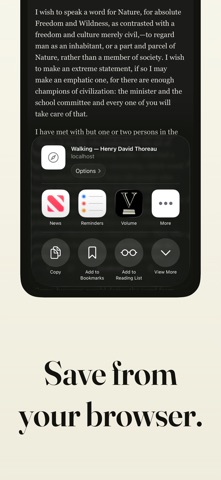
Volume turns the books you own and the articles you find on the web into one private, offline library — and reads them aloud with a natural neural voice, generated entirely on your device. SAVE ARTICLES FROM YOUR BROWSER Found something worth reading? Tap Share in Safari or another app and save it to your library as an article — a clean, offline copy of the text, ready to read or listen to like any book. File it straight into a collection if you like. IMPORT YOUR BOOKS Bring your own EPUB, Markdown, plain-text, and RTF files. Books and articles land in one searchable library, whatever their source. READ COMFORTABLY A reflowable reader with themes, adjustable typography, instant resume, chapter navigation, and footnotes in place — fully offline. KEEP WHAT MATTERS Highlight passages and add notes that survive font changes. See them gathered for one book or across your whole library, and tag them by topic to find them again. LISTEN WITH READ-ALONG Tap play and your book or article is read aloud by an on-device neural voice, with the current passage highlighted as it is spoken. Figures, tables, code, and equations are announced instead of silently skipped, and short pauses mark headings, quotations, and section breaks. Narration follows chapter jumps, keeps your place, works like an audiobook from the lock screen — and by default is kept, so going back or listening again is instant. IN THE CAR With CarPlay, pick a recent book on your car's screen and narration picks up where you left off, with chapters a tap away. TAKE IT WITH YOU Export a narrated book as an M4B audiobook with chapter markers that plays in any audiobook app, or export the original file you imported. Books you finish are marked automatically, and Clean Up clears out what you're done with in one step. PRIVATE BY CONSTRUCTION No account. No ads. No tracking. No telemetry. Your books, your articles, and your reading never leave your device — narration is generated locally, and once something is saved, everything works in airplane mode. The User Guide is pre-loaded, so you can hear read-along the moment the app opens — and it doubles as a seven-chapter tour of importing, reading, and listening. Narration voices are synthesized speech (Kyutai pocket-tts, CC-BY voices); quality of pronunciation can vary on unusual words and names.
What's new · 1.3.0
LISTENING • Narration starts much sooner after you tap play, including the first play after opening the app. Audio begins as soon as the first words are ready instead of waiting for a whole sentence. • Starting a book from the beginning now opens with its title, so you know what's playing. • One playback control now stays in place as you move between a book and your library, instead of disappearing and reappearing. In the library it floats just above search. • Live only is now the default for how much audio to prepare ahead. If you picked an option yourself, your choice is kept. • The app is a smaller download: the on-device voice now arrives separately after you install. If you press play before it's ready, narration waits for it and tells you what's happening, and a download that stalls can be retried. • Settings → Storage now shows your on-device voices and how much space they use. READING • Books open faster, with the text appearing before the rest of the page finishes loading. • A book's title page is now its first page. Swipe straight from it into the text; there's no Start Reading button to tap first. • Narrower default margins give the text more room, Safari Reader style, and the text now fades softly under the status bar and the toolbar instead of stopping at a solid band. • Libre Franklin is the default typeface for new installs. • Jumping to a highlight now lands at the start of the passage, and a jump made just after a chapter loads is no longer undone. LIBRARY • Copy a link on your Mac and the app offers to import it on your iPhone. The offer appears once per copy, hides on its own after a few seconds, and is easy to dismiss. • Catalog downloads now show their progress, both where you tapped and in your library, so a slow download no longer looks like nothing happened. • Edit a subscribed catalog's name, address, and sign-in. Browsing Calibre-Web catalogs is more reliable. • Large collections show every book, load faster, and no longer show the previous collection's books for a moment when you switch. • The small Recently Read widget shows a single cover, and widget covers are cropped cleanly. The User Guide covers everything new. To update your copy, go to Settings → About → Restore User Guide; your place in it is kept.
Details