

ArrivAlarm
WIJNAND EMILE JANSVELD · Navigation
Independent analytics for this App Store listing. AppTracker is not affiliated with WIJNAND EMILE JANSVELD.
Chart standing · US
What changed · US
Listing changes AppTracker has observed for this app in this storefront — new versions, price moves, rating shifts, and store copy.
Easier to use with larger text, VoiceOver and Zoom. Names and addresses wrap instead of getting cut off, the Arm button stays in reach at every text size, and moving the distance slider no longer drags the map while you adjust it. The distance slider is smoother: the circle now grows and shrinks as you slide instead of jumping in steps. On first launch, the location button asks for your location instead of doing nothing. Searching for a business by name shows it at the top again, instead of burying it under everything else at the same address. If you allow alarms or location in Settings after tapping Arm, the alarm now finishes arming when you come back. If location is turned off, ArrivAlarm tells you why it can't arm. Saved places can be reordered from the … menu, and the panel at the bottom no longer slides up twice after a search.
Ratings breakdown · US
The star breakdown behind this app's rating in this storefront.
In-app purchases · US
No in-app purchases.
Screenshots


Keywords this app targets
Search terms AppTracker associates with this app — estimates, not search volume. ❝ = in the app's title; a highlighted number is its current position for that term.
Similar apps
Competitors and close alternatives, as estimated by AppTracker.
 Alarrrm - Future Event Alarm
Hiroaki Abe
Alarrrm - Future Event Alarm
Hiroaki Abe
 Auto Alarm: Accepted Meetings
TETO, LIMITED LIABILITY COMPANY
Auto Alarm: Accepted Meetings
TETO, LIMITED LIABILITY COMPANY
 Cal Alarms: Calendar Alarm
Philipp Baldauf
Cal Alarms: Calendar Alarm
Philipp Baldauf
 CalAlarm — Calendar Alarms
Mitsuhiro Ogata
CalAlarm — Calendar Alarms
Mitsuhiro Ogata
 Alarmi - The mini alarm system
Ralf Andrae
Alarmi - The mini alarm system
Ralf Andrae
 Attack Alarm
mark david
Attack Alarm
mark david
 Entropy Alarm
Mark Garcia
Entropy Alarm
Mark Garcia
 Tsuku Tsuku
Yoshihiko Eto
Tsuku Tsuku
Yoshihiko Eto
About
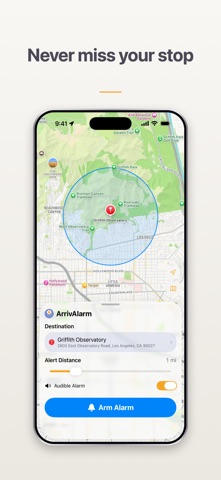
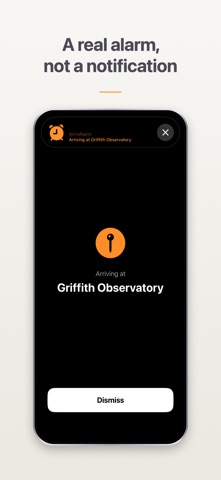
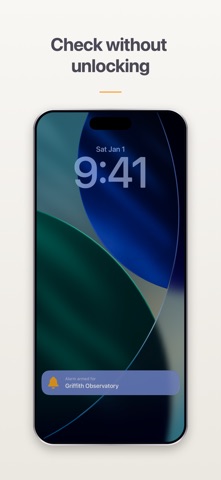
ArrivAlarm tells you when you're almost there — with a real alarm it schedules through iOS, not a notification. It rings through silent mode. It rings through a Focus. It rings with your screen off and the app closed. Set a destination, choose how much warning you want — anywhere from a tenth of a mile to five — and put your phone away. Go back to your album, your podcast, your book, or your nap. No more surfacing every few minutes to check how close you are. No account. No ads. No analytics. Nothing to set up but where you're going. SET IT IN SECONDS Search for a place, pick one you've saved, or press and hold the map to drop a pin. Drag the slider to set your alert distance and the map shows you exactly where the alarm will fire. AN ALARM THAT ACTUALLY GOES OFF ArrivAlarm schedules a real iOS alarm with AlarmKit, not a notification you might miss. It rings on silent. It rings through a Focus. It rings with the screen off and the app closed. ON YOUR WRIST Because it's a real iOS alarm, your Apple Watch buzzes at arrival when your iPhone is locked — so the alert reaches you even with your phone packed away. Nothing to install on the watch. If your phone is unlocked you already have it in hand, so the watch stays quiet. QUIET WHEN YOU NEED IT Switch to vibrate-only for a silent train or a shared space. Your watch still buzzes and the alert still appears on screen. AT A GLANCE A Live Activity on your Lock Screen and Dynamic Island shows your status without opening the app. PLACES YOU GO OFTEN Save the stops you use regularly, reorder them how you like, and pull one up in a tap. PRIVATE BY DESIGN Everything happens on your device. Your location is never sent to a server, never stored anywhere else, and never shared. No accounts, no analytics, no ads, no third-party SDKs of any kind. Requires iOS 26.0 or later.
What's new · 1.0.3
Easier to use with larger text, VoiceOver and Zoom. Names and addresses wrap instead of getting cut off, the Arm button stays in reach at every text size, and moving the distance slider no longer drags the map while you adjust it. The distance slider is smoother: the circle now grows and shrinks as you slide instead of jumping in steps. On first launch, the location button asks for your location instead of doing nothing. Searching for a business by name shows it at the top again, instead of burying it under everything else at the same address. If you allow alarms or location in Settings after tapping Arm, the alarm now finishes arming when you come back. If location is turned off, ArrivAlarm tells you why it can't arm. Saved places can be reordered from the … menu, and the panel at the bottom no longer slides up twice after a search.
Details