

Airport Codes Map
Kazuaki Takahashi · Education
Independent analytics for this App Store listing. AppTracker is not affiliated with Kazuaki Takahashi.
Chart standing · US
What changed · US
Listing changes AppTracker has observed for this app in this storefront — new versions, price moves, rating shifts, and store copy.
• Fixed an issue where the correct airport could be off-screen in map quizzes when the choices were spread across the globe • Added a "Start quiz" button at the top of the home screen • Fixed airport code input appearing reversed in Arabic and Hebrew • Right and wrong answers are now marked with icons, not only by color • Improved the layout when a larger text size is set
In-app purchases · US
What this app sells inside itself, grouped by kind and priced for this storefront.
Screenshots



About
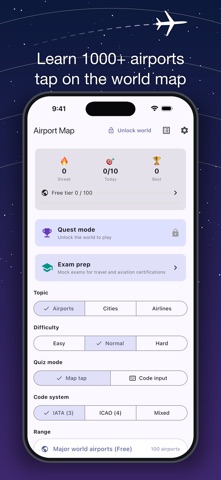
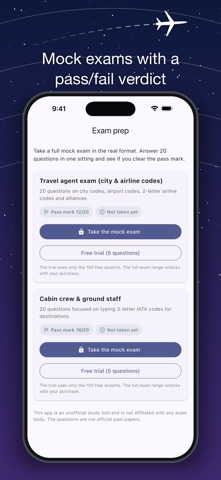
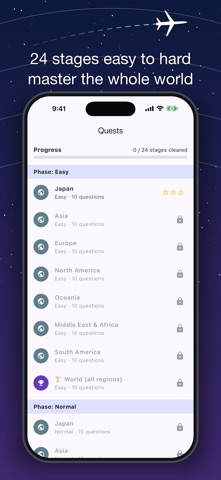
■ EXAM PREP MODE Mock exams built around the syllabus of real certifications: - Travel agent exam: 20 questions on city codes, airport codes, 2-letter airline codes and alliances. Pass mark 60% - Cabin crew / ground staff (airport codes test): 20 questions focused on typing 3-letter IATA codes. Pass mark 90% Answer 20 questions in one sitting for a pass/fail verdict. A free 5-question trial exam is available before you buy. Note: this app is an unofficial study tool and is not affiliated with any exam body. The questions are not official past papers. Master IATA 3-letter (HND / LAX / LHR) and ICAO 4-letter (RJTT / KLAX / EGLL) airport codes by tapping locations on a world map. For aspiring pilots, cabin crew candidates, airport enthusiasts, geography lovers, and frequent international travelers. ▼ Highlights ◎ 100 major world airports fully free ◎ Unlock all 1300+ airports (every IATA-coded airport in Japan, all 88) + 50 city codes + 125 airlines with a one-time purchase ◎ No ads. Offline-ready — no network needed after first download ◎ Intuitive map-tap interface — location becomes muscle memory ◎ Spaced Repetition (SRS) surfaces the airports you keep missing ◎ IATA / ICAO / mixed modes for flexible learning ◎ 24-stage Quest Mode for gradual mastery from beginner to expert ◎ Mastery Map — airports you've learned light up in green ◎ All 3 major airline alliances (Star Alliance / oneworld / SkyTeam) with member carriers ▼ Perfect for - Aspiring commercial and private pilots - Aviation industry candidates and cabin crew applicants - Airport and aviation enthusiasts (avgeeks) - International travelers who want to read ticket codes at a glance - Geography, world map, and world affairs fans - IATA / ICAO certification study companion ▼ Content - 1300+ airports (IATA + ICAO + latitude/longitude) - 50 metropolitan city codes (TYO = Tokyo [HND/NRT], NYC = New York [JFK/LGA/EWR], etc.) - 125 airlines (IATA 2-letter + ICAO 3-letter + hub airport) ▼ Learning Modes - Airport Quiz — tap the correct airport on the map - City Code Quiz — pinpoint metropolitan hubs - Airline Hub — locate the airline's home base on the map - Airline Name — identify the carrier from its two-letter code - Alliance — pick the alliance the airline belongs to - Code Input — type the IATA / ICAO code with the on-screen keyboard - Review — SRS drills for the airports you missed ▼ Details - Data source: OurAirports (Public Domain) - Japanese names attached to major hubs - Wikipedia links available in 6 languages (Japanese / English / Korean / Traditional Chinese / Spanish / German), opened in your UI language - One-time purchase — no subscription - No ads. Learn without distractions. ▼ Sample airports you'll learn HND (Tokyo Haneda) / NRT (Tokyo Narita) / KIX (Osaka Kansai) / LAX (Los Angeles) / JFK (New York) / LHR (London Heathrow) / CDG (Paris Charles de Gaulle) / FRA (Frankfurt) / SIN (Singapore) / HKG (Hong Kong) / ICN (Seoul Incheon) / DXB (Dubai) / SYD (Sydney)... Look at "HND", "LAX", "LHR" and instantly picture where you want to go.
What's new · 1.0.20
• Fixed an issue where the correct airport could be off-screen in map quizzes when the choices were spread across the globe • Added a "Start quiz" button at the top of the home screen • Fixed airport code input appearing reversed in Arabic and Hebrew • Right and wrong answers are now marked with icons, not only by color • Improved the layout when a larger text size is set
Details