

BlockSeeker
Fredy Soussou · Utilities
Independent analytics for this App Store listing. AppTracker is not affiliated with Fredy Soussou.
Chart standing · US
What changed · US
Listing changes AppTracker has observed for this app in this storefront — new versions, price moves, rating shifts, and store copy.
Running a mix of hardware? This update is built for you. FLEET HEALTH AT A GLANCE • The dashboard graph is now a health timeline: it shows when miners went offline, ran hot or dropped below their hashrate floor, and how many. • A summary underneath says what's wrong right now and on which type of miner — tap to see the miners' names. • Miners that haven't answered yet after you open the app show as "checking" instead of offline. • Each miner's History shows a health strip and how much of the time it stayed healthy. A BETTER LIVE ACTIVITY • Shows how many miners are online (for example 38/41) and flags offline ones, on the Lock Screen and in the Dynamic Island. • Turns itself off when you leave your miners' Wi-Fi, and shows "Paused" instead of old numbers when the app isn't updating. • Prefer it on the Lock Screen only? Turn off the Dynamic Island in Settings. MORE HOME MINERS • Compact home Scrypt ASICs that serve their own local web API are found automatically and get their own "Home ASIC" group, with live hashrate in MH/s, temperature, fans and uptime. • Reboot, switch pools, set pool & wallet and choose a power plan (High, Balanced or Eco) right from the app. • Solo miners whose AxeOS-compatible firmware uses the newer nested status API are now read correctly — hashrate, power, temperatures, fan, block hits and both pools — with reboot, pool switching and frequency/voltage changes. NAME YOUR MINERS • Rename any miner from its settings. Your name is used in every alert, including the block-found celebration. EARNINGS AT A GLANCE • Estimated pool earnings per day now sit right next to the estimated cost per day — tap for the per-coin breakdown. • Scrypt block odds and earnings are now correct when different kinds of Scrypt miners are mixed. CHANGE POOLS ACROSS HARDWARE TYPES • New pool & wallet screen: set the primary pool, fallback pool and wallet for one hardware type or for your entire fleet, from the Controls tab or a group's settings. • It starts with what each miner has now, and any field you leave blank stays as it is. • Every miner keeps its own worker name, so per-miner pool stats carry on. • New Primary / Fallback switch (beta) in each group's settings: every miner moves to that pool, miners already there are left alone, each switch is checked five minutes later and resent if needed, and the group stays there after a reboot. Not available yet for desktop ASICs. • Pool switching and pool changes now work with the latest open-source miner firmware, and the pool list is no longer reordered when you switch. THE RIGHT UNITS FOR EVERY ALGORITHM • Hashrate limits use each miner's own units instead of assuming Bitcoin. • Miners running under 1 GH/s show their hashrate in MH/s and are no longer flagged as "No hashrate". • Miners on different algorithms keep separate alert thresholds. • The daily cost estimate skips miners that are switched off and tells you how many of your miners report wattage. AUTOMATIC REBOOTS • Per miner: after a set number of hours of runtime, at a time of day, or when hashrate stays below a floor for as long as you choose. • A reboot that comes due while the app is closed runs once at the next check-in, not once per missed day. • Stop after a few attempts or keep retrying until the miner recovers, with a notification each time. • Off until you turn it on. FEWER FALSE ALARMS • A glitching miner can no longer inflate your swarm hashrate — impossible readings from the firmware are ignored. • BlockSeeker recognises the network your miners are on, so leaving home no longer triggers "miners offline". • A miner is only flagged after several failed checks in a row — you set how many in Settings. • Large fleets are checked in smaller batches to avoid timeouts, and a miner being re-checked is shown that way rather than as offline.
In-app purchases · US
No in-app purchases.
Screenshots




Similar apps
Competitors and close alternatives, as estimated by AppTracker.
 Crypto mining tracker MinerBox
WitPlex LLC
Crypto mining tracker MinerBox
WitPlex LLC
 Bitcoin Mining Crypto Miner
CT9 INFOTECH
Bitcoin Mining Crypto Miner
CT9 INFOTECH
 Bitcoin Mining: Crypto Miner
Lowhill Games Oy
Bitcoin Mining: Crypto Miner
Lowhill Games Oy
 Bitcoin Mining - Crypto Miner
CRYPTO COMPANY LIMITED
Bitcoin Mining - Crypto Miner
CRYPTO COMPANY LIMITED
 Miner CloudOS - Bitcoin Mining
Nimuben Kotadiya
Miner CloudOS - Bitcoin Mining
Nimuben Kotadiya
 Giga Miner: Bitcoin Mining
Giga Miner
Giga Miner: Bitcoin Mining
Giga Miner
 Bitcoin Mining: Cloud Miner
B99 Technologies LTD
Bitcoin Mining: Cloud Miner
B99 Technologies LTD
 Ethereum Mining, ETH Miner
CT9 INFOTECH
Ethereum Mining, ETH Miner
CT9 INFOTECH
About
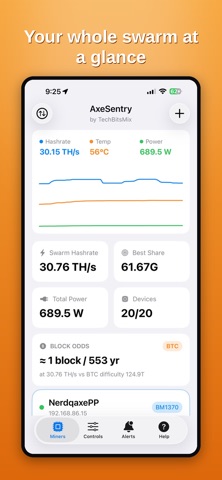
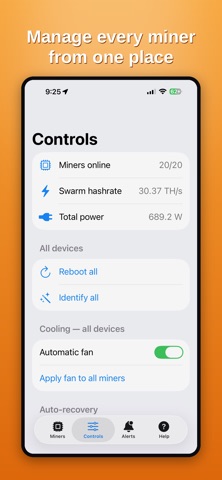
BlockSeeker watches and controls your home cryptocurrency miners so you don't have to. It talks to your devices directly over your local Wi-Fi — no account, no cloud, nothing leaves your network. ONE APP FOR YOUR WHOLE FLEET • Open-source ESP32 solo miners that expose the AxeOS web API • Compact home ASICs with a JSON status API • Larger ASICs that speak the standard CGMiner API, on stock or aftermarket firmware Miners are grouped by type, and an automatic scan finds them all on your network. WATCH EVERYTHING AT A GLANCE • Live hashrate, temperature, power, best share and uptime for every miner • Fleet totals, average temperature per miner type, and a health timeline showing when miners went offline, ran hot or slowed down • Estimated electricity cost per day from your total power draw and your kWh rate • List or grid view; a dead or stuck miner is pinned to the top in red ALERTS THAT FIT EACH MINER • High-temperature, low-hashrate, best-share, block-found and offline alerts • Per-type thresholds — big ASICs run hotter than small solo miners, so set each group its own limits and stop the alert spam • Per-device overrides when one miner is special • Alert history grouped by miner type; mute when you need quiet AUTO-RECOVERY • Automatically reboot a stuck or overheating miner — every type — up to three tries a minute apart • On supported devices, optionally undervolt/downclock a miner that keeps overheating (with safe floors) • Fully opt-in and configurable EARNINGS & ODDS • Solo miners get block-odds estimates by algorithm — Bitcoin (SHA-256), Litecoin (Scrypt) and Zcash (Equihash) • Pool miners get an estimated daily payout per coin (and in USD) • A miner that solves a block lights up gold on the dashboard, with the height and difficulty, plus a full-screen celebration and sound CONTROL EVERY MINER • Switch pool, set performance work modes, tune frequency/voltage/fan where supported, identify and reboot • Apply pool switch, work mode or solo/pool to a whole group at once BUILT FOR YOUR DEVICES • iPhone and iPad • iCloud keeps your miner list the same on every device • Home-screen widget and a Live Activity with miners online, on the Lock Screen and (optionally) the Dynamic Island • Best-effort background monitoring so alerts can reach you when the app is closed PRIVATE BY DESIGN • Works only on your local network — your device must be on the same Wi-Fi as your miners • No sign-up, no analytics, no tracking. Nothing is collected. BlockSeeker is an independent app and is not affiliated with, endorsed by, or sponsored by any mining hardware manufacturer.
What's new · 1.1
Running a mix of hardware? This update is built for you. FLEET HEALTH AT A GLANCE • The dashboard graph is now a health timeline: it shows when miners went offline, ran hot or dropped below their hashrate floor, and how many. • A summary underneath says what's wrong right now and on which type of miner — tap to see the miners' names. • Miners that haven't answered yet after you open the app show as "checking" instead of offline. • Each miner's History shows a health strip and how much of the time it stayed healthy. A BETTER LIVE ACTIVITY • Shows how many miners are online (for example 38/41) and flags offline ones, on the Lock Screen and in the Dynamic Island. • Turns itself off when you leave your miners' Wi-Fi, and shows "Paused" instead of old numbers when the app isn't updating. • Prefer it on the Lock Screen only? Turn off the Dynamic Island in Settings. MORE HOME MINERS • Compact home Scrypt ASICs that serve their own local web API are found automatically and get their own "Home ASIC" group, with live hashrate in MH/s, temperature, fans and uptime. • Reboot, switch pools, set pool & wallet and choose a power plan (High, Balanced or Eco) right from the app. • Solo miners whose AxeOS-compatible firmware uses the newer nested status API are now read correctly — hashrate, power, temperatures, fan, block hits and both pools — with reboot, pool switching and frequency/voltage changes. NAME YOUR MINERS • Rename any miner from its settings. Your name is used in every alert, including the block-found celebration. EARNINGS AT A GLANCE • Estimated pool earnings per day now sit right next to the estimated cost per day — tap for the per-coin breakdown. • Scrypt block odds and earnings are now correct when different kinds of Scrypt miners are mixed. CHANGE POOLS ACROSS HARDWARE TYPES • New pool & wallet screen: set the primary pool, fallback pool and wallet for one hardware type or for your entire fleet, from the Controls tab or a group's settings. • It starts with what each miner has now, and any field you leave blank stays as it is. • Every miner keeps its own worker name, so per-miner pool stats carry on. • New Primary / Fallback switch (beta) in each group's settings: every miner moves to that pool, miners already there are left alone, each switch is checked five minutes later and resent if needed, and the group stays there after a reboot. Not available yet for desktop ASICs. • Pool switching and pool changes now work with the latest open-source miner firmware, and the pool list is no longer reordered when you switch. THE RIGHT UNITS FOR EVERY ALGORITHM • Hashrate limits use each miner's own units instead of assuming Bitcoin. • Miners running under 1 GH/s show their hashrate in MH/s and are no longer flagged as "No hashrate". • Miners on different algorithms keep separate alert thresholds. • The daily cost estimate skips miners that are switched off and tells you how many of your miners report wattage. AUTOMATIC REBOOTS • Per miner: after a set number of hours of runtime, at a time of day, or when hashrate stays below a floor for as long as you choose. • A reboot that comes due while the app is closed runs once at the next check-in, not once per missed day. • Stop after a few attempts or keep retrying until the miner recovers, with a notification each time. • Off until you turn it on. FEWER FALSE ALARMS • A glitching miner can no longer inflate your swarm hashrate — impossible readings from the firmware are ignored. • BlockSeeker recognises the network your miners are on, so leaving home no longer triggers "miners offline". • A miner is only flagged after several failed checks in a row — you set how many in Settings. • Large fleets are checked in smaller batches to avoid timeouts, and a miner being re-checked is shown that way rather than as offline.
Details