

Pixel Art by Amora
Leonardo Amora · Graphics & Design
Independent analytics for this App Store listing. AppTracker is not affiliated with Leonardo Amora.
Chart standing · US
What changed · US
Listing changes AppTracker has observed for this app in this storefront — new versions, price moves, rating shifts, and store copy.
COMMUNITY GALLERY It's time to show the world your art! Just go to Export and tap Post: the frame you are on joins the Community gallery, on the projects screen, next to the 30 latest pieces and the featured picks. Open any art full screen and swipe for more. One post a day, with Report and Block for everyone. SKETCH, THE THIRD PEN The pencil button now holds three pens behind the little handle on its corner: Pixel, Vector and Sketch, each with its own color. Sketch draws freely, off the pixel grid, on smooth high-resolution paper with real pencils: HB, 2B, 6B, charcoal and ink pen, with pressure and stabilization. Rough out the idea, then pixel it on top. Select, move and scale parts of the sketch without losing quality. FILL REFERENCE Draw the lines on one layer and paint the colors on another. Turn on Fill reference in the lines layer menu and the bucket fills inside those lines from any other layer, without ever touching the line art. It works with vector lines too. SMART SELECTION ON VECTOR LAYERS Drag a rectangle, or a lasso with a finger resting, and the nodes inside are picked. Drag to move them, pull a corner to scale, and rest a finger to duplicate whole paths. MONOCHROME INTERFACE In Settings, every color of the interface becomes its own shade of gray, from dark to light. Your art and your colors never change. ALSO The selection outline now stays visible on white. Undo keeps a layer's Lock Alpha and parallax depth. Deleting a layer no longer leaves a pending shape's handles on the screen. Maximum effort!
Screenshots



About
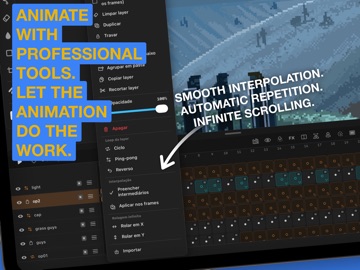
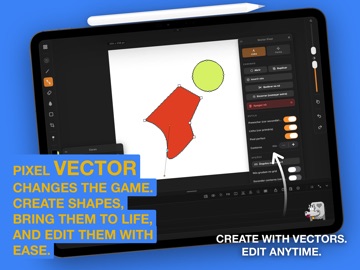
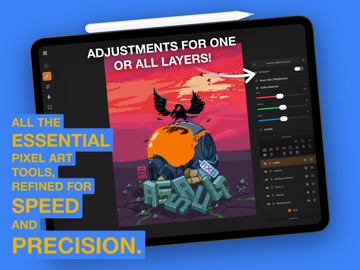
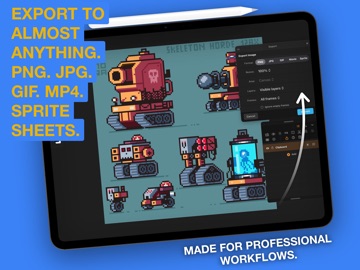
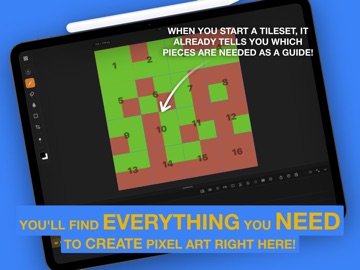
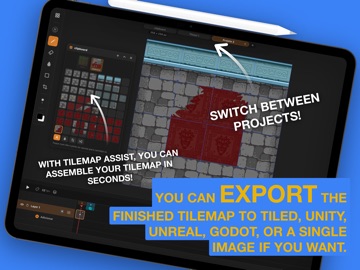
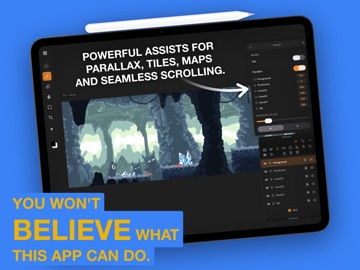
You are not going to believe what fits inside this app. Pixel Art Studio is a pixel art and animation studio built from scratch for iPad and Mac. The feel is inspired by Procreate, the output is pure pixels: no blur, no interpolation, every pixel exactly where you put it. And then it keeps going, way past what a pixel editor is supposed to do. ONE TAP AND THE SHAPE IS PERFECT Scribble a wobbly line, hold the pencil at the end of the stroke, and QuickShape turns it into a flawless line, rectangle, ellipse or polygon, snapped to the classic pixel art angles. Believe it: you can draw an isometric cube, a cylinder, a staircase or a rounded box in one gesture, extrude it to any height, and never nudge a single pixel by hand. Independent brush axes, spray, pressure shading, glow, blur and a silhouette brush that closes your outline and floods it the moment you lift the pencil. Four axis symmetry, Lock Alpha, one coat of paint per pixel, and Smart Nudge that snaps shapes to their neighbours. ANIMATION TOOLS FROM ANOTHER UNIVERSE This is where it stops behaving like a pixel editor. Leave frames empty between two drawings and Tweening fills them in, reading how your art moved, scaled and rotated, object by object. Two sketches become a full animation. Layer Loop is the loopOut of After Effects: two frames of a blinking eye on Cycle, Ping-pong or Reverse, and that layer animates the entire scene by itself, forever. Infinite Scroll slides a layer with wrap around, one full lap every N frames, on X or Y. Paint one strip of clouds, get an endless sky. Offset Assist is the Photoshop Offset filter, live under your pen, so seamless tiles are built, not guessed. Add per layer frames, onion skinning, animation tags, a scrub bar with playhead, folders, blend modes and Parallax Assist playing depth right inside the canvas. SELECT LIKE MAGIC Tap an object and the whole object is selected. Tap a color and it is selected across the layer, connected or not. Freehand and polygon lasso, exact color matching, additive wand, 9 slice scaling in the Unity Sliced style, rotation, mirroring, and a move handle with 1px arrows because pixel art is precision. Erase or transform the same selection across every frame at once. A TILESET STUDIO HIDING INSIDE Build a tileset, stamp a map with it, edit one tile and watch every copy in the map update. Then export PNG plus Tiled .tsj and .tmj, one tile layer per app layer, ready to drop into your engine. Ask around: almost nobody does this. EXPORT LIKE A PRO PNG, JPG, GIF, image sequence and sprite sheet with a configurable grid. MP4 in 4:5, 9:16, 1:1, 16:9 or the canvas ratio, with a safe area drawn over the canvas and loop repetition inside the file. Ship everything, the current frame or a single tag. Opens and saves .aseprite, so your work is never locked in. Record a time lapse of the session and publish your process. IPAD AND MAC Apple Pencil with pressure, two and three finger gestures, project tabs, automatic backup of your library and preview broadcast to another screen. On Mac, the same app with keyboard shortcuts, hover hints and wheel zoom. Your projects and your .aseprite files travel between both. One tap. Perfect pixels. Animation that thinks for you. Maximum effort!
What's new · 1.8
COMMUNITY GALLERY It's time to show the world your art! Just go to Export and tap Post: the frame you are on joins the Community gallery, on the projects screen, next to the 30 latest pieces and the featured picks. Open any art full screen and swipe for more. One post a day, with Report and Block for everyone. SKETCH, THE THIRD PEN The pencil button now holds three pens behind the little handle on its corner: Pixel, Vector and Sketch, each with its own color. Sketch draws freely, off the pixel grid, on smooth high-resolution paper with real pencils: HB, 2B, 6B, charcoal and ink pen, with pressure and stabilization. Rough out the idea, then pixel it on top. Select, move and scale parts of the sketch without losing quality. FILL REFERENCE Draw the lines on one layer and paint the colors on another. Turn on Fill reference in the lines layer menu and the bucket fills inside those lines from any other layer, without ever touching the line art. It works with vector lines too. SMART SELECTION ON VECTOR LAYERS Drag a rectangle, or a lasso with a finger resting, and the nodes inside are picked. Drag to move them, pull a corner to scale, and rest a finger to duplicate whole paths. MONOCHROME INTERFACE In Settings, every color of the interface becomes its own shade of gray, from dark to light. Your art and your colors never change. ALSO The selection outline now stays visible on white. Undo keeps a layer's Lock Alpha and parallax depth. Deleting a layer no longer leaves a pending shape's handles on the screen. Maximum effort!
Details