

Focus Meter 集中タイマー
kazunari aoki · Education
Independent analytics for this App Store listing. AppTracker is not affiliated with kazunari aoki.
Chart standing · US
What changed · US
Listing changes AppTracker has observed for this app in this storefront — new versions, price moves, rating shifts, and store copy.
• The app now remembers your last time and mode. While the timer is stopped, tap the time to change it • You can now try App Blocking free up to 3 times before getting Pro • When notifications are off, the app now lets you know the end sound won't play while your screen is off • Fixed an issue where the Haptics setting had no effect
Screenshots



About
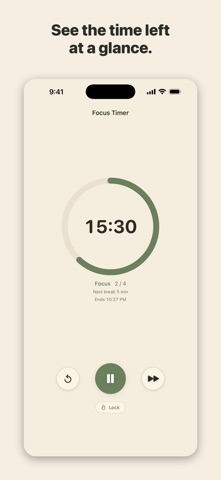
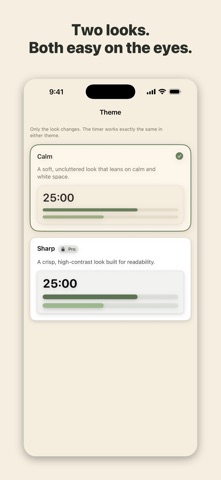
Focus Meter is a visual focus timer for students and anyone who wants to concentrate. See your remaining time at a glance — not just as numbers, but as bars, a line, or a ring. It looks like a piece of desk stationery, so you'll actually want to leave it out on your desk while you study. ■ Days Until Your Exam Add your exam or mock test date and Focus Meter counts down the days, hours, minutes and seconds. The timer screen always shows "X days to go," connecting today's session to the day that matters. Home Screen and Lock Screen widgets are included. ■ Three Timers • Countdown — for study, reading, work, or timed practice tests • Pomodoro — alternate focus and breaks to stay sharp longer • Dual — run a total session and a Pomodoro at the same time (for example, 25-minute cycles inside a 90-minute block) ■ Three Ways to See the Time Standard bars (like the LCD on a desk timer), a minimal line meter, or a ring. Two themes — Calm and Sharp — so it fits your desk. ■ Block Distracting Apps While You Focus (Pro) Temporarily block the apps you choose — social media, games — but only while your timer is running. Everything unblocks automatically when the session ends, even if the app was closed. Need out early? Use Emergency Unlock and write down your reason. Phone calls and emergency features are never blocked. ■ A Record Worth Keeping Completed sessions are saved as Today, Streak, and Total. You can share a card of your progress. ■ Built Not to Break Your Focus • Lock mode during a session (prevents accidental taps) • Keeps the screen awake / notifications • Live Activity on the Lock Screen and Dynamic Island • Portrait and landscape (desk mode) • Ad-free with Pro ■ Focus Meter Pro (one-time purchase) Removes ads and unlocks the Dual timer, ring and line displays, the Sharp theme, app blocking during focus, and unlimited exam dates and presets. A single purchase — no subscription, no further charges. Great for exam prep, professional certifications, working from home, or reading. A quiet, readable timer you'll want to keep on your desk.
What's new · 1.8.3
• The app now remembers your last time and mode. While the timer is stopped, tap the time to change it • You can now try App Blocking free up to 3 times before getting Pro • When notifications are off, the app now lets you know the end sound won't play while your screen is off • Fixed an issue where the Haptics setting had no effect
Details