

Debt Descent: Payoff Planner
Sean Mandable · Finance
Independent analytics for this App Store listing. AppTracker is not affiliated with Sean Mandable.
Chart standing · US
What changed · US
Listing changes AppTracker has observed for this app in this storefront — new versions, price moves, rating shifts, and store copy.
New in 1.20.2 • Pay a debt weekly, every 2 weeks or twice a month: open the debt's ••• menu, choose Edit details, and set how it's paid. Each date gets its own row in Upcoming, and the months with an extra payment date pay the debt down sooner. • A "1% plus interest" minimum for cards, the way most card companies work it out. New cards start on it. Cards already in the app keep their rule unless you change it in Edit details. • Paydays: add your next payday in Income & bills, and Upcoming lists each payment under the paycheck that covers it, with what that paycheck still has to pay. Add what's in the bank, if you like, and it shows whether that covers what's due before your next payday. • Bills with due dates: give a bill a due date in Income & bills and it's listed in Upcoming with your payments, where a check marks it paid. • Autopay: turn on "On autopay" for a debt, a payment group or a bill, and Debt Descent logs each payment on its due date, the next time you open the app. • Keep a debt at its own payment: tick "Takes only its payment" in Edit details, with an end date if you want one, and your extra goes to your other debts. • Add a loan's original amount and start date in Edit details to see how much of it you've paid off and how far ahead of its original term you are. • A loan in deferment: in Edit details, choose whether its payment is added to your monthly total when payments start, or comes out of it. • Notifications (Pro): due-date notifications have a Log button that logs the payment without opening the app, and a new payday notification tells you what each paycheck has to cover. Turn it on in Settings. • The Extra card folds like the cards around it, and "Pick a debt-free date" opens only when you want it. • Fixes for a loan whose deferment ends before that month's due date, and for payments made in a month's last days toward a debt due on the 1st or 2nd. New in 1.20.1 • Your debt-free date and payoff dates now count this month's payments before you log them. Before, a payment due later this month that you hadn't logged yet counted as next month's, so those dates ran a month late until you logged it. • Full schedule (Pro) now starts with what's still due this month. • When your plan never clears and the app suggests a method that needs Pro, it now says so. Thank you for using Debt Descent! If something isn't working the way you'd expect, or there's a feature you'd like me to add, please don't hesitate to let me know at support@seanmandable.me.
Ratings breakdown · US
The star breakdown behind this app's rating in this storefront.
In-app purchases · US
What this app sells inside itself, grouped by kind and priced for this storefront.
Screenshots




Keywords this app targets
Search terms AppTracker associates with this app — estimates, not search volume. ❝ = in the app's title; a highlighted number is its current position for that term.
Similar apps
Competitors and close alternatives, as estimated by AppTracker.
 debtbrak: Faster Debt Payoff
RIZZMONEY LLC
debtbrak: Faster Debt Payoff
RIZZMONEY LLC
 Debt Payoff Planner & Tracker
OxbowSoft LLC
Debt Payoff Planner & Tracker
OxbowSoft LLC
 Debt Payoff Pro
SVT Software
Debt Payoff Pro
SVT Software
 Pay Down Velocity Banking
Daniel Demski
Pay Down Velocity Banking
Daniel Demski
 Debt Snowball Planner
Jonathan Wildy
Debt Snowball Planner
Jonathan Wildy
 Debt Payoff Tracker - DebtFree
Musku Akshay Reddy
Debt Payoff Tracker - DebtFree
Musku Akshay Reddy
 Debt Payoff Planner
Business Insights ICT
Debt Payoff Planner
Business Insights ICT
 Debt Manager
MH Riley Ltd
Debt Manager
MH Riley Ltd
About
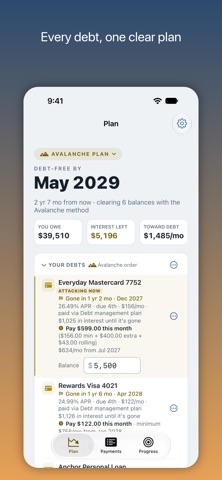
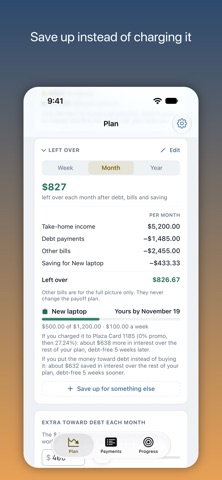
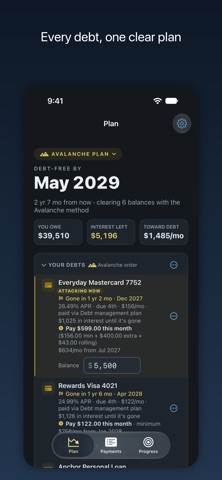
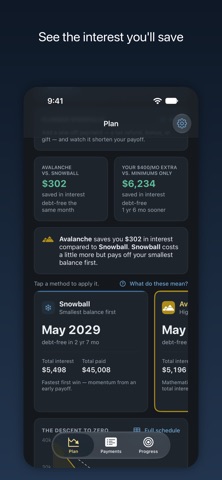
Debt Descent shows you exactly when you'll be debt-free. Enter your real balances and APRs, and it lays out your payoff plans side by side so you can see which one gets you there faster and cheaper. I built it while paying down my own debt, and the features are the ones I needed myself. Add your debts and the extra you can pay each month, and Debt Descent runs both standard methods at once: - Snowball: pay off the smallest balance first for quick wins - Avalanche: pay off the highest APR first to save the most interest You get real numbers: - Your debt-free date and payoff time for each method - Pick a debt-free date and see the extra it takes - Total interest, total paid, and what each method saves, side by side - A "descent to zero" chart that plots every balance falling to zero - What's left over: add your take-home pay (or read it from a paystub) and the bills outside the plan, and see what's really left each week, month, and year It also handles the parts of real life that get in the way of a plan: - Windfalls: add a future bonus or tax refund and watch your payoff date move up - Pay weekly, every two weeks or twice a month: each debt follows its own payment schedule - Paydays and bills: see which paycheck covers each payment and bill, and whether what's in the bank covers what's due before the next one - Autopay: debts and bills on autopay log themselves - Skip or defer a month's payment, and see what it costs before you do - Save up for a purchase, and see what charging it would cost instead - Refinance and consolidation: model a balance transfer, a loan, or new rates per account, then apply the deal in one step - Payment groups: log one monthly payment that covers several debts and it splits to the cent - Promo and deferred-interest tracking, so a 0% intro APR doesn't surprise you when it reverts - Per-debt amortization schedules and "Test a payoff" what-ifs - Payment logging that shows whether you're ahead of the plan or behind - Due-date notifications you can log a payment from, a payday notification, and calendar (.ics) export - A shareable progress card, with what your balances cost in interest each day - Siri, Shortcuts, Spotlight and widgets: ask when you'll be debt-free, log a payment by voice, or log your next payment from the medium widget in one tap - A "Track only" option for balances you want to watch outside the plan - Built for accessibility: Dynamic Type up to the largest sizes, and VoiceOver reads each field and row by name Adding a card takes seconds: - Scan a paper statement with the camera or open a statement PDF, and Debt Descent reads the balance, APR, any intro rate, minimum, and due date for you - Or import and export your whole plan as JSON or PDF Sync and privacy: - iCloud sync keeps your debts, payments, and plan up to date across iPhone, iPad, and Mac. It's automatic and free. - There's no account, no sign-up, and no server on my end. Your data lives on your device and in your own private iCloud, where I can't see it. - There's no bank linking. You type your balances or point the camera at a statement, and nothing connects to your accounts. - Statement reading happens on your device with PDFKit, Vision, and Apple Intelligence. Nothing is uploaded. Debt Descent is free to use: add your debts, run Snowball and Avalanche, see your debt-free date, track payments and progress, pay on your own schedule, track bills by paycheck, put debts on autopay, skip or defer a payment, see what's left over after debt and bills, share your progress card, read a statement on your device, and export your payments as a CSV. A one-time Pro upgrade ($14.99, unlocks on all your devices and, with Family Sharing, your family's; no subscription) adds five more payoff methods including a custom order you set yourself, the what-if slider and per-debt payoff tests, picking your debt-free date, windfalls, refinance modeling, amortization schedules, PDF and calendar export, and due-date and payday notifications.
What's new · 1.20.2
New in 1.20.2 • Pay a debt weekly, every 2 weeks or twice a month: open the debt's ••• menu, choose Edit details, and set how it's paid. Each date gets its own row in Upcoming, and the months with an extra payment date pay the debt down sooner. • A "1% plus interest" minimum for cards, the way most card companies work it out. New cards start on it. Cards already in the app keep their rule unless you change it in Edit details. • Paydays: add your next payday in Income & bills, and Upcoming lists each payment under the paycheck that covers it, with what that paycheck still has to pay. Add what's in the bank, if you like, and it shows whether that covers what's due before your next payday. • Bills with due dates: give a bill a due date in Income & bills and it's listed in Upcoming with your payments, where a check marks it paid. • Autopay: turn on "On autopay" for a debt, a payment group or a bill, and Debt Descent logs each payment on its due date, the next time you open the app. • Keep a debt at its own payment: tick "Takes only its payment" in Edit details, with an end date if you want one, and your extra goes to your other debts. • Add a loan's original amount and start date in Edit details to see how much of it you've paid off and how far ahead of its original term you are. • A loan in deferment: in Edit details, choose whether its payment is added to your monthly total when payments start, or comes out of it. • Notifications (Pro): due-date notifications have a Log button that logs the payment without opening the app, and a new payday notification tells you what each paycheck has to cover. Turn it on in Settings. • The Extra card folds like the cards around it, and "Pick a debt-free date" opens only when you want it. • Fixes for a loan whose deferment ends before that month's due date, and for payments made in a month's last days toward a debt due on the 1st or 2nd. New in 1.20.1 • Your debt-free date and payoff dates now count this month's payments before you log them. Before, a payment due later this month that you hadn't logged yet counted as next month's, so those dates ran a month late until you logged it. • Full schedule (Pro) now starts with what's still due this month. • When your plan never clears and the app suggests a method that needs Pro, it now says so. Thank you for using Debt Descent! If something isn't working the way you'd expect, or there's a feature you'd like me to add, please don't hesitate to let me know at support@seanmandable.me.
Details