

PhotoForge Studio
Jiri Kluciar · Photo & Video
Independent analytics for this App Store listing. AppTracker is not affiliated with Jiri Kluciar.
Chart standing · US
What changed · US
Listing changes AppTracker has observed for this app in this storefront — new versions, price moves, rating shifts, and store copy.
Now in 8 languages Orriva speaks German, Spanish, French, Italian, Portuguese (Brazil) and Japanese — alongside English and Czech. It follows your iPhone's language; to pick a different one, go to Settings → Orriva → Language. Also new • Pick a place by hand and plan a shoot somewhere you aren't yet — the widget follows it too • Tools grouped into Plan & shoot and Process photos • Manual camera: shutter speed, ISO and focus in one panel under the viewfinder • Photo editor: tap Original to compare, and clear messages when something goes wrong • RAW develop: Light, Color and Detail panels; a free develop is used only once it succeeds • Bigger weather icons, and the widget never shows a made-up battery level • Tinted Home Screen icon
Ratings breakdown · US
The star breakdown behind this app's rating in this storefront.
In-app purchases · US
What this app sells inside itself, grouped by kind and priced for this storefront.
Screenshots




About
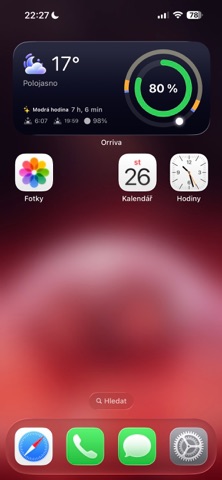
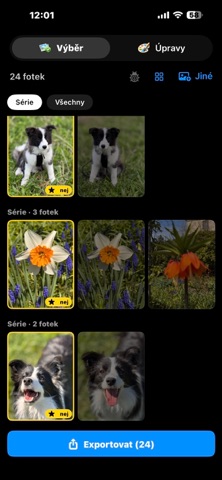
Too many photos, too little time? Orriva finds the keepers from a burst, plans the light before you shoot, and develops your RAWs — completely offline, right on your device. THE KEEPER FINDER — FREE Import a burst of similar shots and Orriva suggests the sharpest one in each series. Double-tap to zoom to 100% and check the eyes yourself — the app only suggests, you decide. It never deletes anything on its own. PLAN THE LIGHT — FREE Blue hour and golden hour countdown, sunrise and sunset with compass bearings so you know where to stand, moon phase and local weather. The Horizont home-screen widget keeps it one glance away. CALCULATORS — FREE ND filter exposure times, hyperfocal distance, and the 500/NPF rule for night skies. PHOTO EDITOR (Pro) Looks with an adjustable strength slider, crop to popular ratios (1:1, 3:2, 4:5, 16:9), straighten the horizon, one-tap Auto, plus brightness, contrast, saturation and sharpening. Watermark, EXIF viewer, before/after compare and on-device face tools included. RAW DEVELOPING (Pro — first 5 free) Open RAW files from Sony, Canon, Nikon and more (ARW, CR3, NEF, DNG). Dial in exposure, white balance, noise reduction and sharpening by hand, guided by a live histogram. Your first five developments are free, so you can check your files come out right before you pay. MANUAL CAMERA & BATCH RESIZE (Pro) Full control over shutter speed, ISO and focus. Resize and watermark a whole shoot in one go. DESIGNED FOR IPHONE AND IPAD On iPad the editor, the keeper finder and RAW developing use the whole screen — library on the left, photo in the middle, controls on the right. PRIVATE BY DESIGN Orriva works fully offline. Your photos never leave your device — no accounts, no ads, no tracking, nothing uploaded. Pro is a one-time purchase, not a subscription.
What's new · 1.2
Now in 8 languages Orriva speaks German, Spanish, French, Italian, Portuguese (Brazil) and Japanese — alongside English and Czech. It follows your iPhone's language; to pick a different one, go to Settings → Orriva → Language. Also new • Pick a place by hand and plan a shoot somewhere you aren't yet — the widget follows it too • Tools grouped into Plan & shoot and Process photos • Manual camera: shutter speed, ISO and focus in one panel under the viewfinder • Photo editor: tap Original to compare, and clear messages when something goes wrong • RAW develop: Light, Color and Detail panels; a free develop is used only once it succeeds • Bigger weather icons, and the widget never shows a made-up battery level • Tinted Home Screen icon
Details