

MNML: Minimal Widgets
Srivishnu Ramakrishnan · Utilities
Independent analytics for this App Store listing. AppTracker is not affiliated with Srivishnu Ramakrishnan.
Chart standing · US
What changed · US
Listing changes AppTracker has observed for this app in this storefront — new versions, price moves, rating shifts, and store copy.
MNML 2.0 is our biggest update yet. There are now 74 minimal widgets, 52 for the Home Screen and 22 for the Lock Screen. That's 24 new widgets, two new categories, 20 redesigns and a fresh new app. TWO NEW CATEGORIES → Sky — the sun, the moon and the seasons, worked out on your iPhone for your location or a city you choose → Everyday — countdowns, tap-to-count tallies and a front page for your day 24 NEW WIDGETS Sky → Daylight — today's night, twilight and day on one band, with sunrise and sunset → Moon — tonight's moon, engraved line by line, with the next full or new moon → Sun Hours — sunrise, sunset and the length of the day → Next Solstice — days until the next solstice or equinox → Sundial — a sundial drawn for where you are, with solar time beside clock time Everyday → Countdown, Stamp and Ticket — the days left until a date that matters, on an engraved plaque, a postage stamp or a ticket → Tally, Sprig and Measure — tap the widget to count glasses of water, cups of coffee or pages read. They start fresh at midnight → Broadsheet — our first Large widget: your day as a front page, with the year, your calendar and the sky → Plus a Tally button for Control Center Clock and Calendar → Time Zones — three cities you choose, with day and night at a glance, in small and medium → Order of the Day — today's calendar, set like a printed program Lock Screen → Daylight, Next Solstice, Countdown and Next Event → Our first circular widgets: Moon, Week Number and Year Percent → Our first inline widgets, above the clock: Week Number and Sun Hours 20 REDESIGNED WIDGETS Widgets you've already added keep working and switch to their new look on their own. Lock Screen → Year Fraction — today as a fraction of the year → Year Dial — a half dial of the months, with a needle on today → Year, in Words — the year's progress as one short sentence → Month Ruler — the month along a ruler, with a caret under today → Hourglass — empties as the month runs out → Month in Weeks — the month's weeks, filling in as they pass → Staircase — ten steps climbing to your daily step goal → Trail — your steps as a path walked toward a flag → Days Ahead — today and the next two days, with your first event when Calendar is connected Home Screen → Progress: Dotted Month, Dotted Year, Year Round, Dotted Day and Dotted Week, each with its own shape → Clock: Waterline and Duo → Calendar: Month Ahead, Dateline and Ledger → Health: Footprints → Progress Rings and Progress Bars are now Time Rings and Time Bars TAP TO RESTYLE → Tap an MNML widget on your Home Screen to open it in the app, try another style or font, then tap Save to Home Screen A FRESH NEW APP → A new gallery: swipe between categories or jump to one from the menu in the corner → Featured, New and Favorites, all in the same menu → Widgets fly out of the gallery onto their own page → Previews shown at your iPhone's real widget size and shape → A guide for every widget: how to add it, what you can change and how to read it → Location and Calendar access are optional, and set up right on a widget's page → A redesigned Apple Health screen and a simpler MNML Pro screen → A new animated launch SMALLER IMPROVEMENTS → Activity widgets show units: kcal, and km or mi for your region → Heart shows how long ago your heart rate was measured → Strip Hour's current hour stands taller, so it's easy to spot in every style → Health previews in the app follow your saved daily goals → Bug fixes and performance improvements
In-app purchases · US
What this app sells inside itself, grouped by kind and priced for this storefront.
Screenshots



About
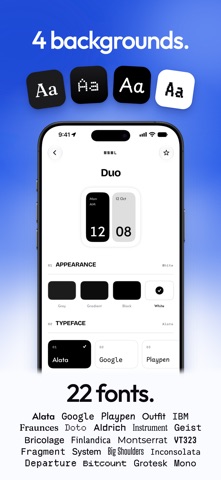
MNML is a collection of beautifully designed, ready-to-use widgets for your Home Screen and Lock Screen. Designed for people who love clean, distraction-free iPhone setups. Add clocks, calendars, year progress, date and health widgets that make your iPhone feel clean and intentional. No setup. No templates. Just beautifully designed widgets. Ready to use. MINIMAL WIDGETS FOR EVERY DAY → Clock widgets — bold digital clocks, dot clocks, ring clocks, block clocks and more → Calendar widgets — see today, the date or a full month at a glance → Progress widgets — track your day, week, month and year progress with dots, bars, lines and rings → Apple Health widgets — show steps or heart rate from Apple Health → Sky widgets — sunrise and sunset, daylight, the moon, the next solstice and a sundial → Everyday widgets — count down to the dates that matter, tap to count your day and read it as a front page → Lock Screen widgets — keep your date, calendar, progress or steps close by FOR A CLEANER HOME SCREEN MNML is not a widget maker. You do not need to create a layout, design a theme or dig through hundreds of templates. Every widget is thoughtfully designed to look great on your Home Screen or Lock Screen. Pick a design, choose the look and type style you like, then add it to your iPhone. MAKE IT YOURS → Explore 74 ready-to-use widgets across clocks, calendars, progress, health, sky and everyday. → Choose from 22 carefully selected fonts. → Choose from four beautiful widget styles: White, Gray, Black or Gradient Black. MINIMAL. AESTHETIC. READY TO ADD. Whether you want a minimal clock widget, an aesthetic calendar widget, a year progress widget, a simple date widget or a clean steps widget, MNML gives you a focused collection built for everyday glances. MNML Pro unlocks the full collection of minimal widgets and future additions. Purchase options are shown clearly in the app before you buy. Support: https://minimalwidgets.com/support Privacy Policy: https://minimalwidgets.com/privacy Terms of Use: https://www.apple.com/legal/internet-services/itunes/dev/stdeula/
What's new · 2.0
MNML 2.0 is our biggest update yet. There are now 74 minimal widgets, 52 for the Home Screen and 22 for the Lock Screen. That's 24 new widgets, two new categories, 20 redesigns and a fresh new app. TWO NEW CATEGORIES → Sky — the sun, the moon and the seasons, worked out on your iPhone for your location or a city you choose → Everyday — countdowns, tap-to-count tallies and a front page for your day 24 NEW WIDGETS Sky → Daylight — today's night, twilight and day on one band, with sunrise and sunset → Moon — tonight's moon, engraved line by line, with the next full or new moon → Sun Hours — sunrise, sunset and the length of the day → Next Solstice — days until the next solstice or equinox → Sundial — a sundial drawn for where you are, with solar time beside clock time Everyday → Countdown, Stamp and Ticket — the days left until a date that matters, on an engraved plaque, a postage stamp or a ticket → Tally, Sprig and Measure — tap the widget to count glasses of water, cups of coffee or pages read. They start fresh at midnight → Broadsheet — our first Large widget: your day as a front page, with the year, your calendar and the sky → Plus a Tally button for Control Center Clock and Calendar → Time Zones — three cities you choose, with day and night at a glance, in small and medium → Order of the Day — today's calendar, set like a printed program Lock Screen → Daylight, Next Solstice, Countdown and Next Event → Our first circular widgets: Moon, Week Number and Year Percent → Our first inline widgets, above the clock: Week Number and Sun Hours 20 REDESIGNED WIDGETS Widgets you've already added keep working and switch to their new look on their own. Lock Screen → Year Fraction — today as a fraction of the year → Year Dial — a half dial of the months, with a needle on today → Year, in Words — the year's progress as one short sentence → Month Ruler — the month along a ruler, with a caret under today → Hourglass — empties as the month runs out → Month in Weeks — the month's weeks, filling in as they pass → Staircase — ten steps climbing to your daily step goal → Trail — your steps as a path walked toward a flag → Days Ahead — today and the next two days, with your first event when Calendar is connected Home Screen → Progress: Dotted Month, Dotted Year, Year Round, Dotted Day and Dotted Week, each with its own shape → Clock: Waterline and Duo → Calendar: Month Ahead, Dateline and Ledger → Health: Footprints → Progress Rings and Progress Bars are now Time Rings and Time Bars TAP TO RESTYLE → Tap an MNML widget on your Home Screen to open it in the app, try another style or font, then tap Save to Home Screen A FRESH NEW APP → A new gallery: swipe between categories or jump to one from the menu in the corner → Featured, New and Favorites, all in the same menu → Widgets fly out of the gallery onto their own page → Previews shown at your iPhone's real widget size and shape → A guide for every widget: how to add it, what you can change and how to read it → Location and Calendar access are optional, and set up right on a widget's page → A redesigned Apple Health screen and a simpler MNML Pro screen → A new animated launch SMALLER IMPROVEMENTS → Activity widgets show units: kcal, and km or mi for your region → Heart shows how long ago your heart rate was measured → Strip Hour's current hour stands taller, so it's easy to spot in every style → Health previews in the app follow your saved daily goals → Bug fixes and performance improvements
Details