

CourseDeck: AI Study Planner
Evan Kim · Education
Independent analytics for this App Store listing. AppTracker is not affiliated with Evan Kim.
Chart standing · US
What changed · US
Listing changes AppTracker has observed for this app in this storefront — new versions, price moves, rating shifts, and store copy.
Plan repeat coursework faster and keep your study sessions in view. • Create daily, weekly, or every-other-week assignment batches with date previews. • Duplicate assignments and add tasks directly from a course or calendar day. • Start focus sessions and review session history in assignment details. • Fixes for canceled assignment edits, overlapping timers, and tracked study time.
Price & rating history · US
Reconstructed from the listing changes AppTracker has observed in this storefront. A field is charted once it has changed more than once, and each line starts at the value it moved from.
Average rating · ★ 4.67 now · 2 changes on record
Ratings breakdown · US
The star breakdown behind this app's rating in this storefront.
In-app purchases · US
What this app sells inside itself, grouped by kind and priced for this storefront.
Screenshots



About
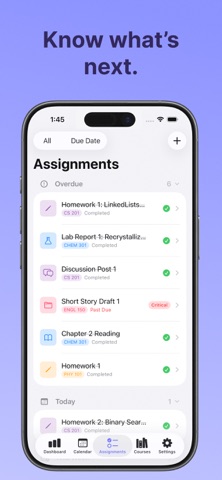
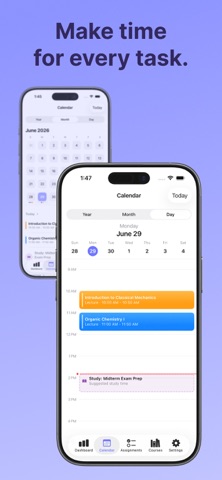
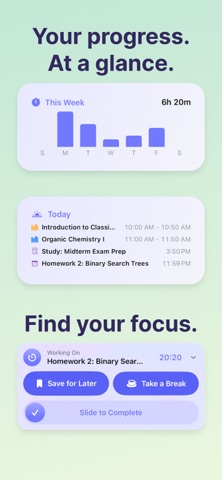
Turn your syllabus into a semester plan. CourseDeck helps college and high school students organize homework, track assignments and exams, and make time to study. Import a syllabus PDF, review the details, and bring your coursework into one student planner. See what's due, follow your class schedule, and focus on your next task. LESS SETUP, MORE STUDY TIME Use the AI syllabus scanner to find assignments, exam dates, class times, and grading details. Check and edit the results before adding them to your course. YOUR COURSEWORK, TOGETHER Keep classes, homework, and deadlines in one place. Browse your calendar, check upcoming assignments, and track progress as you work through the semester. MAKE REPEAT WORK EASIER Create daily, weekly, or every-other-week assignment batches. Duplicate an assignment or add one directly from a course or calendar day to save setup time. FOCUS ON THE NEXT TASK Start a focus timer from an assignment, review your session history, and follow your progress on the Lock Screen with Live Activities. PLAN AROUND YOUR DAY With CourseDeck Pro, get suggested study times that fit around classes and your preferred work windows. Choose session lengths and quiet hours that match how you study. KEEP YOUR CALENDAR CONNECTED Sync assignments and class schedules to Apple Calendar. Bring external calendar feeds into CourseDeck to see more of your schedule together. START FREE. GET MORE WITH PRO. Organize courses and assignments for free, with limited AI syllabus scans. CourseDeck Pro adds: • Unlimited AI syllabus scans • Smart work-time suggestions • Daily Preview • Assignment queueing • Pomodoro mode • Home Screen widgets Download CourseDeck and make your next semester easier to plan. Terms of Use: https://www.apple.com/legal/internet-services/itunes/dev/stdeula/ Privacy Policy: https://coursedeck.net/privacy-policy
What's new · 1.0.5
Plan repeat coursework faster and keep your study sessions in view. • Create daily, weekly, or every-other-week assignment batches with date previews. • Duplicate assignments and add tasks directly from a course or calendar day. • Start focus sessions and review session history in assignment details. • Fixes for canceled assignment edits, overlapping timers, and tracked study time.
Details