

InOne: AI Teleprompter
Callum Kemp · Photo & Video
Independent analytics for this App Store listing. AppTracker is not affiliated with Callum Kemp.
Chart standing · US
What changed · US
Listing changes AppTracker has observed for this app in this storefront — new versions, price moves, rating shifts, and store copy.
Read more naturally and get back to your next take faster. • A redesigned home screen makes it easier to resume your script and find your projects and recordings. • Prompter lines follow sentences and paragraphs, with optional pause breaks and current-word highlighting. • Choose a default scrolling speed and light, dark or system appearance in Settings. • Improved voice following and clearer camera and microphone setup. • Expanded language support, with better right-to-left text in the prompter and captions. Voice following depends on speech recognition being available on your device.
Screenshots




About
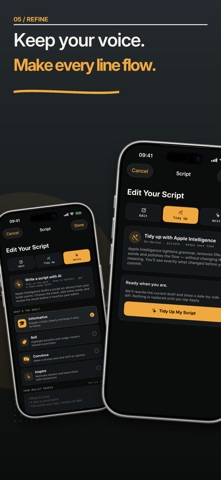
Your script, teleprompter, camera and video editor in one app. InOne helps you speak naturally to the lens without memorising every word, from your first idea to your finished video. WRITE AND REFINE YOUR SCRIPT Type, paste or import your words. Turn notes into a ready-to-read script or improve a draft while keeping your meaning and voice. Review every suggested change before applying it. AI writing uses Apple Intelligence on supported devices. LOOK AT THE LENS Keep your script close to the camera with the overlay autocue. Set the scrolling speed yourself or use Follow My Voice, which moves with your speech and waits when you pause. RECORD YOUR WAY Use either camera in portrait or landscape. Rehearse before recording, start with a countdown, adjust text and background, brighten your face with the built-in screen light, or use Focus Mode and display a chroma-green backdrop on your screen for filming with an external camera. CLEAN UP EVERY TAKE InOne links your transcript to the video timeline and can find filler words and long pauses. Choose what to cut, restore anything instantly and keep the original recording untouched. FINISH THE VIDEO Join clips from different takes, reorder them and export one video. Add filters, captions, keyword highlights and motion before saving to Photos. MADE FOR SOLO CREATORS Create social videos, product reviews, tutorials, lessons and presentations without juggling several apps. InOne Pro Cleanup, transcripts, captions, clip stitching and edited-video exports require a paid InOne Pro subscription. The free version supports scripts up to 300 words and recordings up to one minute, with a small watermark on exports. InOne Pro unlocks longer scripts and recordings, watermark-free video and additional writing, recording and editing tools. Prices and any eligible trial appear before purchase. InOne Pro is available as a monthly (1 month) or annual (1 year) auto-renewable subscription. The price, billing period and any eligible trial terms are shown before purchase. Payment is charged to your Apple Account at confirmation of purchase, or when an eligible free trial ends. Subscriptions renew automatically unless cancelled at least 24 hours before the end of the current period. Your Apple Account is charged for renewal within 24 hours before the current period ends. Manage or cancel your subscription in your Apple Account settings. Terms of Use (EULA): https://www.apple.com/legal/internet-services/itunes/dev/stdeula/ Privacy Policy: https://inoneteleprompter.app/privacy Support: https://inoneteleprompter.app/
What's new · 1.02
Read more naturally and get back to your next take faster. • A redesigned home screen makes it easier to resume your script and find your projects and recordings. • Prompter lines follow sentences and paragraphs, with optional pause breaks and current-word highlighting. • Choose a default scrolling speed and light, dark or system appearance in Settings. • Improved voice following and clearer camera and microphone setup. • Expanded language support, with better right-to-left text in the prompter and captions. Voice following depends on speech recognition being available on your device.
Details