

おうちシアター
Naoki Chiba · Education
Independent analytics for this App Store listing. AppTracker is not affiliated with Naoki Chiba.
Chart standing · US
What changed · US
Listing changes AppTracker has observed for this app in this storefront — new versions, price moves, rating shifts, and store copy.
- Added nearby data sync. Send your video list, tags, and settings to another iPhone or iPad when needed, even with a different Apple Account. Open Nearby sync in parent Settings. - Fixed a freeze when children edited video start and stop points. - Improved time input for play ranges and YouTube URLs.
In-app purchases · US
No in-app purchases.
Screenshots




About
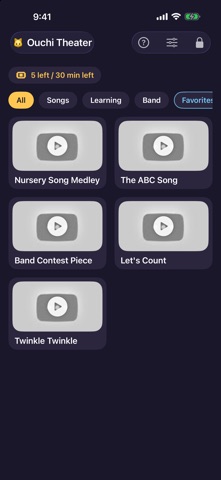
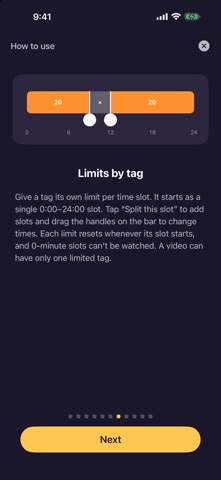
A video player for parents: your child sees only the videos you choose, with no search, no recommendations and no related videos. Hand a child the regular video app and they can drift from one recommended video to the next. Ouchi Theater shows only the videos you have picked, so your child can watch them as often as they like, and nothing else. FEATURES - Shows only the videos you choose (no search, no recommendations) - Tap to play full screen; when it ends, one tap takes you back to the list - Parent mode protected by a passcode for adding and organizing videos - Add a video by pasting its URL, or browse inside the app and add it - Organize with tags: create, reorder and rename tags, and choose their videos - Daily limits on the number of videos and on watch time (each can be turned on or off; resets every day) - Limits per tag and time slot (for example: not in the morning, up to 20 minutes in the evening) - Videos that are limited right now show a lock and are skipped during continuous play - If you allow it, your child can make their own tags to group favorite videos - Play modes: one at a time, continuous, repeat, repeat all, and shuffle - Set a play range for each video (a start point, a stop point, or both), e.g. to skip a long intro or loop just part of a song - Manually sync your video list, tags, and settings with a nearby iPhone or iPad, even with a different Apple Account. Review before replacing the receiving library, and restore its previous state if needed. PIN, language, and viewing history stay on each device. - How-to guides for children and for parents - Display in hiragana, Japanese or English WHO IT IS FOR - Parents who don't want to hand over the regular video app - Families who replay the same songs or practice pieces again and again - Parents who want to allow certain videos only at certain times of day PLEASE NOTE - An internet connection is required. Videos play in YouTube's official embedded player; nothing is downloaded or saved. - For extra peace of mind, use it together with iOS Guided Access.
What's new · 1.4
- Added nearby data sync. Send your video list, tags, and settings to another iPhone or iPad when needed, even with a different Apple Account. Open Nearby sync in parent Settings. - Fixed a freeze when children edited video start and stop points. - Improved time input for play ranges and YouTube URLs.
Details