

DanPraTube
Tadashi Yamanaka · Photo & Video
Independent analytics for this App Store listing. AppTracker is not affiliated with Tadashi Yamanaka.
Chart standing · US
What changed · US
Listing changes AppTracker has observed for this app in this storefront — new versions, price moves, rating shifts, and store copy.
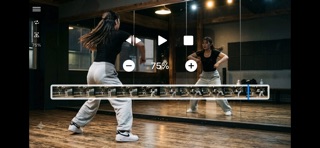
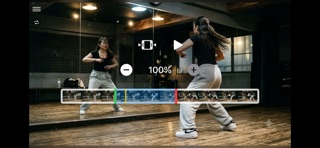
What's New in Version 1.30 • Added a new feature: side-by-side video comparison. From the menu, choose "Compare with another video" to play the current video alongside another one. • The layout automatically switches between side-by-side and top-and-bottom depending on device orientation, and each video can be zoomed, panned, mirrored, and muted independently. • Tap and drag on the waveform to fine-tune playback position, then set a sync point at the moment where the two videos match. • Added a button that analyzes the audio waveforms and automatically suggests a sync point candidate. • Play and pause both videos together, so you can pause at exactly the right moment to compare. • From the menu, you can reselect the comparison video, return to the original video, and adjust mirror settings. • Fixed the DanPraTube widget icon appearing as a plain white silhouette on watchOS 27's new "Siri Modular" watch face. • Improved stability.
In-app purchases · US
No in-app purchases.
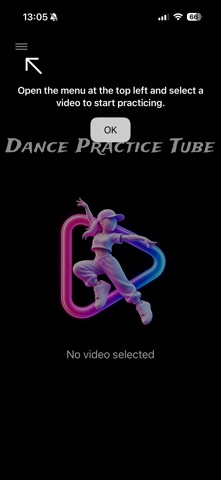
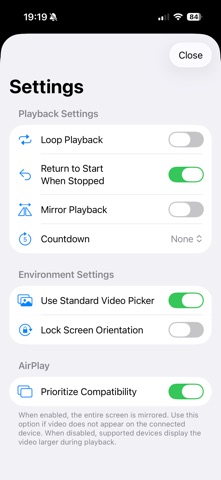
Screenshots



Similar apps
Competitors and close alternatives, as estimated by AppTracker.
 DanceTribe :For all dancers
AlphaTheta Corporation
DanceTribe :For all dancers
AlphaTheta Corporation
 BaM Video Delay
Orange Qube
BaM Video Delay
Orange Qube
 Coach Video Analyzer
Harald Niklaus
Coach Video Analyzer
Harald Niklaus
 DanceTime Deluxe
Wimbledon Sound
DanceTime Deluxe
Wimbledon Sound
 DanStream
DanceSport Digital, s.r.o.
DanStream
DanceSport Digital, s.r.o.
 Pole Dance: Move Library
Appsolute LLC
Pole Dance: Move Library
Appsolute LLC
 Video Delay Instant Replay Pro
michal bojanowicz
Video Delay Instant Replay Pro
michal bojanowicz
 Swim Coach Plus HD
Zappasoft Pty Ltd
Swim Coach Plus HD
Zappasoft Pty Ltd
About
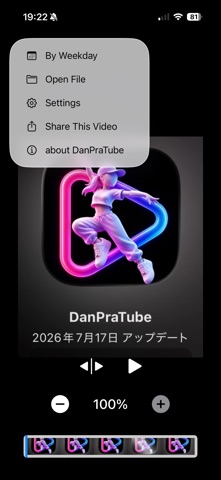
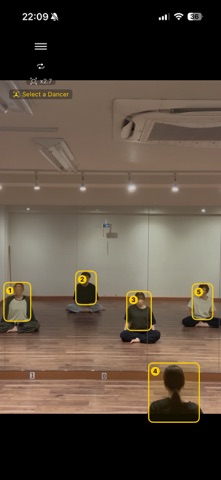
Built by a dancer, for dancers. DanPraTube (Dance Practice Tube) is a video player designed specifically for dance practice, featuring only the tools dancers truly need. Learn choreography, study every detail, and practice until you move like your favorite performers. DanPraTube was created to be the app dancers have always wanted. Main Features • Use AI-powered Spotlight to automatically follow the dancer you want to study • See AI-detected dancers in group videos and tap to select who to follow • Play two videos side by side, with sync points auto-detected from audio waveforms • Add or remove the current video from Photos favorites • Combine class-day and favorites filters to find videos to practice • Resume practice with your last video and range restored • Pinch to zoom in on choreography details • Swipe left or right to move between the previous and next videos • Share the video you're watching via AirDrop and more • Slow-motion playback for detailed movement analysis • Video previews while adjusting playback position and range • Loop playback for repeating selected sections • Mirror mode to match your instructor's direction • Organize and select videos by class day • Lock screen orientation to stay focused on practice • AirPlay support for TVs and external displays • Control playback remotely with Apple Watch • Set A–B loop points from the Apple Watch Loop Setting screen • Countdown playback for synchronized group practice • Smart Stack support for quick access to Apple Watch controls Compare Two Videos Side by Side Comparing an instructor's video with your own, or last week's practice with this week's, usually means fighting timing that's off from the start. Tap and drag each video's waveform to set a "sync point" where they match, or tap once for an automatic suggestion. Once synced, both videos play and pause together, with independent speed, mute, and mirror controls. Follow the Movement You Want with Spotlight In lesson videos with an instructor and several dancers, the person you want to study can be hard to follow once you zoom in. With AI-powered Spotlight, select a dancer and the video automatically follows their movement, so you can focus on choreography, posture, and footwork. Pause the video to see AI-detected dancers in selection frames, then tap the one you want to follow. If Spotlight loses track — due to resolution, clothing, crossing paths, or occlusion — just reselect the dancer to resume. Organize Practice Videos with Favorites Tap the heart to update Photos favorites, and combine recording-day and favorites filters to quickly find lesson videos to practice. Set Loop Points from Apple Watch Swipe up during playback for "Loop Setting," then tap A and B to mark the part to repeat — no iPhone needed. Tap again to clear it. Designed by a Dancer I'm a dancer myself, and DanPraTube grew from everyday dancer needs — repeat just this part, watch it slower, follow an instructor more easily, control playback without walking back to the phone — all designed to help you stay focused, without interruption. No Ads. No Subscription. DanPraTube has no ads and is a one-time purchase, not a subscription — practice without distractions. Perfect For • Dancers who want to follow an instructor or a specific dancer in group videos • Dancers who want more efficient practice sessions • Dancers who want to zoom in and study subtle posture and movement details • Anyone who learns choreography using videos • Dancers who need slow-motion playback to master routines • Dancers who want to compare an instructor's video, or past practice, side by side • Studio users with an external display who want Apple Watch control • Anyone looking for a simple yet powerful video player Coming Soon • Ghost mode (overlay two videos with transparency) DanPraTube will keep evolving with feedback from dancers worldwide. Feature requests and feedback are always welcome in the reviews.
What's new · 1.30
What's New in Version 1.30 • Added a new feature: side-by-side video comparison. From the menu, choose "Compare with another video" to play the current video alongside another one. • The layout automatically switches between side-by-side and top-and-bottom depending on device orientation, and each video can be zoomed, panned, mirrored, and muted independently. • Tap and drag on the waveform to fine-tune playback position, then set a sync point at the moment where the two videos match. • Added a button that analyzes the audio waveforms and automatically suggests a sync point candidate. • Play and pause both videos together, so you can pause at exactly the right moment to compare. • From the menu, you can reselect the comparison video, return to the original video, and adjust mirror settings. • Fixed the DanPraTube widget icon appearing as a plain white silhouette on watchOS 27's new "Siri Modular" watch face. • Improved stability.
Details