

PD Meter: Pupillary Distance
heekyung moon · Utilities
Independent analytics for this App Store listing. AppTracker is not affiliated with heekyung moon.
Chart standing · US
What changed · US
Listing changes AppTracker has observed for this app in this storefront — new versions, price moves, rating shifts, and store copy.
Fixes the most common reason for a result that makes no sense. If both card marks end up on the same end of the card, or both pupil marks on the same eye, the result card now names that mistake and shows how to fix it, instead of a meaningless number and advice to hold the phone closer. A new "Re-mark the pupils" button clears just the two pupil marks and keeps the card marks on the same photo; "Re-mark the card edges" does the same for the card.
Ratings breakdown · US
The star breakdown behind this app's rating in this storefront.
In-app purchases · US
No in-app purchases.
Screenshots


About
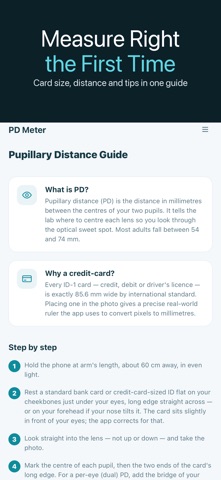
Ordering glasses online and need your PD? PD Meter helps you measure your pupillary distance (PD) in millimeters using a front-camera selfie and any standard-size card, like a credit card, for scale — no ruler, no second person, no trip to the optician. Your pupillary distance is the gap between the centers of your pupils. Online eyewear stores ask for it so your lenses are centered correctly in the frame. PD Meter gives you a quick, repeatable estimate from the comfort of your home. HOW IT WORKS • Hold a standard card (a credit card, ID or any ISO-size card) under your eyes — its known width gives the app a real-world scale. • Take a front-camera selfie, looking straight at the lens. • Mark the center of each pupil and the edges of the card. • PD Meter converts pixels to millimeters and shows your PD instantly. WHAT YOU GET • PD in millimeters, ready to enter at checkout. • Single (binocular) PD, the value most retailers request. • A clear, guided flow with on-screen tips for good lighting and head position. • Re-measure as many times as you like and average your results for confidence. WHO IT'S FOR Anyone buying prescription or blue-light glasses online, parents checking a child's fit, or anyone who simply wants their PD on hand without booking an appointment. A NOTE ON ACCURACY PD Meter provides an estimate based on your photo and the card scale. Results depend on lighting, camera angle and how precisely you place the markers. For high prescriptions or progressive lenses, confirm your PD with an optician. This app is not a medical device.
What's new · 1.0.26
Fixes the most common reason for a result that makes no sense. If both card marks end up on the same end of the card, or both pupil marks on the same eye, the result card now names that mistake and shows how to fix it, instead of a meaningless number and advice to hold the phone closer. A new "Re-mark the pupils" button clears just the two pupil marks and keeps the card marks on the same photo; "Re-mark the card edges" does the same for the card.
Details