

SnapSpend
Fredy Soussou · Finance
Independent analytics for this App Store listing. AppTracker is not affiliated with Fredy Soussou.
Chart standing · US
Screenshots




About
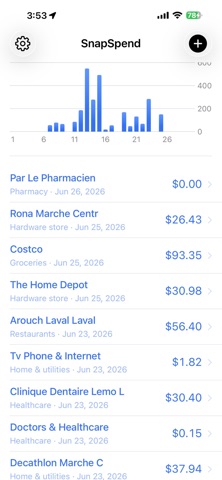
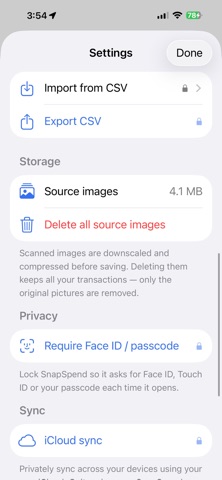
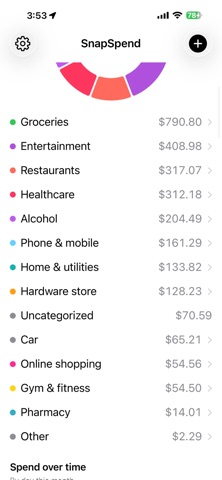
SnapSpend turns a photo of your statement or receipt into organized spending — privately, on your device. Pay once, no subscription. Most budgeting apps make you hand over your bank login and pay every month. SnapSpend doesn't. Snap a screenshot of your credit card, bank, or chequing statement (or a single receipt) and it reads every transaction right on your iPhone. No account. No bank connection. Nothing is uploaded. PERSONAL & BUSINESS, KEPT SEPARATE (Pro) • Two independent books — Personal and Business — switch between them anytime • Scan an expense straight into the book you're in • Each book keeps its own dashboard, categories, trends and totals — clean separation for tax time SCAN ANYTHING • Card and bank statements — pulls every line into a review screen you confirm • Single receipts and bills — grabs the total; tap to pick it on itemised receipts • Import several statement screenshots at once (Pro) • Direct PDF statement import works best with Tangerine credit-card statements; other banks may import partially — you review and fix every row before saving (Pro) • Reads English and French statements (and more), accents included IT LEARNS YOUR SPENDING • Set a vendor's category once and SnapSpend remembers it next time • Rename or merge vendors — future scans follow automatically • Auto-categorizes common merchants out of the box STAY IN CONTROL • Dashboard with category breakdown and spend-over-time • Per-category trends — up or down vs last week, month, or year • Budgets with alerts at 80% and 100% (Pro) • Detects recurring charges and subscriptions (Pro) • Duplicate detection across receipts and statements, even with spelling differences YOUR DATA STAYS YOURS • On-device — OCR and parsing run locally, with no servers of ours • Free iCloud backup — privately stored in your own iCloud, so deleting and reinstalling brings everything back • Source images stored encrypted; delete them anytime • No sign-up, no analytics, no tracking Import from Mint, YNAB, or a bank CSV, and export your data to CSV anytime — opens in Excel & Numbers (Pro). SnapSpend Pro is a one-time purchase — pay once, keep it forever. No subscription.
What's new · 1.2
NEW: Share expenses with someone (Pro). Send a month or a year to a partner or bookkeeper by AirDrop, Messages or email — they open it in SnapSpend to review and save, with duplicates caught automatically. Plus Backup & restore: save a backup file you keep, and restore it anytime. As always: on-device, no account, no subscription.
Details