

書いて覚える Word List
Twelve Axis, Inc. · Education
Independent analytics for this App Store listing. AppTracker is not affiliated with Twelve Axis, Inc.
Chart standing · US
What changed · US
Listing changes AppTracker has observed for this app in this storefront — new versions, price moves, rating shifts, and store copy.
Review words at just the right time with spaced repetition. NEW FEATURES [Spaced Repetition] A new question order, Spaced Repetition, picks the right time to review each word based on your answers, and quizzes you only on words that are due for review or that you haven't studied yet. Each correct answer stretches the interval: 1 → 3 → 7 → 16 → 36 → 80 → 180 days. A wrong answer starts the word over. You can check each word's next review date and review stage on its edit screen. * The Spaced Repetition question order is part of "Unlock All Features". [See exactly what was wrong] When a voice or handwritten answer is wrong, the parts that differ from the correct answer are marked. [See handwriting recognition as you write] When you finish writing, what was recognized appears before you press the check button, so you can make sure it's right before you answer. [Read the answer aloud] The answer card now has a button that reads the answer aloud, even when "Read Answer Aloud" is turned off in Settings. FIXES & IMPROVEMENTS • Voice and handwriting answer areas now show which language to answer in. • When a handwritten answer differs only in uppercase and lowercase letters, it's still marked correct, with a note pointing out the difference. • In word lists, Add Folder is now in the + menu, and Select and Sort are now in the … menu. • When words added on a device without Apple Intelligence arrive through iCloud, a device that supports it now creates their example sentences automatically (when Generate Examples Automatically is on). • Fixed an issue where moving words could fail the first time. • Fixed an issue where answers weren't recorded if you ended a quiz partway through. • Fixed an issue where automatically filled-in readings garbled katakana long vowel marks and Latin letters (such as コーヒー and Tシャツ).
In-app purchases · US
What this app sells inside itself, grouped by kind and priced for this storefront.
Screenshots




About
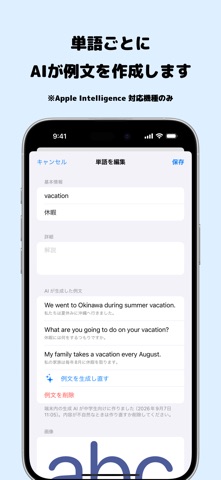
For school tests, what matters most is learning exactly what your school and your class will cover. Word List lets you build your own word lists for the words a store-bought vocabulary book doesn't have. Reading words aloud and writing them by hand helps them stick. YOUR OWN WORD LISTS • Create folders to organize words by lesson or unit • Study English, French, Korean, Chinese, and more — 32 languages in all • Choose the word and translation languages for each folder or each word BUILD A LIST FROM A PHOTO OF YOUR TEXTBOOK • Take a photo of a textbook or handout to read the words and add them all at once • Reads English and 20 other languages, including French, German, and Chinese • Set your level to leave basic words out of the suggestions (English only) • Reading happens on your device. Images are never sent anywhere. • Translations are filled in automatically (iOS 18 or later; not available for some languages) LEARN BY SPEAKING • Reading aloud is a good way to start learning new words • Speech recognition checks the words you say WRITE IT DOWN • Handwriting recognition reads what you write • Actually moving your hand makes words stick much better FILL-IN-THE-BLANK QUESTIONS • On-device AI writes example sentences with your words (iOS 26 or later, on devices that support Apple Intelligence; not available for some languages) • Fill-in-the-blank questions from those sentences help you learn each word along with how it's used LEARN KANJI TOO • Set the word language to Japanese and the translation to Japanese (Hiragana) to make cards that pair kanji with their readings • Readings are filled in for you • Practice writing the kanji for a reading shown in an example sentence (uses example sentences made by AI example sentences) KEEP GOING, KEEP IMPROVING • Your accuracy is recorded • A ranking shows your weakest words at a glance • Spaced repetition quizzes you on each word right when it's due for review (Unlock All Features) SHARE AND SYNC • Swap word lists with friends via AirDrop or Messages • iCloud sync keeps the same lists on all your devices UNLOCK ALL FEATURES (ONE-TIME PURCHASE) • No limit on questions per session • Multiple question orders, such as spaced repetition and lowest accuracy first • Review only the questions you missed • No limit on words read from an image (the free version reads up to 5 at a time) • Import from CSV (comma-separated text), choosing the columns, text encoding, and delimiter Adding words, handwriting, voice answers, fill-in-the-blank questions, sharing, and iCloud sync are all free.
What's new · 1.3.1
Review words at just the right time with spaced repetition. NEW FEATURES [Spaced Repetition] A new question order, Spaced Repetition, picks the right time to review each word based on your answers, and quizzes you only on words that are due for review or that you haven't studied yet. Each correct answer stretches the interval: 1 → 3 → 7 → 16 → 36 → 80 → 180 days. A wrong answer starts the word over. You can check each word's next review date and review stage on its edit screen. * The Spaced Repetition question order is part of "Unlock All Features". [See exactly what was wrong] When a voice or handwritten answer is wrong, the parts that differ from the correct answer are marked. [See handwriting recognition as you write] When you finish writing, what was recognized appears before you press the check button, so you can make sure it's right before you answer. [Read the answer aloud] The answer card now has a button that reads the answer aloud, even when "Read Answer Aloud" is turned off in Settings. FIXES & IMPROVEMENTS • Voice and handwriting answer areas now show which language to answer in. • When a handwritten answer differs only in uppercase and lowercase letters, it's still marked correct, with a note pointing out the difference. • In word lists, Add Folder is now in the + menu, and Select and Sort are now in the … menu. • When words added on a device without Apple Intelligence arrive through iCloud, a device that supports it now creates their example sentences automatically (when Generate Examples Automatically is on). • Fixed an issue where moving words could fail the first time. • Fixed an issue where answers weren't recorded if you ended a quiz partway through. • Fixed an issue where automatically filled-in readings garbled katakana long vowel marks and Latin letters (such as コーヒー and Tシャツ).
Details