

EDGE Lighting LED Border Light
Vasilkoff Ltd · Photo & Video
Independent analytics for this App Store listing. AppTracker is not affiliated with Vasilkoff Ltd.
Chart standing · US
What changed · US
Listing changes AppTracker has observed for this app in this storefront — new versions, price moves, rating shifts, and store copy.
What’s New: Improved app performance and stability Enhanced wallpaper downloading experience Better support for subscriptions and premium access Updated analytics and attribution systems Fixed minor bugs and improved reliability
Price & rating history · US
Reconstructed from the listing changes AppTracker has observed in this storefront. A field is charted once it has changed more than once, and each line starts at the value it moved from.
Average rating · ★ 4.20 now · 3 changes on record
Ratings breakdown · US
The star breakdown behind this app's rating in this storefront.
In-app purchases · US
What this app sells inside itself, grouped by kind and priced for this storefront.
Screenshots



About
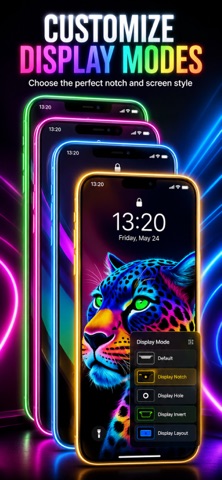
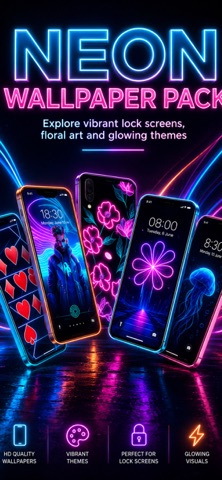
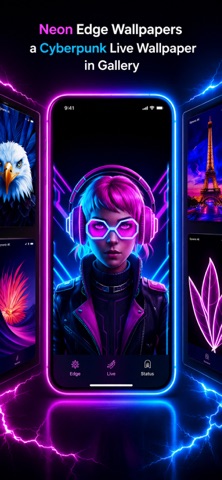
Edge Lighting: Live Wallpapers Transform your iPhone screen with glowing edge light wallpapers, animated borders, and beautiful background styles. Edge Lighting lets you create custom wallpapers with colorful LED-style borders, notch and Dynamic Island layouts, live photo effects, and personal background images. Design a wallpaper that fits your device, matches your style, and looks great on your Lock Screen. Key Features Custom Edge Lighting Wallpapers Create bright LED-style borders with neon, rainbow, pastel, and custom color combinations. Adjust the border size, glow, speed, and style to make your wallpaper look exactly how you want. Live Photo Wallpaper Export Save animated edge lighting designs as Live Photos and use them as wallpapers through the Photos app. Notch and Dynamic Island Support Choose layouts for notch, Dynamic Island, camera hole, or no cutout. Adjust cutout width, height, radius, and position for a better fit on your iPhone screen. Background Image Support Use built-in wallpapers or choose your own photo from the Photos app. Adjust background zoom and position before saving so your image fits nicely inside the edge design. Border Styles and Shapes Choose from different edge styles, including clean lines and decorative border patterns. Customize the look to match your mood, wallpaper, or device theme. Device Fit Controls Fine-tune margins, corner radius, border thickness, horizontal position, and iOS wallpaper adjustment settings for a better Lock Screen result. Wallpaper Collections Browse curated wallpapers, trending designs, most downloaded styles, presets, and daily reward wallpapers. Easy Save and Setup Guide Save your wallpaper to Photos, then follow the built-in tutorial to set it on your iPhone Lock Screen. Why Choose Edge Lighting Create custom glowing wallpapers Supports notch and Dynamic Island layouts Save animated designs as Live Photos Use your own photos as backgrounds Adjust wallpaper fit before saving Browse beautiful preset wallpaper collections Designed for iPhone Lock Screen customization Make your iPhone screen glow with custom edge lighting wallpapers. Terms of Use (EULA): https://www.apple.com/legal/internet-services/itunes/dev/stdeula/ Privacy Policy: https://edge-lighting-e84b6.web.app/privacy.html
What's new · 1.29
What’s New: Improved app performance and stability Enhanced wallpaper downloading experience Better support for subscriptions and premium access Updated analytics and attribution systems Fixed minor bugs and improved reliability
Details