

Captora: AI Auto Captions
Xeobo Software DOO · Photo & Video
Independent analytics for this App Store listing. AppTracker is not affiliated with Xeobo Software DOO.
Chart standing · US
What changed · US
Listing changes AppTracker has observed for this app in this storefront — new versions, price moves, rating shifts, and store copy.
What's new in Captora: • Saving to Photos is smoother: Captora now asks only for permission to add videos, not to see your whole library, and asks before the export starts. • If a video can't be saved to Photos, you now land on the "Your video is ready" screen, where you can share it, open Settings or retry without rendering again. • The onboarding screens now appear in your language. • The app now follows your phone's language by default. • Stability improvements and bug fixes. Enjoying Captora? We'd love your feedback!
Screenshots




About
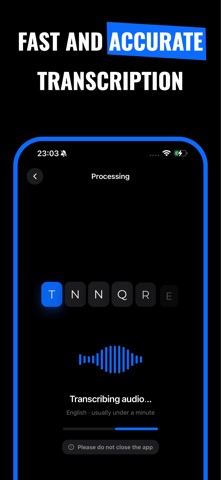
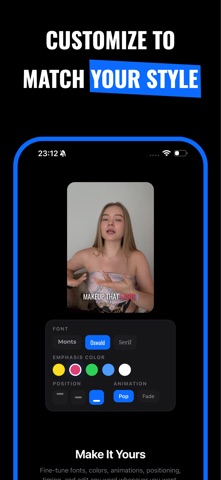
Add captions to any video — automatically, right on your iPhone. Import a clip and Captora writes the captions for you: accurate, timed to every word, and styled to stop the scroll. Then export your video with the captions burned right in — ready for TikTok, Instagram Reels, YouTube Shorts, and anywhere else you post. No timelines to fight. No typing out transcripts. Just import, tweak, and share. And it speaks your language — 17 of them, with automatic detection built in. WHY CREATORS CHOOSE CAPTORA • Word-perfect timing — AI transcribes your speech and syncs every word to the audio, so captions land exactly on the beat. • Styles that stop the scroll — word-by-word pop, karaoke highlights, line-by-line reveals, or clean static captions. • Make it yours — fonts, colors, outlines, shadows, background boxes, sizing, spacing, and drag-anywhere positioning. • Emphasize what matters — make a key word bigger or recolor it with a tap. • Save your look — build a template once and reuse it on every video. • Edit anything — fix a word or nudge its timing without re-recording. • 17 languages, auto-detected — caption in the language you actually speak. PRIVATE BY DESIGN Your video never leaves your device. Captora sends only the audio to generate captions — or switch on the on-device speech model and go completely offline, so nothing leaves your iPhone at all. The final video is rendered right on your phone. CAPTION IN 17 LANGUAGES English, Spanish, French, German, Italian, Portuguese, Polish, Czech, Slovak, Croatian, Slovenian, Hungarian, Romanian, and more — across Latin and Cyrillic scripts. Not sure? Let Captora auto-detect the language for you. HOW IT WORKS 1. Import any video from your library. 2. Captora generates the captions automatically. 3. Style it, tweak any word, and export — burned in and ready to post. MADE FOR Short-form creators, marketers, educators, podcasters clipping episodes, and anyone who wants their videos watched with the sound off — which is how most of your audience is watching. FREE TO START — PRO WHEN YOU NEED MORE Every style, template and language is free to use. Start captioning right away: 60 minutes of transcription a month, exported at 720p with a small Captora watermark. Captora Pro removes the limits: • Unlimited auto-captions (fair use applies) • Full-resolution export — exactly as you shot it • No watermark Captora Pro is an auto-renewing subscription. It renews unless cancelled at least 24 hours before the end of the current period. Manage or cancel any time in your App Store account settings. Terms of Use (EULA): https://www.apple.com/legal/internet-services/itunes/dev/stdeula/ Privacy Policy: https://xeobodoo.com/captora/privacy.html
What's new · 1.0.13
What's new in Captora: • Saving to Photos is smoother: Captora now asks only for permission to add videos, not to see your whole library, and asks before the export starts. • If a video can't be saved to Photos, you now land on the "Your video is ready" screen, where you can share it, open Settings or retry without rendering again. • The onboarding screens now appear in your language. • The app now follows your phone's language by default. • Stability improvements and bug fixes. Enjoying Captora? We'd love your feedback!
Details