

Analog Field Kit
Joachim Zodet · Photo & Video
Independent analytics for this App Store listing. AppTracker is not affiliated with Joachim Zodet.
Chart standing · US
What changed · US
Listing changes AppTracker has observed for this app in this storefront — new versions, price moves, rating shifts, and store copy.
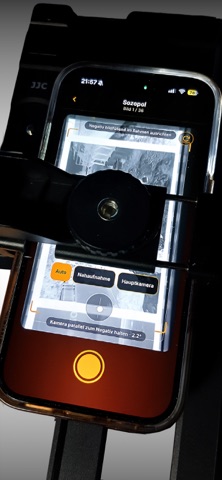
The camera preview in the scanner remains visible while you scroll through the tools.
In-app purchases · US
No in-app purchases.
Screenshots




Keywords this app targets
Search terms AppTracker associates with this app — estimates, not search volume. ❝ = in the app's title; a highlighted number is its current position for that term.
Similar apps
Competitors and close alternatives, as estimated by AppTracker.
 Filmlog Analog
Marco Krenz
Filmlog Analog
Marco Krenz
 DarkRoom Chemist
Ali Younis
1 shared topic
DarkRoom Chemist
Ali Younis
1 shared topic
 ProFilm Meter
Scott Henderson
1 shared topic
ProFilm Meter
Scott Henderson
1 shared topic
 Aperture - Light Meter
Nicolae Gherasim
1 shared topic
Aperture - Light Meter
Nicolae Gherasim
1 shared topic
 FilmFridge
Gary Zorko
FilmFridge
Gary Zorko
 Analogue - BW Darkroom
Marcus Carlsson
Analogue - BW Darkroom
Marcus Carlsson
 Mobile Darkroom: RAW Photo Lab
Bjoern Kindler
Mobile Darkroom: RAW Photo Lab
Bjoern Kindler
 Ancient Light
Greg Anderson
Ancient Light
Greg Anderson
About
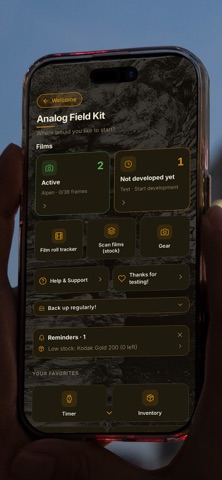
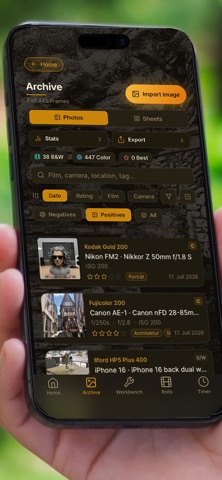
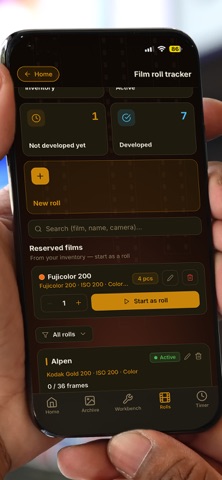
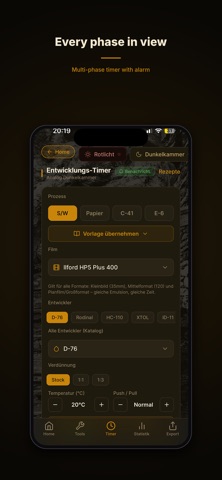
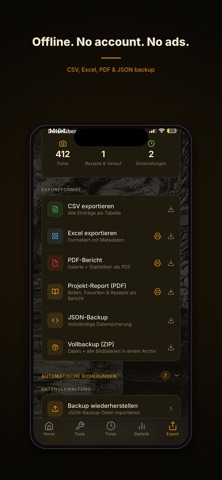
For analog photographers who want to keep their entire creative process clearly connected. Analog Field Kit is not a simple collection of separate apps, helping you avoid an app stack. It guides you through the creative process, from film, camera, and exposure through development to scanning, contact sheets, prints, and the archive. Analog Field Kit connects these steps into a traceable story instead of spreading them across apps, notebooks, and files. The app is available in six languages. FROM ROLL TO EXPOSURE Start a roll from your film stock or record it by barcode. For every frame, save exposure data, equipment, filters, adapters, location, notes, and tags. Take photos directly or import them from your photo library. Recognized EXIF shooting data can be applied as suggestions. Manage your own cameras, lenses, filters, lens adapters, and filter adapters. Analog Field Kit checks sizes and mounts and suggests suitable adapter combinations. Add your own equipment and rare film stocks freely; curated film profiles and more than 360 camera models are also included. A light meter, light planning, golden and blue hour, and tools for framing, depth of field, alignment, and distance support you in the field. You can also calculate reciprocity, filter, and bellows corrections. FROM DEVELOPMENT TO ARCHIVE After shooting, the roll status accompanies it through development. The multi-phase timer guides you through a selected or custom recipe. Create, edit, and reuse recipe templates. Times, temperature, dilution, and chemistry stay linked to the run. Calculators help with mixing and temperature-adjusted development times. Chemistry usage can be applied directly. Optional notifications remind you of phase changes and completion. FROM NEGATIVE TO SCAN After development, every frame keeps its place. Assign a complete series of external scans to the image-free frames of a roll, sort them by file name, and review them before saving. Alternatively, photograph negatives and positives with the device camera and convert negatives locally in the app. Frame guides and a level assist capture. The original is retained while the positive edit can be adjusted later. Browse photos in the full-screen viewer, zoom into details, and switch between negative and positive edits for scans. Images can be edited, deleted, shared, or saved to the photo library. For external scans, export metadata as XMP sidecars or as an ExifTool-compatible CSV file with a script. This brings shooting date, camera, lens, exposure, GPS, film, roll, frame, development, rating, notes, and tags into your desktop workflow. FROM CONTACT SHEET TO PRINT Create contact sheets and an organized archive from your photos. In the print log, document the path from negative to darkroom print. Search, sorting, filters, ratings, and statistics help you evaluate rolls, subjects, films, and equipment. The connection between capture, development, scan, and result remains intact. LOCAL, OFFLINE, AND PORTABLE Analog Field Kit requires no account. Images and working data are processed locally and are not sent automatically to an operator's server. Core camera, darkroom, archive, and local backup features are available without a login or server connection. ZIP backups contain data and images and can be restored or shared. JSON, CSV, PDF, and Excel exports as well as XMP and ExifTool output are also available. The app contains no advertising or tracking. External weather, map, or email services open only after you deliberately tap them. An integrated manual explains the workflows step by step.
What's new · 1.2.3
The camera preview in the scanner remains visible while you scroll through the tools.
Details