

SequenceTimer: Auto Interval
Takashi Goto · Lifestyle
Independent analytics for this App Store listing. AppTracker is not affiliated with Takashi Goto.
Chart standing · US
What changed · US
Listing changes AppTracker has observed for this app in this storefront — new versions, price moves, rating shifts, and store copy.
Polished the look of the Settings screen.
Screenshots


About
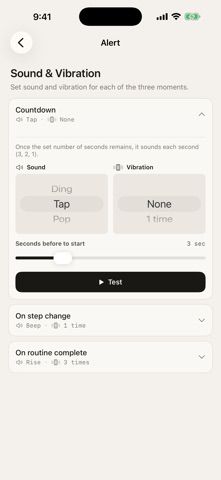
Just press Start. The timer moves through each step automatically, in the order you set. Set up your steps — like “Warm-up 5 min → Exercise 3 min → Rest 1 min” — and let it run. No interaction needed during the session; it advances to the next step on its own. ■ Runs automatically, step by step Line up what you want to do and press Start. From HIIT and strength training intervals to Pomodoro sessions, morning routines, and bedtime wind-downs — build any sequence you like. ■ No tap needed. Notified when each step ends A notification alerts you at the end of each step. No need to watch the screen or press any button. Leave your phone to the side during workouts or cooking — it keeps running in the background and through screen lock. Use a single step to create a simple one-shot timer that just notifies you when it’s done. ■ Notifies without stopping Even when a notification fires, timing never pauses. Because it measures continuously in the background, accumulated time stays accurate across steps. For anyone who wants every second to land exactly right. ■ Repeats taken care of Set a group to repeat — like “Exercise → Rest” × 10 — and it handles the counting. HIIT, circuits, any set-based routine: build it once, start it with one tap every time. ■ Use it for Exercise (HIIT, strength training, stretching), focus (Pomodoro, studying, deep work, meditation), daily life (morning routine, bedtime wind-down, cooking), and more. ■ Key features - Multi-step sequential timer (works as a single-step timer too) - Group repeats (set the number of sets) - Save, reorder, and edit routines - Notifications for step transitions, countdown, and completion - Sound and vibration settings (silent mode support, test playback) - Per-routine color and icon - Keeps running in the background and through screen lock Make your daily routine more precise, with less effort.
What's new · 1.1.1
Polished the look of the Settings screen.
Details