

Document Scanner: Scan & Print
MD. NASAR UDDIN REDOY · Productivity
Independent analytics for this App Store listing. AppTracker is not affiliated with MD. NASAR UDDIN REDOY.
Chart standing · US
What changed · US
Listing changes AppTracker has observed for this app in this storefront — new versions, price moves, rating shifts, and store copy.
• Redesigned Settings — everything is easier to find, with a new About & Legal page for support, restore, terms and privacy. • Choose your language inside the app — no need to change your iPhone settings. • Plans and prices now load directly from the App Store in your local currency. • Bug fixes and performance improvements.
Screenshots



About
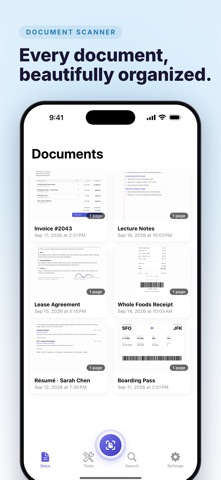
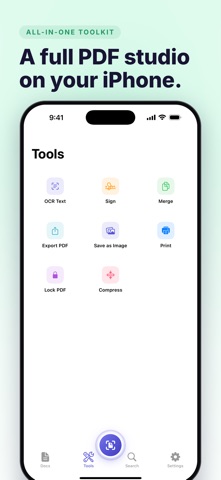
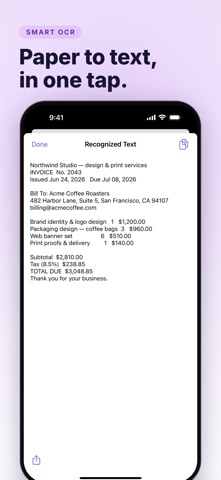
Scan anything in seconds and turn it into a clean, professional PDF — then OCR, sign, print, or share it instantly. Document Scanner uses smart edge detection to capture crisp, deskewed pages that look professionally scanned, not photographed. WHAT YOU CAN DO • Scan multi-page documents with automatic edge detection and perspective correction • Import photos from your library and turn them into sharp, whitened scans • Recognize text (OCR) so your PDFs are fully searchable and copyable • Sign documents with your finger and add your signature anywhere • Print instantly to any nearby AirPrint printer over Wi-Fi — no cables, no computer • No AirPrint printer? Share the PDF to your printer's own app (HP, Canon, Epson, Brother) or to Mail, Messages and Files • Lock sensitive PDFs with a password and compress large files • Smart auto-naming reads the first line so documents name themselves WHY YOU'LL LOVE IT Everything runs on-device using Apple's own scanning and text engines — fast, private, and accurate. No account, no sign-up. Your documents stay on your iPhone unless you choose to share them. Face ID app lock keeps private scans protected. DOCUMENT SCANNER PRO Upgrade to Pro for unlimited scans, OCR, signing, password protection, compression, and AirPrint with no limits. Choose a yearly plan, a one-time Lifetime purchase, or a weekly plan — a free trial may be available. SUBSCRIPTIONS & PRICING • Payment is charged to your Apple ID at confirmation of purchase. • Subscriptions automatically renew unless auto-renew is turned off at least 24 hours before the end of the current period. • Your account is charged for renewal within 24 hours prior to the end of the current period. • Manage or cancel your subscription anytime in your App Store account settings. • Any unused portion of a free trial is forfeited when you purchase a subscription. • Lifetime is a one-time purchase, not a subscription, and does not renew. Terms of Use (EULA): https://www.apple.com/legal/internet-services/itunes/dev/stdeula/ Privacy Policy: https://sites.google.com/view/privacy-policy-004/home Questions or feedback? Email developer.nasar416@gmail.com
What's new · 1.0.2
• Redesigned Settings — everything is easier to find, with a new About & Legal page for support, restore, terms and privacy. • Choose your language inside the app — no need to change your iPhone settings. • Plans and prices now load directly from the App Store in your local currency. • Bug fixes and performance improvements.
Details