

HorHeng
MEET SOFTWARE COMPANY LIMITED · Finance
Independent analytics for this App Store listing. AppTracker is not affiliated with MEET SOFTWARE COMPANY LIMITED.
Chart standing · US
What changed · US
Listing changes AppTracker has observed for this app in this storefront — new versions, price moves, rating shifts, and store copy.
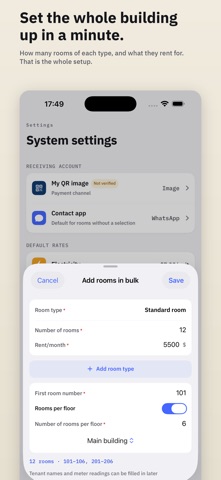
• Two months of Pro free for eligible new subscribers • Set a rent due date per room; it appears on the bill you send the tenant • Save reusable room types with a name, monthly rent, internet fee, electricity rate, and water rate, then assign a type to each room • Add rooms in bulk by entering the number of rooms, first room number, and rooms per floor; numbers run like 101–108 then 201–208, skipping numbers already in use • Fill in tenant names and meter readings later; open bulk setup from Settings or first-run onboarding • Per-unit electricity and water rates now show as money, so 7.00/unit no longer appears as 700
In-app purchases · US
What this app sells inside itself, grouped by kind and priced for this storefront.
Screenshots


About
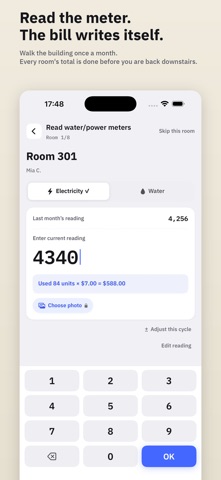
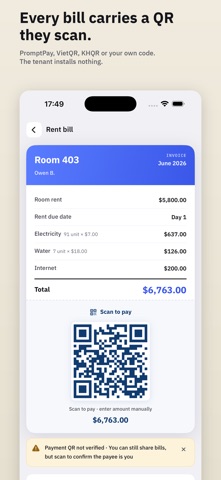
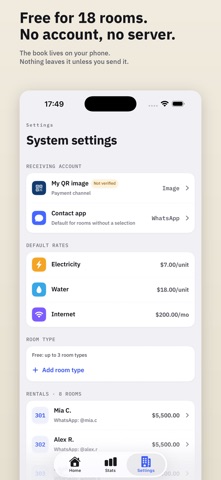
Doorbook is a rent-collection helper for dorm and apartment landlords. Everything runs on your device — no server, no account. • Read water/electricity meters room by room; charges are calculated automatically • Create rent bills with a payment QR and send them to tenants on WhatsApp or LINE to scan and pay • Multi-country payments: PromptPay (Thailand), VietQR (Vietnam), KHQR (Cambodia), PIX (Brazil), SEPA/IBAN (euro zone), or upload your own QR (e.g. WeChat, Alipay, PayPay) • Pick your currency and default rates by country; 15 languages in-app • Monthly collection summary, revenue stats, and top power-using rooms • Private iCloud sync across your devices with the same Apple ID • Your data stays on your device — no account, no server, no tracking Terms of Use (EULA): https://www.apple.com/legal/internet-services/itunes/dev/stdeula/
What's new · 2.0
• Two months of Pro free for eligible new subscribers • Set a rent due date per room; it appears on the bill you send the tenant • Save reusable room types with a name, monthly rent, internet fee, electricity rate, and water rate, then assign a type to each room • Add rooms in bulk by entering the number of rooms, first room number, and rooms per floor; numbers run like 101–108 then 201–208, skipping numbers already in use • Fill in tenant names and meter readings later; open bulk setup from Settings or first-run onboarding • Per-unit electricity and water rates now show as money, so 7.00/unit no longer appears as 700
Details