

GigaGuard: Data Usage Widget
Sami Kuribara · Utilities
Independent analytics for this App Store listing. AppTracker is not affiliated with Sami Kuribara.
Chart standing · US
What changed · US
Listing changes AppTracker has observed for this app in this storefront — new versions, price moves, rating shifts, and store copy.
• Calibration now accepts a comma as the decimal separator (e.g. 18,4) • The usage history chart now shows GB on its axis
In-app purchases · US
What this app sells inside itself, grouped by kind and priced for this storefront.
Screenshots



About
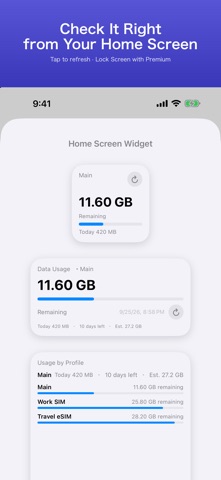
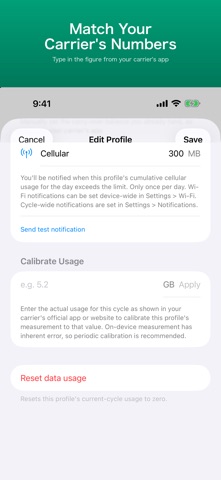
See your remaining data at a glance — right on your Home Screen. No ads. No subscription. No VPN. A data usage widget you can match to your carrier's numbers. TIRED OF… • Trackers that never match what your carrier says? • Ads, or features moved behind a subscription after you paid? • Apps that count Wi-Fi as mobile data? • Billing cycles stuck on the 1st? WHAT GIGAGUARD DOES • Calibrate to your carrier — on-device measurement always drifts a little. Type in the usage shown in your carrier's app and GigaGuard matches it. • Widgets for the Home Screen and Apple Watch (Lock Screen widgets with Premium), with a refresh button that updates without opening the app. • Cellular and Wi-Fi tracked separately — only mobile data counts toward your plan. • Any billing day from the 1st to the 31st, rollover data, and day passes for prepaid or travel eSIMs. • Pace forecast: see where you'll end the cycle and the day you'd hit your cap. • A daily limit alert, plus alerts at the percentages you choose (Premium). • Daily usage history, and per-cycle history (Premium). • Up to 20 lines — main, work and travel eSIM — each with its own plan (Premium). • Siri Shortcuts: "Check remaining data in GigaGuard". PRIVACY • No VPN. GigaGuard never sits in the middle of your connection. • No carrier login, no account. • Your data stays on your iPhone. Nothing is sent to a server. PRICING Free to use. Premium is a one-time purchase — never a subscription. No ads. PLEASE NOTE iOS doesn't let apps read your carrier's official usage, so GigaGuard measures on-device and lets you calibrate. Usage is updated when you open the app or refresh the widget. Per-app usage is not available. For billing, always check your carrier's official app or website.
What's new · 1.15
• Calibration now accepts a comma as the decimal separator (e.g. 18,4) • The usage history chart now shows GB on its axis
Details