

CalmClick
Vladimir Skromny · Utilities
Independent analytics for this App Store listing. AppTracker is not affiliated with Vladimir Skromny.
Chart standing · US
What changed · US
Listing changes AppTracker has observed for this app in this storefront — new versions, price moves, rating shifts, and store copy.
Updated App Store listing. No changes to how the app works.
In-app purchases · US
What this app sells inside itself, grouped by kind and priced for this storefront.
Screenshots




About
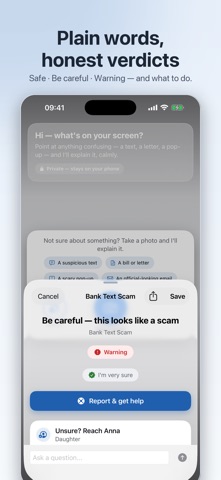
A strange text. A bill that looks odd. A scary pop-up. When something on your screen worries you, CalmClick gives you a calm, honest answer in plain words. HOW IT WORKS 1. Take a photo of anything confusing — a message, a letter, an email, a pop-up — or upload a screenshot. 2. In about ten seconds, CalmClick explains what it is, in simple language. No jargon, no alarm. 3. You get a clear verdict — Safe, Be careful, or Warning — with exact steps: what to do, and what not to do. MADE TO KEEP YOU CALM • Plain language, always. Written for real people, not tech experts. • Honest about uncertainty. When CalmClick isn't sure, it says so — and errs on the side of caution. • Ask follow-up questions in your own words, as many as you like. • One tap to call or text someone you trust when a result looks scary. • Scam reporting shortcuts (forward to 7726, FTC, FBI IC3) right on the result. • Explains in your language, even if the phone is set to another one. PRIVATE BY DESIGN • No account, no sign-in, no ads, no tracking. • CalmClick never monitors your phone. It only sees a photo you choose to take. • Your saved checks stay on your device — with optional auto-clear after 30 days. Set it up for yourself, or in two minutes for a parent or friend. When something looks wrong, all they have to do is take a photo. CalmClick doesn't replace advice from your bank or the police — it helps you stay calm and check before you act. Terms of Use (EULA): https://www.apple.com/legal/internet-services/itunes/dev/stdeula/
What's new · 1.2.1
Updated App Store listing. No changes to how the app works.
Details