

Orbeat: Drum Machine
Chih Han Lin · Music
Independent analytics for this App Store listing. AppTracker is not affiliated with Chih Han Lin.
Chart standing · US
What changed · US
Listing changes AppTracker has observed for this app in this storefront — new versions, price moves, rating shifts, and store copy.
All of these came from your emails. LANES THAT CUT EACH OTHER OFF Put two lanes in the same choke group and a new hit silences the other — a closed hat stopping an open one, exactly the way a real kit behaves. Until now every lane rang out on its own and hats piled up on top of each other. Choke works everywhere sound leaves Orbeat: the built-in kits, samples you imported yourself, and the MIDI Orbeat sends out, where the choked lane gets a proper note-off so your hardware stops too. Set it per lane, up to four groups. Free for everyone. SAVE A MIDI MAP FOR EACH RIG Set the notes your lanes send once, name it, and recall it when you change gear — instead of re-entering the same table every time you move between instruments. General MIDI, Elektron Analog Rytm, Roland TR-8S and Arturia DrumBrute are built in, and your own maps sit alongside them. Free for everyone. EIGHT PATTERNS, A TO H Every project now holds eight patterns instead of one. Switch by tapping, or from a controller — send a program change, or a note, and Orbeat changes pattern without you touching the screen. You choose when the change lands: instantly, on the next beat, or on the next bar. The sequencer never restarts, so a switch mid-phrase stays in time with everything else you have running. Patterns share your kit, your samples and your MIDI setup — only the rhythm changes, so switching stays instant and never reloads a sound. Pattern banks are part of Orbeat Pro. Choke groups and the MIDI maps are free. YOUR SAMPLES PLAY THROUGH A sample longer than one step used to be cut dead the moment its lane fired again — every hit restarted the file from the top with no fade, so on a busy pattern you got a click per hit and never heard the end of the sound. Now the previous hit fades out under the new one, in the same five milliseconds a choke takes, and a long sample can be retriggered as fast as you like without the chop. A player sent a screen recording of it happening; that recording is what found it. Orbeat also stops holding on to every sample it has ever loaded. Switching kits used to keep the old audio in memory until you quit; it is now released the moment nothing is playing it. Thanks to the three players who wrote in — between them, they are this whole update. Tell us what you need next: zhiii0x@gmail.com
Ratings breakdown · US
The star breakdown behind this app's rating in this storefront.
In-app purchases · US
What this app sells inside itself, grouped by kind and priced for this storefront.
Screenshots




About
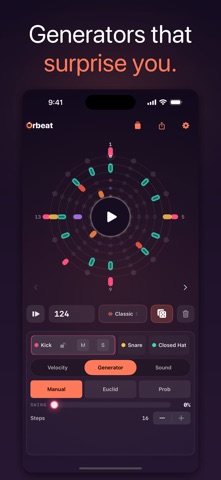
Orbeat is a drum machine in the round. Instead of a grid, your rhythm lives on a glowing mandala — concentric lanes of light that orbit a single play button. Tap the rings, watch the playhead sweep, and feel the groove move. Built to be played, not programmed. Open it and you're already making beats. A CIRCULAR SEQUENCER — UP TO TWELVE LANES Six lanes wrap the screen as rings, and the circle can grow to twelve: the mandala opens a second page of rings in its own electric color set, so every lane keeps its full size. Tap to place hits, lock a lane you love, mute and solo as you build the groove layer by layer. The whole pattern turns as it plays. FOUR DRUM KITS Classic, Acoustic, Glitch, and 8-bit — one tap reskins every voice while your pattern stays put. From clean and punchy to broken and chiptune. BRING YOUR OWN SOUNDS Build a custom kit and drop your own audio into any lane — WAV, AIFF or mp3, up to ten seconds, played at its original pitch and in stereo. Imported samples run clean to the output, while the lanes you leave alone keep their synth voice, so a hi-hat you recorded yourself sits right next to Orbeat's own drums. Your first custom kit is free. GENERATORS THAT SURPRISE YOU Roll the dice for an instant pattern, or use Euclidean rhythms to spread hits evenly around a ring. Like what you hear? Tap the ring to write it in and edit by hand. MAKE IT BREATHE, MAKE IT DRIFT Add swing to push the feel off the grid, draw velocity per step for accents that live, and pan each lane across the stereo field. With Probability, hits fire by chance; with polymeter, each lane gets its own length so the phases drift in and out of sync. TAKE IT ANYWHERE Bounce any loop to a stereo WAV — named with the beat, its length and its tempo, so it still makes sense in your DAW next month — or run Orbeat as an AUv3 instrument with MIDI in & out — sequence other instruments, or play Orbeat's lanes from your host's piano roll inside GarageBand, AUM, Logic, and other AUv3 hosts. Standalone, play the pads live from any MIDI controller and sync the whole groove to external MIDI clock. PLAY IN SYNC WITH THE ROOM Ableton Link keeps Orbeat in time with every Link-enabled app and device on your network — Ableton Live, AUM, Loopy, a friend's iPad across the table. Tempo follows the session, start and stop are shared, and everyone stays in phase. No cables, no setup. PLAY FREE. UNLOCK ONCE. The full instrument is free forever — every kit, the six-lane circle, Euclidean generators, swing, velocity, pan, your first custom kit with your own samples, MIDI in & out, and Ableton Link. Orbeat Pro is a single one-time purchase (no subscription, ever) that unlocks room to grow the circle to twelve lanes, plus Probability, polymeter, WAV export, unlimited saved beats, and extra custom kits. Made for iPhone and iPad. No account, no ads, no tracking — your beats never leave your device unless you share them. Tap the rings. Make it move.
What's new · 1.4.1
All of these came from your emails. LANES THAT CUT EACH OTHER OFF Put two lanes in the same choke group and a new hit silences the other — a closed hat stopping an open one, exactly the way a real kit behaves. Until now every lane rang out on its own and hats piled up on top of each other. Choke works everywhere sound leaves Orbeat: the built-in kits, samples you imported yourself, and the MIDI Orbeat sends out, where the choked lane gets a proper note-off so your hardware stops too. Set it per lane, up to four groups. Free for everyone. SAVE A MIDI MAP FOR EACH RIG Set the notes your lanes send once, name it, and recall it when you change gear — instead of re-entering the same table every time you move between instruments. General MIDI, Elektron Analog Rytm, Roland TR-8S and Arturia DrumBrute are built in, and your own maps sit alongside them. Free for everyone. EIGHT PATTERNS, A TO H Every project now holds eight patterns instead of one. Switch by tapping, or from a controller — send a program change, or a note, and Orbeat changes pattern without you touching the screen. You choose when the change lands: instantly, on the next beat, or on the next bar. The sequencer never restarts, so a switch mid-phrase stays in time with everything else you have running. Patterns share your kit, your samples and your MIDI setup — only the rhythm changes, so switching stays instant and never reloads a sound. Pattern banks are part of Orbeat Pro. Choke groups and the MIDI maps are free. YOUR SAMPLES PLAY THROUGH A sample longer than one step used to be cut dead the moment its lane fired again — every hit restarted the file from the top with no fade, so on a busy pattern you got a click per hit and never heard the end of the sound. Now the previous hit fades out under the new one, in the same five milliseconds a choke takes, and a long sample can be retriggered as fast as you like without the chop. A player sent a screen recording of it happening; that recording is what found it. Orbeat also stops holding on to every sample it has ever loaded. Switching kits used to keep the old audio in memory until you quit; it is now released the moment nothing is playing it. Thanks to the three players who wrote in — between them, they are this whole update. Tell us what you need next: zhiii0x@gmail.com
Details