

Videmus – QR & Barcode Scanner
Julian Schiemann · Utilities
Independent analytics for this App Store listing. AppTracker is not affiliated with Julian Schiemann.
Chart standing · US
What changed · US
Listing changes AppTracker has observed for this app in this storefront — new versions, price moves, rating shifts, and store copy.
New: recommendations Videmus stays free – no ads, no tracking, no purchases. Instead of paid advertising, the app occasionally recommends our own articles and apps. One switch in Settings turns it off completely.
Screenshots


About
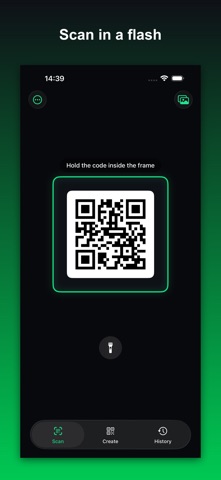
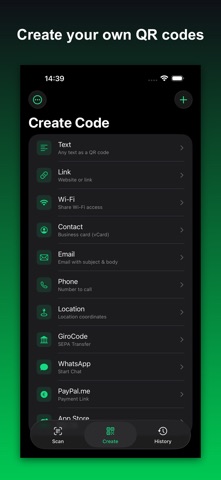
Scan any code – and create your own, with logo, colors and your design. Videmus checks by itself that your code stays readable everywhere. No full-screen ad after every scan, no tracking, no forced cloud. Videmus recognizes instantly, shows the result, and connects you to Wi-Fi networks with a single tap. SCANNING • QR codes and all common barcodes (EAN, Code 128, Data Matrix, Aztec …) • Wi-Fi 1-tap connect: scan SSID + password, connect right away • Scan from photos: a QR from a screenshot or your library • Zoom by pinch or slider, automatic lens switching • Several codes in view? You choose which one you mean UNDERSTANDING THE CONTENT Videmus breaks the code into labelled fields instead of one long string: retail and logistics codes (GS1, Digital Link), payment codes worldwide, boarding passes, rail tickets and driving licences. DHL and UPS shipments can be tracked directly. OPEN IT WHEREVER YOU LIKE Next to the open button sits a menu with the alternatives you have installed – browsers, map apps, wallets. You add your own app by pasting a link from it. CREATING CODES Every type has a form with named fields: link, text, Wi-Fi, contact, event, place, payment – or a type you define yourself. Colours, logo, background and frame shape the code; Videmus then scans it back itself and warns you when it is no longer reliably readable. SHARE, SAVE, PRINT Save to Photos, share and print – all natively through the iOS share sheet. As PNG, and for QR codes also as vector PDF. HISTORY Searchable, with favourites and an optional Face ID lock. Backup to your private iCloud, can be turned off anytime. PRIVACY Your scans never leave the device – no tracking, no data collection, no account. For recommendations the app fetches a small list of our own apps and articles from iosapps.de once a day – no identifier, can be turned off. FREE Videmus is free and ad-free.
What's new · 2.2
New: recommendations Videmus stays free – no ads, no tracking, no purchases. Instead of paid advertising, the app occasionally recommends our own articles and apps. One switch in Settings turns it off completely.
Details