

Receipt Scanner: Expense Log
Oleksii Velykodnyi · Finance
Independent analytics for this App Store listing. AppTracker is not affiliated with Oleksii Velykodnyi.
Chart standing · US
What changed · US
Listing changes AppTracker has observed for this app in this storefront — new versions, price moves, rating shifts, and store copy.
- Improved receipt recognition for more accurate scanning and data extraction, plus performance improvements.
Ratings breakdown · US
The star breakdown behind this app's rating in this storefront.
In-app purchases · US
What this app sells inside itself, grouped by kind and priced for this storefront.
Screenshots


About
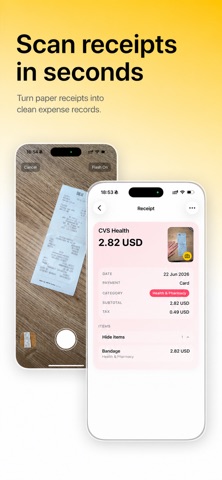
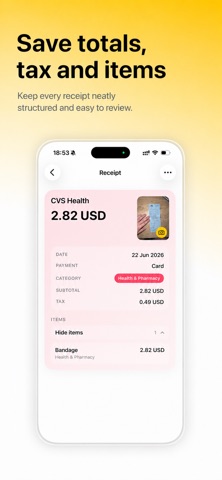
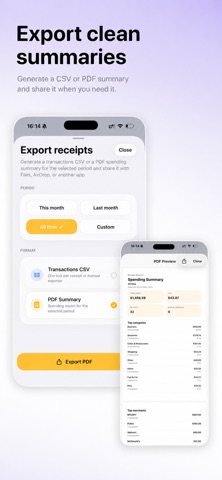
Tired of piles of paper receipts, lost purchase records, and messy spending? Receipt Scanner: Expense Log turns everyday receipts into organized expense records. Scan a receipt, save its photo, track spending by category, keep tax details, manage monthly budgets, search your history, and export CSV or PDF reports when you need them. Key features: • Scan receipts and save receipt photos • Turn purchases into clean expense records • Organize expenses by category • Track spending and monthly budgets • Search receipts and expense history • Keep records for tax time, reimbursements, and personal finance • Export receipt summaries as CSV or PDF Receipt Scanner is built for everyday receipts, personal expenses, household spending, business receipts, work purchases, reimbursements, tax records, simple bookkeeping, and monthly budget tracking. For freelancers, contractors, self-employed users, and small business owners, Receipt Scanner helps keep receipts and expenses organized without manual spreadsheets or messy paper records. Instead of keeping receipts in wallets, drawers, emails, shoeboxes, or paper piles, use Receipt Scanner as a receipt tracker, receipt organizer, expense tracker, spending tracker, budget tracker, and clean expense log. Search saved receipts when you need to find a purchase, check a total, review a category, prepare reimbursement records, or get ready for tax time. Export CSV or PDF summaries when you need expense reports for personal finance, business records, or an accountant. Receipt Scanner keeps the workflow simple: scan receipts, save receipt photos, review expense details, organize spending by category, track budgets, search history, and keep records ready when you need them. An active subscription is required to use the app. Terms of Use: https://myreceiptscanner.com/terms Privacy Policy: https://myreceiptscanner.com/privacy
What's new · 1.5.3
- Improved receipt recognition for more accurate scanning and data extraction, plus performance improvements.
Details