

Pretty Perfect
PRETTY PERFECT PLANNERS LTD · Lifestyle
Independent analytics for this App Store listing. AppTracker is not affiliated with PRETTY PERFECT PLANNERS LTD.
Chart standing · US
What changed · US
Listing changes AppTracker has observed for this app in this storefront — new versions, price moves, rating shifts, and store copy.
We've been busy behind the scenes making Pretty Perfect a little smoother, quicker and less… glitchy. Events that are shared with you will now appear straight away in your Calendar and My Day — no more closing and reopening the app to make them appear. We've fixed a little Budget wobble that could cause the app to crash if an income was entered as £0. Budget amounts now need to be more than zero, which keeps everything behaving as it should. Brain Dump has had a little tidy-up on iPad too, so your note tiles should no longer overlap each other or get chopped off. We've also made some changes behind the scenes to stop those annoying unexpected sign-in prompts appearing after you've left the app sitting for a while. And finally, Savings and Debt amounts should now display properly, with payment sheets opening and closing much more reliably. Basically, lots of little fixes that hopefully mean you notice the app less and get on with organising your life more.
In-app purchases · US
What this app sells inside itself, grouped by kind and priced for this storefront.
Screenshots



Keywords this app targets
Search terms AppTracker associates with this app — estimates, not search volume. ❝ = in the app's title; a highlighted number is its current position for that term.
Similar apps
Competitors and close alternatives, as estimated by AppTracker.
 Smart Planner: Calendar, Tasks
Komorebi Inc.
1 shared topic
Smart Planner: Calendar, Tasks
Komorebi Inc.
1 shared topic
 MealPrepPro Planner & Recipes
Nibble Apps Ltd
1 shared topic
MealPrepPro Planner & Recipes
Nibble Apps Ltd
1 shared topic
 Plantry: Meal Plans & Recipes
Filibaba AB
1 shared topic
Plantry: Meal Plans & Recipes
Filibaba AB
1 shared topic
 PinkPlanner
John Dykheng
1 shared topic
PinkPlanner
John Dykheng
1 shared topic
 Today: Life Planner
Jeffrey Igot
Today: Life Planner
Jeffrey Igot
 Plan to Eat
Plan To Eat, LLC
1 shared topic
Plan to Eat
Plan To Eat, LLC
1 shared topic
 Prepear
, Inc.
1 shared topic
Prepear
Prepear, Inc.
1 shared topic
 Proverbs 31:Daily OrganizerPro
Christian App Empire LLC
1 shared topic
Proverbs 31:Daily OrganizerPro
Christian App Empire LLC
1 shared topic
About
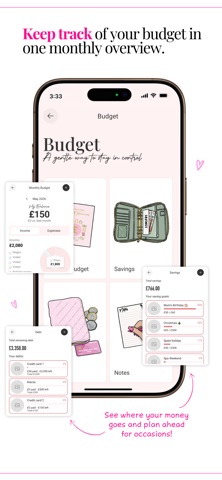
Get organised with the Pretty Perfect App! The all-in-one planning and organisation app designed to help you stay on top of everyday life. Start your free 3-day trial - no commitment required. From meal planning and budgeting to appointments, tasks and shopping lists, Pretty Perfect brings the tools you need together in one easy-to-use app. With four signature Pretty Perfect colour themes to choose from, you can create a planning space that feels both practical and personal. Built from the planning systems behind Pretty Perfect Products and loved by hundreds of thousands, the Pretty Perfect App helps simplify the mental load of everyday life. Instead of juggling multiple apps, notebooks and reminders, you can keep your plans, notes, lists and routines together in one place, ready whenever you need them. Whether you’re managing family life, balancing work and home, or simply looking for a calmer way to stay on top of things, the Pretty Perfect App is designed to support you every step of the way. With thoughtful tools and guided features, it’s easier to create routines, stay focused and feel more in control of your day. FEATURES • Daily planning tools • Budget planning • Meal planning • Shopping lists • Productivity planning • Calendar - by day and by month view • Tasks and to-do lists • Brain Dump and notes • Categorise and colour block your plans • Guided prompts to help you get started • Ready-made routine templates • Aesthetic flip clock timer • Mobile and tablet access SHARED PLANNING Life is often easier when you’re on the same page. Share plans with a partner or family member and stay organised together, whether you’re managing schedules, household responsibilities or day-to-day tasks. Subscribers can invite a loved one to join the Pretty Perfect App at a discounted rate, and access their plans. Making it simple to stay connected and keep everyday life running smoothly, as a team. Terms of Use: https://www.apple.com/legal/internet-services/itunes/dev/stdeula/ Privacy Policy: https://prettyperfectproducts.com/policies/privacy-policy
What's new · 1.0.6
We've been busy behind the scenes making Pretty Perfect a little smoother, quicker and less… glitchy. Events that are shared with you will now appear straight away in your Calendar and My Day — no more closing and reopening the app to make them appear. We've fixed a little Budget wobble that could cause the app to crash if an income was entered as £0. Budget amounts now need to be more than zero, which keeps everything behaving as it should. Brain Dump has had a little tidy-up on iPad too, so your note tiles should no longer overlap each other or get chopped off. We've also made some changes behind the scenes to stop those annoying unexpected sign-in prompts appearing after you've left the app sitting for a while. And finally, Savings and Debt amounts should now display properly, with payment sheets opening and closing much more reliably. Basically, lots of little fixes that hopefully mean you notice the app less and get on with organising your life more.
Details