

Pole Vault OS
Lorenzo Quaid Sison · Sports
Independent analytics for this App Store listing. AppTracker is not affiliated with Lorenzo Quaid Sison.
Chart standing · US
What changed · US
Listing changes AppTracker has observed for this app in this storefront — new versions, price moves, rating shifts, and store copy.
Follow your meet from the first bar to the final attempt with Meet Mode, then review your jumps in Film Room. New • Meet Mode adds a live bar board, passes, undo, and shareable results. Meet and practice Live Activities bring logging controls to supported devices. • Film Room gathers your jump media for slow motion, frame stepping, drawing during review, and side-by-side video comparison. • Detailed attempts capture bar or bungee, outcome, pole, grip, runway marks, and miss reasons. Add venues, optional weather, drill blocks, session goals, and close-out reflections. • Export your journal with attachments and settings, restore into an empty journal, or share a coach-friendly session summary. Improved • Practice and competition records are calculated separately from real-bar clearances. Explore your history with activity and date filters. • Log no-height results and unmeasured practices explicitly. Decimal measurement entry preserves your precision when you edit other details. • Pole details stay attached to historical entries after equipment changes. Fixed • Save failures now stay visible so you can retry. • Adding or undoing attempts preserves an existing session summary. • Manual meet-bar adjustments stay aligned with Live Activity logging. • Corrected negative height formatting and refined text sizing and controls.
Screenshots




About
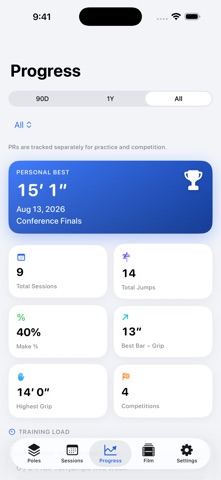
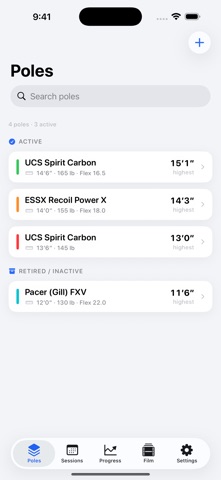
Pole Vault OS keeps your poles, practices, competitions, and jump videos together in one focused training journal. Record the setup behind each attempt, review your technique, and follow your progress without creating an account. YOUR POLES AND THEIR HISTORY Organize poles by brand, model, length, weight rating, flex, serial number, color, and condition. See each pole's logged best and distinguish similar poles by their specifications. Recorded pole details stay with your session and attempt history when you later edit or remove a pole. FROM A QUICK LOG TO A DETAILED SESSION Log a practice or competition with your grip, approach, runway marks, standards, location, and notes. Reuse recent setup to make the next entry quicker. Record individual attempts with their own pole, bar or bungee, make, miss, pass, or run-through. Add takeoff observations and miss reasons, or keep a simple session summary with a clearance, no height, or an unmeasured practice. MEET MODE Follow the competition with a live bar board, attempt notation, bar increments, passes, and undo. Meet and practice Live Activities offer logging controls on supported devices. Share a meet summary when you're done. FILM ROOM Attach photos and video clips to attempts and find them together in Film Room. Review video in slow motion, step through frames, draw over the picture during review, or compare two clips side by side. Your original media stays unchanged. TRAINING CONTEXT Save venues and recall previous runway setup. Add a session cue, jump target, and drill blocks, then close out with effort, duration, wellness ratings, and a reflection. Optional location and Apple Weather help fill in venue and conditions. PROGRESS FROM YOUR LOG Explore height and grip charts, make rates, training load, pole progression, and personal-record history. Filter by practice or competition and by time period. Records are calculated from your logged real-bar clearances, with practice and competition records tracked separately. Misses and bungee attempts do not count as clearance records. YOUR UNITS, YOUR JOURNAL Enter measurements in Imperial or Metric, including precise decimal values. Switch units without changing saved measurements. Export a portable backup with attachments and settings, restore it into an empty journal, or share a session-summary CSV with your coach. Your journal is stored on your device, with no account or tracking. Optional weather uses Apple's weather service. You choose when to export or share your journal. Light and Dark appearance, adjustable text, and accent choices help make the journal your own.
What's new · 1.5
Follow your meet from the first bar to the final attempt with Meet Mode, then review your jumps in Film Room. New • Meet Mode adds a live bar board, passes, undo, and shareable results. Meet and practice Live Activities bring logging controls to supported devices. • Film Room gathers your jump media for slow motion, frame stepping, drawing during review, and side-by-side video comparison. • Detailed attempts capture bar or bungee, outcome, pole, grip, runway marks, and miss reasons. Add venues, optional weather, drill blocks, session goals, and close-out reflections. • Export your journal with attachments and settings, restore into an empty journal, or share a coach-friendly session summary. Improved • Practice and competition records are calculated separately from real-bar clearances. Explore your history with activity and date filters. • Log no-height results and unmeasured practices explicitly. Decimal measurement entry preserves your precision when you edit other details. • Pole details stay attached to historical entries after equipment changes. Fixed • Save failures now stay visible so you can retry. • Adding or undoing attempts preserves an existing session summary. • Manual meet-bar adjustments stay aligned with Live Activity logging. • Corrected negative height formatting and refined text sizing and controls.
Details