

GIFmaker-Gif Studio
bo chen · Photo & Video
Independent analytics for this App Store listing. AppTracker is not affiliated with bo chen.
Chart standing · US
What changed · US
Listing changes AppTracker has observed for this app in this storefront — new versions, price moves, rating shifts, and store copy.
GIFmaker now speaks six languages: English, Chinese, Japanese, Korean, German, and Spanish.
Ratings breakdown · US
The star breakdown behind this app's rating in this storefront.
In-app purchases · US
No in-app purchases.
Screenshots

Similar apps
Competitors and close alternatives, as estimated by AppTracker.
 gif maker - video meme creator
Sounak Sarkar
gif maker - video meme creator
Sounak Sarkar
 GIF Maker: Video to GIF HD
Ahmet Burak Ozyurt
GIF Maker: Video to GIF HD
Ahmet Burak Ozyurt
 GIF Distillery
Hiroyuki Miura
GIF Distillery
Hiroyuki Miura
 Video to GIF – No Watermark
OpsOh LLC
Video to GIF – No Watermark
OpsOh LLC
 Live Studio - All-in-One
Aaron Satterfield
Live Studio - All-in-One
Aaron Satterfield
 KeyMotion: Dance & Zoom Video
冰 韩
KeyMotion: Dance & Zoom Video
冰 韩
 Gif Me! Camera
pierre gougelet
Gif Me! Camera
pierre gougelet
 Videocraft: Video Maker
Mauricio Eastmond
Videocraft: Video Maker
Mauricio Eastmond
About
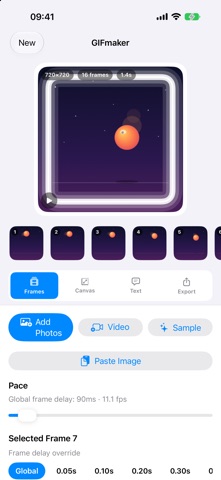
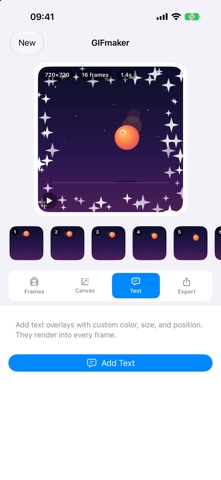
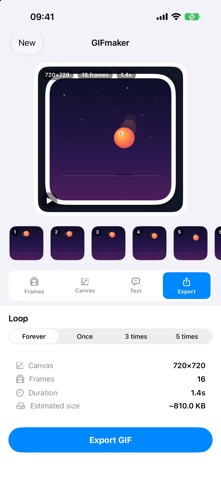
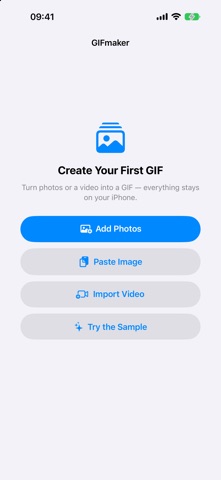
GIFmaker is a complete GIF studio that runs entirely on your device. Turn photos, videos, or Live Photos into animated GIFs, then fine-tune every detail with a live animated preview. No watermark. No account. No uploads. Every frame stays on your device. Key features: - Photos to GIF — pick images and arrange them into an animation - Paste from clipboard — copy an image anywhere, then paste or drag it straight in - Video to GIF — trim any video or Live Photo and choose the frame rate - 11 border styles — neon glow, rainbow, sparkle, zigzag, sticker, dots, polaroid, film, rounded, stroke, or none - Live preview — watch your GIF play as you edit - Per-frame timing — set the delay of each frame on its own - Text overlays — add captions with custom color, size, and position - Filmstrip editing — drag to reorder, duplicate, reverse, or boomerang - Canvas presets — 1:1, 4:3, 3:4, 16:9, 9:16 with fit and background controls - Export, share, or save GIFs to Photos Also on Mac — the same editor, with clipboard paste and drag-and-drop. Perfect for social posts, memes, product demos, and tutorials.
What's new · 1.2.0
GIFmaker now speaks six languages: English, Chinese, Japanese, Korean, German, and Spanish.
Details