

ShutterVoice
JAMSoft Inc · Photo & Video
Independent analytics for this App Store listing. AppTracker is not affiliated with JAMSoft Inc.
Chart standing · US
What changed · US
Listing changes AppTracker has observed for this app in this storefront — new versions, price moves, rating shifts, and store copy.
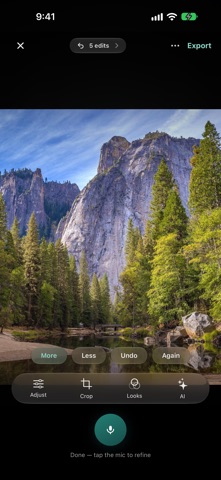
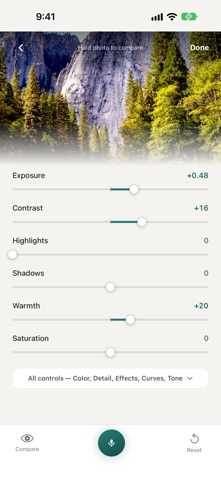
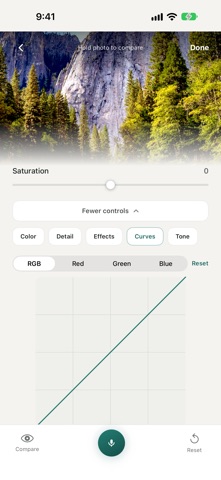
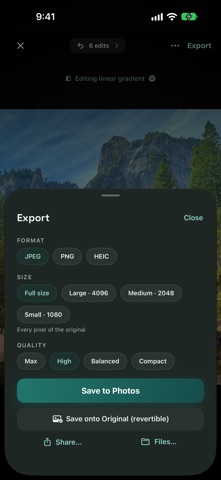
A new look Redesigned around a teal palette with a new Home screen: one “Speak to start” button, quick import, and a Recents strip that reopens your last photos. Dark Mode follows the system setting, and text scales with your preferred text size. Voice Voice recognition is rebuilt on Apple’s newer speech engine and follows your device language. You can open a tool or pick a photo by voice, and say things like “reset the warmth” to undo one named thing. Each spoken edit shows what was changed, with More / Less / Undo / Again buttons underneath. Editing tools Masks: select the subject, background, people, highlights or shadows, or paint a brush, linear or radial mask. Each mask keeps its own adjustments. Pro colour tools: a colour mixer, curves, and importing .cube LUTs. Geometry: perspective correction, lens correction and auto-straighten alongside crop. Nine starter looks, plus saving your own grade as a reusable look. An edit timeline you can step back through. AI Studio Free AI edits (Auto Enhance, Remove Background, Blur Background, Restore, Film Look, Portrait Retouch) run on the device by default. Cloud AI is an explicit opt-in, and each edit is labelled as free or needing Cloud AI before you tap it. Cancelled edits are never charged a credit. Batch editing Edit up to 30 photos at once with one look, adjustment or spoken edit, with progress shown as a Live Activity. Saving and the rest of the system HDR export, and edits to Live Photos save back as Live Photos. Edit directly inside the Photos app through a new ShutterVoice editing extension. A Home Screen widget that starts a voice edit. Drag and drop a photo onto the editor on iPad. Accessibility Curves, gradient handles and the crop frame work with VoiceOver, and the editor stays usable at the largest text sizes.
In-app purchases · US
What this app sells inside itself, grouped by kind and priced for this storefront.
Screenshots



About
ShutterVoice is a voice-first photo editor built for fast, natural editing. Choose a photo, tap the mic, and say what you want changed. Use simple commands to adjust light, color, crop, rotate, mask, compare, save, and export. For advanced edits, ShutterVoice includes AI-powered tools like Auto Enhance, Remove Background, Blur Background, Film Look, Portrait Retouch, Expand, Declutter, and more. ShutterVoice also supports batch editing, so you can apply one adjustment or AI instruction across multiple photos and save the results back to Photos. Key features: Edit photos with natural voice commands Manual controls for light, color, detail, and effects AI Studio presets for common creative edits Freeform AI instructions for custom changes Mask tools for subject and brush-based edits Crop, rotate, flip, straighten, and aspect-ratio tools Before/after compare view Batch editing for up to 30 photos Save edited photos to your Photos library Share extension, Siri Shortcuts, and Visual Intelligence support https://jamsoftinc.com/privacy-policy-shuttervoice https://www.apple.com/legal/internet-services/itunes/dev/stdeula/
What's new · 1.3
A new look Redesigned around a teal palette with a new Home screen: one “Speak to start” button, quick import, and a Recents strip that reopens your last photos. Dark Mode follows the system setting, and text scales with your preferred text size. Voice Voice recognition is rebuilt on Apple’s newer speech engine and follows your device language. You can open a tool or pick a photo by voice, and say things like “reset the warmth” to undo one named thing. Each spoken edit shows what was changed, with More / Less / Undo / Again buttons underneath. Editing tools Masks: select the subject, background, people, highlights or shadows, or paint a brush, linear or radial mask. Each mask keeps its own adjustments. Pro colour tools: a colour mixer, curves, and importing .cube LUTs. Geometry: perspective correction, lens correction and auto-straighten alongside crop. Nine starter looks, plus saving your own grade as a reusable look. An edit timeline you can step back through. AI Studio Free AI edits (Auto Enhance, Remove Background, Blur Background, Restore, Film Look, Portrait Retouch) run on the device by default. Cloud AI is an explicit opt-in, and each edit is labelled as free or needing Cloud AI before you tap it. Cancelled edits are never charged a credit. Batch editing Edit up to 30 photos at once with one look, adjustment or spoken edit, with progress shown as a Live Activity. Saving and the rest of the system HDR export, and edits to Live Photos save back as Live Photos. Edit directly inside the Photos app through a new ShutterVoice editing extension. A Home Screen widget that starts a voice edit. Drag and drop a photo onto the editor on iPad. Accessibility Curves, gradient handles and the crop frame work with VoiceOver, and the editor stays usable at the largest text sizes.
Details