
Chart standing · US
What changed · US
Listing changes AppTracker has observed for this app in this storefront — new versions, price moves, rating shifts, and store copy.
Sample data - You can now load a set of example trades with one tap and explore every metric and report without entering anything by hand. Removing it is just as easy, and it's never included in your backups. Sign-in - Signing in is faster and more direct: Sign in with Apple is now the only method, with no intermediate screen to pick a provider. iCloud backup - We rewrote the iCloud backup system from the ground up. Detecting existing backups and syncing between devices is far more reliable, and errors are now reported accurately instead of showing generic messages. iCloud is the only backup destination; your data is still encrypted on device before upload. Improvements and fixes - When we can't confirm your license or subscription because you're offline, Settings now says so clearly instead of showing your account as having no plan. - You can log trades without assigning them to an account. - Fixed: the Schwab/Thinkorswim import screen could reopen by itself after finishing. - Icon and text adjustments across several screens.
Price & rating history · US
Reconstructed from the listing changes AppTracker has observed in this storefront, so each line starts at the first change on record.
Price · USD
Screenshots


About
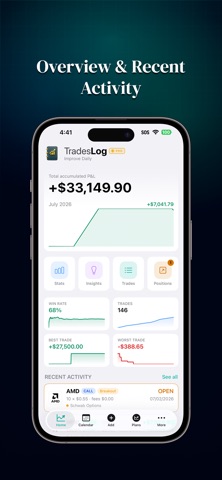
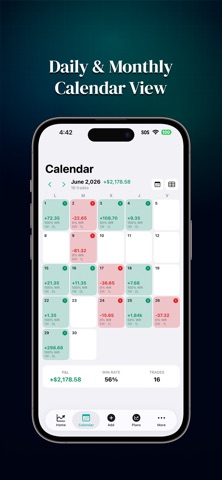
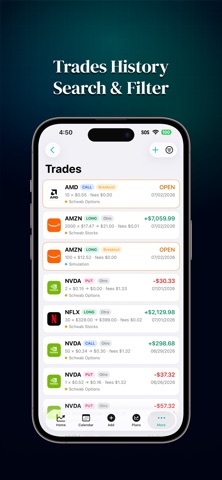
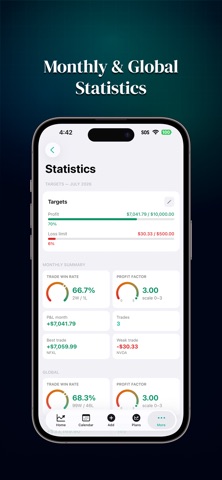
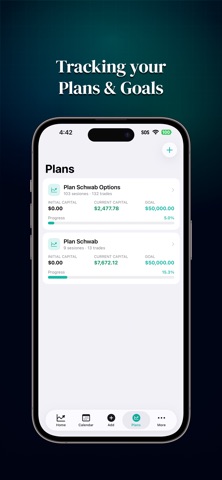
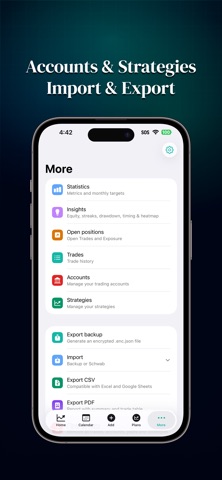
TradesLog is a private trading journal for iOS. Track every trade, review your performance, and build consistency — all while keeping your data stored locally on your device. Designed for stock and options traders, whether you trade long or short. Track Your Trading ■ Stocks and options trading journal ■ Long & short positions ■ Multiple accounts and paper trading ■ Strategies and capital allocation plans ■ Monthly goals and performance targets Analyze Your Performance ■ Win rate, profit factor, average win/loss ■ Best and worst trades ■ Execution discipline ■ Equity curve and drawdown analysis ■ Monte Carlo simulation and trade distribution ■ Daily, weekly, and monthly P&L calendar ■ Open positions and portfolio exposure by ticker Backup & Export ■ Encrypted iCloud and Google Drive backups ■ Local encrypted backup files with recovery key ■ Export to CSV and PDF for taxes or external analysis Privacy First ■ Your trade data stays on your device ■ No ads, no tracking, no selling your data ■ Biometric protection ■ AES-256 encrypted backups Free & Pro ■ TradesLog includes a 14-day full access trial. ■ After the trial, core features remain free. Upgrade to Pro for advanced analytics, encrypted backups, and Google Drive sync. Disclaimer ■ TradesLog is a journaling and record-keeping tool only. ■ Nothing in the app should be considered financial or investment advice. ■ Company logos displayed in this app are provided by Logo.dev (https://logo.dev) for identification purposes only. All trademarks and logos are the property of their respective owners. Terms of Use: https://tradeslog.app/terms.html Privacy Policy: https://tradeslog.app/privacy.html
What's new · 1.0.4
Sample data - You can now load a set of example trades with one tap and explore every metric and report without entering anything by hand. Removing it is just as easy, and it's never included in your backups. Sign-in - Signing in is faster and more direct: Sign in with Apple is now the only method, with no intermediate screen to pick a provider. iCloud backup - We rewrote the iCloud backup system from the ground up. Detecting existing backups and syncing between devices is far more reliable, and errors are now reported accurately instead of showing generic messages. iCloud is the only backup destination; your data is still encrypted on device before upload. Improvements and fixes - When we can't confirm your license or subscription because you're offline, Settings now says so clearly instead of showing your account as having no plan. - You can log trades without assigning them to an account. - Fixed: the Schwab/Thinkorswim import screen could reopen by itself after finishing. - Icon and text adjustments across several screens.
Details