

Formshot: Passport ID Photo
NIXLIGHT TECHNOLOGY LIMITED · Utilities
Independent analytics for this App Store listing. AppTracker is not affiliated with NIXLIGHT TECHNOLOGY LIMITED.
Chart standing · US
What changed · US
Listing changes AppTracker has observed for this app in this storefront — new versions, price moves, rating shifts, and store copy.
1. Support for more languages. 2. Minor bug fixes.
In-app purchases · US
What this app sells inside itself, grouped by kind and priced for this storefront.
Screenshots




About
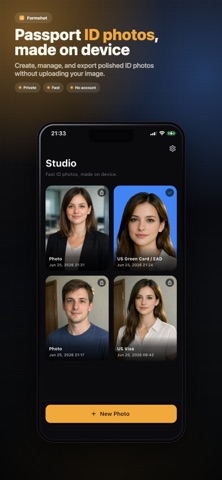
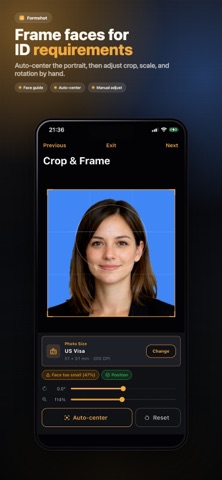
Create passport, visa, and ID photos directly on your phone. Formshot helps you remove the background, choose the right photo size, position your face, and export a ready-to-use image or print sheet. HOW IT WORKS 1. Take a photo or choose one from your library. 2. Remove the background on device and refine the cutout when needed. 3. Select a built-in passport, visa, or ID photo preset—or enter a custom size. 4. Adjust the background, crop, head size, and position with visual guides. 5. Export a JPEG, PNG, PDF, or multi-photo print sheet. 20 BUILT-IN PHOTO PRESETS Choose presets for documents from the United States, United Kingdom, Schengen Area, Germany, France, China, Japan, South Korea, Australia, Canada, Singapore, India, and Hong Kong. Custom sizes support millimeters, inches, pixels, and adjustable DPI. ON-DEVICE BACKGROUND REMOVAL Remove the original background without uploading your portrait to an image-processing server. Choose white, blue, red, gray, or any custom color, then refine edges with erase and restore tools. FRAMING AND PHOTO ADJUSTMENTS Use face-positioning guides and head-size checks while cropping. Auto-center the portrait or manually adjust its scale, position, and rotation. Fine-tune brightness, contrast, saturation, warmth, and skin tone when needed. FLEXIBLE EXPORT • Export as JPEG, PNG, or PDF • Create print sheets with 1, 2, 4, or 8 photos • Save to Photos or Files, or share directly • Re-edit and resize saved projects PRIVATE BY DESIGN No account is required. Portrait processing happens on your device. Formshot does not upload your photos. Document photo requirements can change, and final acceptance is determined by the issuing authority. Always check the latest official requirements before submitting your photo.
What's new · 1.0.1
1. Support for more languages. 2. Minor bug fixes.
Details