

vPlayer HiFi
雷光 单 · Music
Independent analytics for this App Store listing. AppTracker is not affiliated with 雷光 单.
Chart standing · US
What changed · US
Listing changes AppTracker has observed for this app in this storefront — new versions, price moves, rating shifts, and store copy.
v2.90 — iPhone Duo poses • Closed (outer display): stays in portrait; audio output, Shazam, Music Understanding and Lab are grouped on the right edge. • Open, landscape: player on the left (larger artwork), library browsing on the right. • Open, portrait: player at the top left, Now Playing on the top right, library browsing below. • Partially open, propped up: same layout as open portrait, and it steps around the fold automatically. Both portrait poses share one layout, so nothing jumps when you fold or unfold. • Partially open, landscape: each column steps around the fold. • Form diagram: in the portrait poses it appears at the top right, over the Now Playing list. • Sheets: while propped up they only take the lower half and never cover the upper playback controls.
Screenshots





About
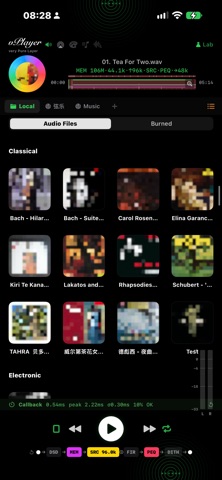
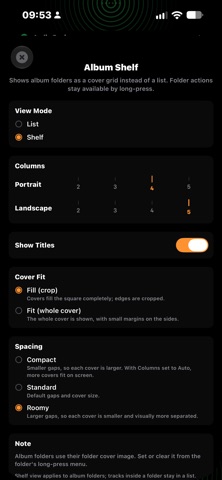
vPlayer HiFi is a dedicated audio player for those who care about sound quality above all else. ▸ Bit‑perfect — Custom AudioUnit pipeline with hardware sample‑rate. vPlayer matches your source rate so the system never touches your signal. ▸ Native DSD Playback — DSF and DFF up to DSD512, decoded through a custom engine with 3 selectable FIR decimation filters (Steep / Gentle / Wide Bandwidth). Choose 176.4kHz or 352.8kHz output. No transcoding, no compromise. ▸ SACD-R ISO Decoder — Native Scarlet Book TOC parser. DSD64 playback with selectable decimation (176.4 kHz or 352.8 kHz). ▸ Memory Playback — Preload entire tracks into a dedicated 600 MB memory buffer — enough to hold a full CD‑length album or a high‑rate DSD track. Eliminates jitter from live file I/O. ▸ Polyphase SRC + FIR Upsampling — 6 SRC algorithms from Linear to Sinc‑512 tap with Kaiser‑windowed polyphase resampling. Independent FIR upsampling at 2× / 4× / 8× with selectable tap count (31 / 63 / 127) and homomorphic Minimum‑Phase conversion. SRC and FIR are mutually exclusive — one clean path, no double‑processing. ▸ Formats — MP3 · AIFF · M4A (Lite). Upgrade to Pro for studio‑grade WAV / FLAC / DSD (DSF, DFF) native playback. ▸ 10‑Band Graphic EQ — ±12 dB manual adjustment with per‑band reference guide. Instant response, zero latency. Toggle on/off directly from the signal chain bar. ▸ 638 AutoEq Headphone Presets — Directly load fixed‑band EQ corrections from the oratory1990 measurement database. Pick your brand, pick your model, done. Preamp is auto‑computed to prevent clipping. ▸ Parametric EQ (PEQ) — Full 10-band parametric equalizer: frequency, Q, and gain per band, with peaking, low-shelf, and high-shelf filters. Replaces the graphic EQ for surgical control. 13 Music Genre Presets — Classical, jazz, vocal, rock/pop, and folk tone shaping, crafted for vPlayer. ▸ Room EQ — Measure your room with a sine sweep and apply automatic correction, with Flat or Warm target curves. ▸ Output Covered — Built‑in speaker, wired headphones, AirPlay, Bluetooth, and external USB DAC. vPlayer detects your active route and matches the hardware sample rate automatically. ▸ Hands‑On Signal Chain — DSD · MEM · SRC ⊕ FIR · EQ · DITH. Tap any chip to open its config panel — switch DSD filters, choose SRC algorithms, set FIR parameters, adjust EQ. Real‑time route detection shows your output device. ▸ Shazam Recognition — Identify any music playing around you with one tap. Built on Apple ShazamKit. ▸ Music Painting — Generative art engine. Every track paints a unique visual — Constellation or Impression style. Save and browse your gallery. ▸ Drag album folders via Finder or iTunes to the App's sharing folder. Pull down to refresh. Swipe to delete. Folders are auto‑detected. ▸ Dual Theme — Dark & Silver. Tap the vPlayer title to switch.
What's new · 2.90
v2.90 — iPhone Duo poses • Closed (outer display): stays in portrait; audio output, Shazam, Music Understanding and Lab are grouped on the right edge. • Open, landscape: player on the left (larger artwork), library browsing on the right. • Open, portrait: player at the top left, Now Playing on the top right, library browsing below. • Partially open, propped up: same layout as open portrait, and it steps around the fold automatically. Both portrait poses share one layout, so nothing jumps when you fold or unfold. • Partially open, landscape: each column steps around the fold. • Form diagram: in the portrait poses it appears at the top right, over the Now Playing list. • Sheets: while propped up they only take the lower half and never cover the upper playback controls.
Details