

Mochi - SSH + Terminal
Egor Kolesnikov · Developer Tools
Independent analytics for this App Store listing. AppTracker is not affiliated with Egor Kolesnikov.
Chart standing · US
What changed · US
Listing changes AppTracker has observed for this app in this storefront — new versions, price moves, rating shifts, and store copy.
Mochi now works with herdr, so you can control your AI coding agents from your iPhone. • Live Activity on the lock screen with your agents and their status • Notifications when an agent is blocked or done, even when Mochi is closed • Tap a notification to open that agent's pane • New app icon • Reconnecting after the app was in the background is more reliable
Ratings breakdown · US
The star breakdown behind this app's rating in this storefront.
In-app purchases · US
No in-app purchases.
Screenshots


About
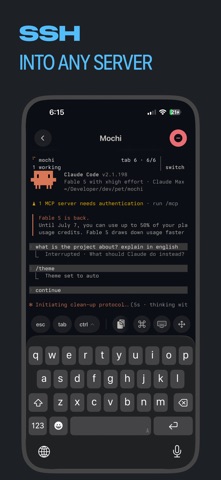
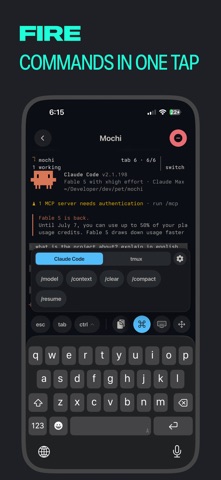
Mochi is the place to control your AI coding agents from your iPhone. The agents run in herdr on your server. Mochi shows what each one is doing and takes you to it when it needs you. CONTROL YOUR AGENTS WITH HERDR • Live Activity on the lock screen: which agents are working and which are waiting for you • A notification when an agent is blocked or done, even when Mochi is closed • Tap it to open that agent's pane and answer from the chat input • Swipe to switch herdr tabs A REAL TERMINAL UNDERNEATH Mochi is a fast, beautiful SSH client built on the Ghostty terminal engine — a real terminal emulator in your pocket, not a toy. SSH INTO ANY SERVER Save your connections and jump into any of them in a tap. Password and key auth, custom ports, works great over Tailscale. FIRE COMMANDS IN ONE TAP Build your own shortcut groups: tmux prefixes, Ctrl combos, slash commands, whole snippets with Enter. The keyboard toolbar puts esc, tab, ctrl and ⌘ right above the keys — no more fighting the mobile keyboard. MAKE IT YOURS 500+ built-in terminal themes with search and light/dark filters. Real monospace fonts (JetBrains Mono and more), adjustable size, pinch to zoom in session. LOCK KEYS BEHIND FACE ID Private keys live in the iOS Keychain. Flip one switch and every use of a key requires Face ID. BUILT FOR ENGINEERS • Ghostty-powered terminal emulation — fast, correct, modern • Multiple simultaneous sessions • Native iOS design that feels at home on iOS 26 • No accounts, no tracking — your servers are your business
What's new · 1.3.0
Mochi now works with herdr, so you can control your AI coding agents from your iPhone. • Live Activity on the lock screen with your agents and their status • Notifications when an agent is blocked or done, even when Mochi is closed • Tap a notification to open that agent's pane • New app icon • Reconnecting after the app was in the background is more reliable
Details