

FloGravity Launcher
骏 刘 · Utilities
Independent analytics for this App Store listing. AppTracker is not affiliated with 骏 刘.
Chart standing · US
What changed · US
Listing changes AppTracker has observed for this app in this storefront — new versions, price moves, rating shifts, and store copy.
1. iPhone Duo: Better layouts when folding, unfolding and changing orientation, including the Mac Remote toolbar, shortcut and arrow keys, and Calendar columns. 2. Mac Remote: New wired QR pairing on compatible devices. After scanning, verify the code and confirm on Mac; connection, permission and expired-code messages are clearer. 3. Image Tools: Crop freely or use original, preset or custom ratios. Drag to adjust, pan or pinch to zoom, and undo/redo. Apply a ratio or framing to a batch, then refine each image. 4. Calendar and widgets: Set custom day, week, month or year intervals and choose whether to include the current week, month or year. The app and widgets share recurrence rules, with improved Gregorian and lunar repeats. 5. Display: Updated action, tool and widget icons and localized app names. Notes and numbered-step annotations render more consistently, and Action Panel menus are clearer in light/dark mode. 6. Account recovery: Temporary network errors no longer clear your login. Account checks on return to foreground reduce unnecessary sign-ins after network changes. 7. Feedback: See feedback for your iPhone or iPad after signing in. Switching accounts clears previous lists, making browsing and submissions clearer.
In-app purchases · US
What this app sells inside itself, grouped by kind and priced for this storefront.
Screenshots
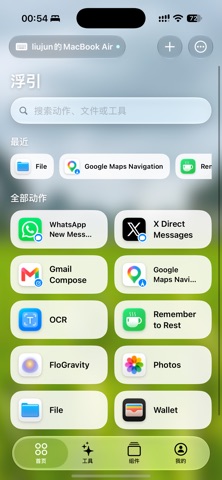
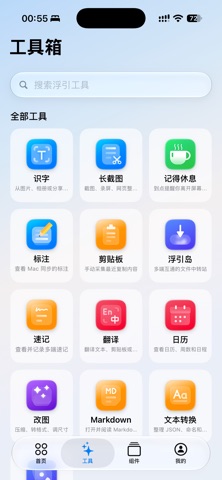
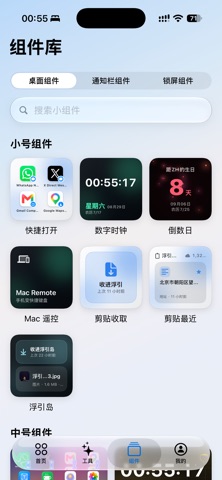
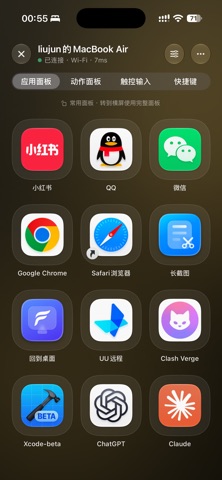


About
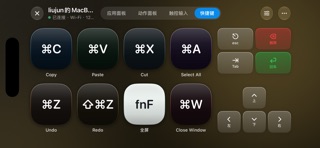
FloGravity is a Mac remote first—and an action, widget, and productivity toolbox for iPhone and iPad too. TURN IPHONE INTO A MAC REMOTE • Discover and pair with a supported version of FloGravity for Mac through an encrypted session, then switch between multiple paired Macs. • Trigger favorites in portrait, or rotate to landscape for the full Action Panel and app panel, with search and app launching from your Mac. • Use the screen as a trackpad for pointer movement, clicks, scrolling, and multi-touch gestures. Text typed into the input bar can appear on your Mac as you type. • Build shortcut combinations and use directional, editing, volume, brightness, and media controls. • Add Mac Remote entry points to the Home Screen, Lock Screen, and Control Center for quick access from the places you use most. A BIG-SCREEN REMOTE FOR IPAD Mac Remote takes advantage of the larger iPad canvas: action and app panels show more at once, the touch surface has more room, and shortcut slots and system controls are better suited to extended use. Portrait and landscape adapt independently instead of simply stretching the iPhone interface. MORE THAN A REMOTE • Build a mobile Action Panel for app links, websites, Shortcuts, files, folders, and FloGravity tools. • Turn consecutive screenshots, screen recordings, or Safari full-page screenshot PDFs into scrolling images. • Use OCR, Translate, Calendar, Countdowns and to-dos, Quick Notes, Clipboard, FloGravity Island, Image Tools, Markdown, Text Tools, rest reminders, and wallpapers. SYNC AND CONTINUE Many tools work locally. Supported content can sync through iCloud, helping you continue naturally across iPhone, iPad, and Mac. Some advanced remote, widget, sync, and customization features require FloGravity Pro. Certain remote features require Mac accessibility permission or a supported FloGravity for Mac version, and some controls require newer system versions. Availability may vary by device, OS version, and the paired Mac version. Terms of Use (EULA): https://www.apple.com/legal/internet-services/itunes/dev/stdeula/ Privacy Policy: https://fg.vkr.me/mac/privacy/
What's new · 1.1.0
1. iPhone Duo: Better layouts when folding, unfolding and changing orientation, including the Mac Remote toolbar, shortcut and arrow keys, and Calendar columns. 2. Mac Remote: New wired QR pairing on compatible devices. After scanning, verify the code and confirm on Mac; connection, permission and expired-code messages are clearer. 3. Image Tools: Crop freely or use original, preset or custom ratios. Drag to adjust, pan or pinch to zoom, and undo/redo. Apply a ratio or framing to a batch, then refine each image. 4. Calendar and widgets: Set custom day, week, month or year intervals and choose whether to include the current week, month or year. The app and widgets share recurrence rules, with improved Gregorian and lunar repeats. 5. Display: Updated action, tool and widget icons and localized app names. Notes and numbered-step annotations render more consistently, and Action Panel menus are clearer in light/dark mode. 6. Account recovery: Temporary network errors no longer clear your login. Account checks on return to foreground reduce unnecessary sign-ins after network changes. 7. Feedback: See feedback for your iPhone or iPad after signing in. Switching accounts clears previous lists, making browsing and submissions clearer.
Details