

StreamPad: Macro Controller
Duc Tran Dinh · Developer Tools
Independent analytics for this App Store listing. AppTracker is not affiliated with Duc Tran Dinh.
Chart standing · US
What changed · US
Listing changes AppTracker has observed for this app in this storefront — new versions, price moves, rating shifts, and store copy.
- Fixed a crash on launch on the newest iOS version. - New connect screen: the app opens straight into the computer you used last, shows progress while connecting, and lets you cancel at any time. - Recent computers show their name and system, and you can rename them. - Keep several computers saved and switch between them instantly. - Only one phone plays the computer's sound at a time, and each phone has its own volume, or can follow the computer's volume. - The speaker button now has a volume bar; tap it to pick a speaker or stop playback. - New volume boost: let the volume bar go up to 300%. - Switch language right on the connect screen. - Change the accent colour from the app's Settings. - Page names now match what you set on the computer.
In-app purchases · US
No in-app purchases.
Screenshots




About
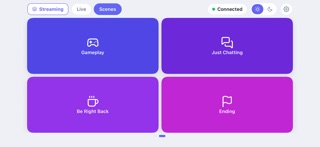
Stream Pad turns your phone into a customizable macro pad for your Mac or Windows computer - no cloud, no account, no internet required. Install the free Stream Pad Companion app on your computer, connect your phone over the same Wi-Fi network, and trigger keyboard shortcuts, media controls, and app actions with a single tap. FEATURES - Fully customizable grid of buttons, icons, and colors, edited from the Companion dashboard on your computer - Multiple pages for organizing different sets of shortcuts - Instant Wi-Fi pairing via QR code - no typing IP addresses - Media controls (play/pause, volume) and custom keyboard shortcuts - Works entirely on your local network - everything stays between your phone and your computer Stream Pad is self-hosted: your macros, layouts, and button presses never leave your home network.
What's new · 26.10.1415
- Fixed a crash on launch on the newest iOS version. - New connect screen: the app opens straight into the computer you used last, shows progress while connecting, and lets you cancel at any time. - Recent computers show their name and system, and you can rename them. - Keep several computers saved and switch between them instantly. - Only one phone plays the computer's sound at a time, and each phone has its own volume, or can follow the computer's volume. - The speaker button now has a volume bar; tap it to pick a speaker or stop playback. - New volume boost: let the volume bar go up to 300%. - Switch language right on the connect screen. - Change the accent colour from the app's Settings. - Page names now match what you set on the computer.
Details