

LiveMaker: Video to Photo
Vladimirs Matusevics · Photo & Video
Independent analytics for this App Store listing. AppTracker is not affiliated with Vladimirs Matusevics.
Chart standing · US
What changed · US
Listing changes AppTracker has observed for this app in this storefront — new versions, price moves, rating shifts, and store copy.
• Start from a moving photo — pick one from your library, trim and crop its motion, then save it back as a video or a looping GIF • Save as Video — keep any trimmed, cropped moment as an ordinary video you can share anywhere Thank you for using LiveMaker!
Ratings breakdown · US
The star breakdown behind this app's rating in this storefront.
Screenshots


About
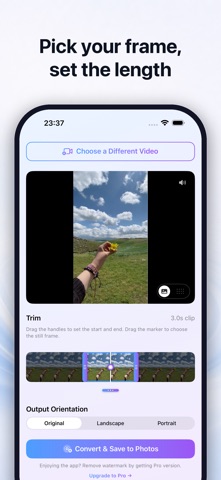
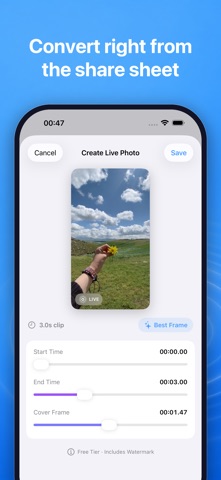
LiveMaker turns any video into a moving photo you can save to your library. Pick a clip from your library, trim it to the part you want, choose the still frame, and save. No account, no upload as it all runs on your device. The timeline has drag handles so you can set exactly where the motion starts and ends. Move the playhead to pick which frame shows up as the still image. A pan slider lets you reframe the crop before saving, and there's a mute button right on the preview if you'd rather strip the audio. Save as GIF: turn the same trimmed, cropped moment into a looping GIF for messages and social apps. Save as Video: keep any trimmed, cropped moment as an ordinary video. You can also start from a moving photo already in your library and turn its motion into a video or a GIF. Any video in your Photos library works - camera clips, screen recordings, downloads, whatever you've got. PRIVACY No account needed. Nothing leaves your device. Live Photos is a trademark of Apple Inc. LiveMaker is an independent app not affiliated with or endorsed by Apple Inc. It is a video transformation tool that creates media files compatible with the Live Photo format.
What's new · 1.5
• Start from a moving photo — pick one from your library, trim and crop its motion, then save it back as a video or a looping GIF • Save as Video — keep any trimmed, cropped moment as an ordinary video you can share anywhere Thank you for using LiveMaker!
Details