

Marten: Markdown Code Notes
joseph hamawi · Productivity
Independent analytics for this App Store listing. AppTracker is not affiliated with joseph hamawi.
Chart standing · US
What changed · US
Listing changes AppTracker has observed for this app in this storefront — new versions, price moves, rating shifts, and store copy.
Sharing, exporting, and fixes: • Share a note as Markdown, plain text, PDF, or a spreadsheet. The file now carries the whole project, not just its name: your note body plus every filled tab and field. • API keys, secrets, and passwords are hidden in shared files by default. Flip "Include secret values" when you really do want to send them. • Copying a key, secret, or password now shows a green confirmation, and credential notes got their own copy button. • Deleting a note sticks. A note deleted on one device no longer reappears on another, and deletes made offline are applied as soon as you reconnect. • Tap anywhere on a row to open a note, including the empty space around the title. • Opening a note no longer moves it to the top of the list. Only a real edit does. • Notes keep your line breaks exactly as you typed them when you switch from edit to preview. • Small stability and layout improvements.
In-app purchases · US
No in-app purchases.
Screenshots


About
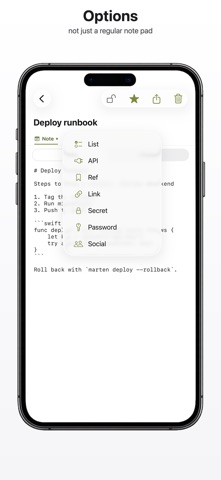
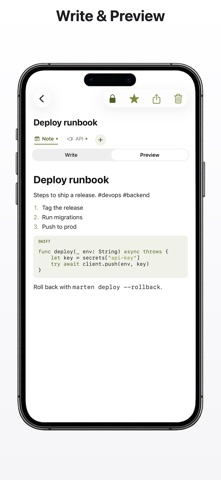
Marten is a clean, distraction-free note app built for developers. Write in Markdown with syntax-highlighted code blocks, then turn any note into a project with just the tabs you need. Keep a plain note, or add API keys, secrets, passwords, social logins, links, references, and checklists. Each filled tab becomes an item, so one note holds everything about a project. FEATURES Markdown editor Fenced code blocks with an olive, editor-style highlight. Toggle a live preview anytime. Project tabs Note, List, API, Ref, Link, Secret, Password, and Social. Add only the tabs you want with a tap. Secrets vault Store API keys, passwords, and accounts with masked fields and a quick reveal. Checklists Reminders-style lists with tap-to-complete items. Tags and search Organize with #hashtags and find anything instantly with full-text search. Sync, your way Local-first storage that works offline, with optional cloud sync across your devices. Turn sync on or off whenever you want. Built for every screen A native app for iPhone, iPad, and Mac, with an adaptive three-column layout on iPad and Mac. Light and dark themes. Private by design Your notes are yours. No ads, no tracking, and you can delete your account and all data from inside the app at any time. Marketing URL: https://marten.kodefoundry.com Privacy Policy URL: https://marten.kodefoundry.com/privacy
What's new · 1.0.3
Sharing, exporting, and fixes: • Share a note as Markdown, plain text, PDF, or a spreadsheet. The file now carries the whole project, not just its name: your note body plus every filled tab and field. • API keys, secrets, and passwords are hidden in shared files by default. Flip "Include secret values" when you really do want to send them. • Copying a key, secret, or password now shows a green confirmation, and credential notes got their own copy button. • Deleting a note sticks. A note deleted on one device no longer reappears on another, and deletes made offline are applied as soon as you reconnect. • Tap anywhere on a row to open a note, including the empty space around the title. • Opening a note no longer moves it to the top of the list. Only a real edit does. • Notes keep your line breaks exactly as you typed them when you switch from edit to preview. • Small stability and layout improvements.
Details