

Plan4U: AI Calendar Planner
Yevhenii Bruchkovskyi · Productivity
Independent analytics for this App Store listing. AppTracker is not affiliated with Yevhenii Bruchkovskyi.
Chart standing · US
What changed · US
Listing changes AppTracker has observed for this app in this storefront — new versions, price moves, rating shifts, and store copy.
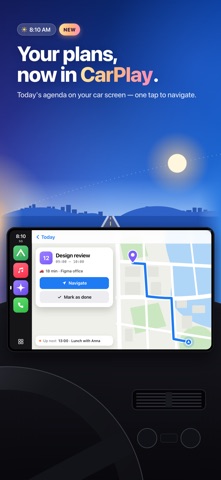
Plan4U is now in CarPlay. • Today and tomorrow on your car screen as a timeline — what's on now and what's next. • Tap an event for a map, travel time and one-tap directions in Apple Maps, Google Maps or Waze. • Add by voice while you drive: tap the mic, say "call the dentist tomorrow at 10", and the AI assistant fills in the rest. • Mark tasks done or postpone them by 15 minutes, an hour or to tomorrow. Also new: tapping a row in the widget opens that event, and every row in the event editor is now tappable end to end.
Screenshots



About
Plan4U is a calm, colorful planner for your events, tasks and reminders — with an AI assistant that turns a sentence into a plan, a timeline that keeps your day clear, and now CarPlay for the road. Type "Dinner with Anna tomorrow at 7pm at Meat & Fish" and it's in your calendar — with the time, the place and a reminder. YOUR DAY AT A GLANCE • A clear day timeline with a live "now" line • Five views — Schedule, Month, Day, List and Year • Events and tasks together — tick tasks off right in the list • A task board for ideas and to-dos without a date — schedule them when the time is right • Colors and stickers — recognize every event at a glance • Repeats that fit your life — daily, on chosen weekdays, monthly, yearly or every N days ADD IT IN SECONDS • AI quick add — write or say it the way you talk • Dates in titles are understood as you type • An AI assistant inside the editor — "move it to Friday at 6 and remind me an hour before" • Siri, the Action Button and Control Center quick add • Share a link, a note or a photo into Plan4U from any app ON THE ROAD — NEW IN CARPLAY • Today and tomorrow on your car screen as a timeline • Map, travel time and one-tap directions in Apple Maps, Google Maps or Waze • Add a task by voice while you drive • "Time to leave" alerts based on travel time by car, on foot or by transit PLAN IT TOGETHER • Shared calendars for family, friends or a team — with roles • Send a task to someone with a message — it's theirs, and the conversation starts right there • One-on-one chats with events and tasks inside, plus all discussions in one list • Invite people, see who's coming, and reply from the notification • Share a public link so anyone can see the event — no app needed • Attach files and photos NEVER MISS IT • Reminders that arrive on time, plus a second one for what matters • A morning briefing with the day ahead • A Live Activity countdown to your next event on the Lock Screen • Home Screen widgets and Apple Watch MAKE IT YOURS • Light, dark or system theme and accent colors • Card, Compact or Timeline list styles • Two-way sync with Apple Calendar • Sign in with Apple or Google PLAN4U PREMIUM Unlock everything: AI quick add and the assistant, the task board, CarPlay, repeats, priorities, colors, guests, a second reminder, attachments, Apple Calendar sync, widgets and themes. Download Plan4U and make every day feel organized. ——— Terms of Use: https://evgeniybruchkovskiy.github.io/plan4u-legal/terms.html Privacy Policy: https://evgeniybruchkovskiy.github.io/plan4u-legal/privacy.html
What's new · 2.5.0
Plan4U is now in CarPlay. • Today and tomorrow on your car screen as a timeline — what's on now and what's next. • Tap an event for a map, travel time and one-tap directions in Apple Maps, Google Maps or Waze. • Add by voice while you drive: tap the mic, say "call the dentist tomorrow at 10", and the AI assistant fills in the rest. • Mark tasks done or postpone them by 15 minutes, an hour or to tomorrow. Also new: tapping a row in the widget opens that event, and every row in the event editor is now tappable end to end.
Details