

Boreal Markdown Editor
Borealbit Technology Limited · Productivity
Independent analytics for this App Store listing. AppTracker is not affiliated with Borealbit Technology Limited.
Chart standing · US
Screenshots


About
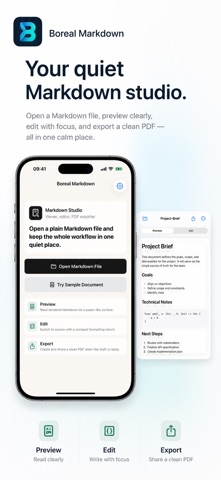
Boreal Markdown is a focused iOS document tool for people who already keep notes, drafts, specs, and reports in plain Markdown files. Open a .md or .markdown file from Files, read the rendered preview, edit the source, then save intentionally or export a clean PDF. Boreal Markdown is built around the small document loop, not a new notes database or cloud workspace. Included for everyone: - Open Markdown and plain text files through iOS file access - Read a rendered Markdown preview with clear document typography - Switch between preview and source editing - Apply headings, bold, italic, links, lists, and code to the cursor or selected text - See saved and unsaved states near the document title - Choose Save, Discard, or Cancel before leaving a document with unsaved edits - Save changes back to the opened file when iOS file access allows it - Export the rendered document as a PDF with paper, theme, text size, and title options - Share the PDF or save it back to Files - Persist appearance, accent, editor text, and PDF defaults between launches Boreal Pro is an optional one-time purchase. It unlocks: - Document outline navigation - Find and replace - Markdown cleanup - Split editing and preview on supported layouts - Advanced PDF themes, margins, table of contents, page numbers, headers, footers, and reusable presets Boreal Markdown is local-first. There is no account, subscription, hosted sync service, AI processing, backend document storage, or collaboration system. Use Boreal Markdown when you want a quiet iPhone and iPad workbench for opening, editing, saving, and sharing Markdown files as PDFs.
What's new · 1.1.0
Boreal Markdown 1.1.0 makes document editing safer and adds optional advanced tools. - Formatting actions now edit the cursor or selected text instead of rewriting the whole document - Unsaved changes are protected with Save, Discard, and Cancel choices - Appearance, accent, editor text size, and PDF defaults persist between launches - Dark mode uses readable adaptive surfaces and text - File reads and writes are coordinated with document providers - UTF-8, UTF-16, UTF-32, GBK, and GB18030 Markdown files can be opened - Boreal Pro is available as a one-time purchase for outline, find and replace, cleanup, split view, and advanced PDF controls
Details