

Tabwise: Bills & Invoices
John Doan · Finance
Independent analytics for this App Store listing. AppTracker is not affiliated with John Doan.
Chart standing · US
What changed · US
Listing changes AppTracker has observed for this app in this storefront — new versions, price moves, rating shifts, and store copy.
Duplicate any record — and start the next one in seconds. • Duplicate. Right-click a record on Mac or iPad, or touch and hold it on iPhone, and choose Duplicate… to start a new one already filled in: the same payee, amount, currency, category, payment method and notes, dated today. If the original had a due date, the copy keeps the same gap, so Net-30 stays Net-30. Nothing is saved until you tap Save. • Every copy starts fresh: unpaid, one-time, and without the original's check number, reference number or attachments. A duplicate can never double-count a payment or start a second repeating schedule by accident. • Delete asks first. Choosing Delete from the right-click or touch-and-hold menu now asks you to confirm, and names the record, so one stray click can't remove a bill. • Fixed: the privacy note in Settings now correctly says your records are kept on your devices and in your own private iCloud, where they have synced since version 1.2. Everything still syncs across your iPhone, iPad and Mac through your own private iCloud. Free. No ads. No tracking.
Screenshots

About
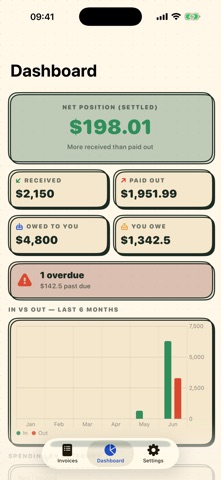
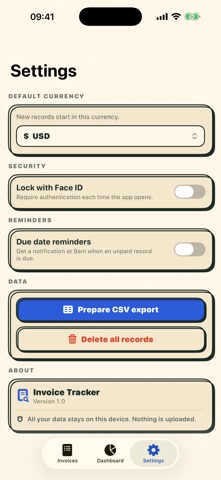
Keep every bill, invoice, and payment in one private place — and always know what you owe and what's owed to you. Invoice Tracker is a simple, private ledger for the money moving in and out of your life or small business. Record a bill you paid or an invoice you sent, note how it was paid — online or by check — and Invoice Tracker keeps the dates, amounts, receipts, and status organized for you. No accounts. No ads. No tracking. Everything stays on your device. TRACK MONEY IN AND OUT • Log money out (bills you pay) and money in (invoices and payments you receive) in one ledger • Record the payee or client, amount, category, and a note for every entry • See your running totals: what you owe, what's owed to you, and your net position EVERY PAYMENT DETAIL • Mark how it was paid: online, check, card, cash, or bank transfer • Save the check number for checks and the payment or receipt URL for online payments • Add a reference or invoice number to tie it back to your paperwork NEVER MISS A DUE DATE • Set issue and due dates and see at a glance what's Pending, Partially Paid, Paid, or Overdue • Turn on optional reminders to get a local notification before something is due • Set bills and invoices to repeat weekly, monthly, quarterly, or yearly — the next one is created automatically when you mark it paid RECEIPTS AND RECORDS • Attach a photo of a receipt or check, or a PDF invoice, right to the entry • Search and filter by payee, status, note, or check number in an instant SEE THE BIG PICTURE • A dashboard with your net position, money received vs. paid out, and what's still outstanding • Clear charts of the last six months and your spending by category • Flag tax-deductible items and see your year-to-date deductible total at tax time EXPORT ANYTIME • Export everything to a CSV file to share with your accountant or open in a spreadsheet PRIVATE BY DESIGN • No account, no sign-up, no email • Works completely offline — your records never leave your device • No tracking, no analytics, no ads • Optional Face ID / Touch ID lock keeps your records private • Delete the app and every record goes with it WORKS EVERYWHERE • A universal app for iPhone, iPad, and Mac A quick note: Invoice Tracker is a personal record-keeping tool. It is not a bank, does not connect to any account, and does not move money, and it does not provide financial, tax, or legal advice. Any figures shown in the App Store screenshots are fictitious examples. Built by an independent developer who wanted a calm, private way to keep on top of bills and invoices.
What's new · 1.5
Duplicate any record — and start the next one in seconds. • Duplicate. Right-click a record on Mac or iPad, or touch and hold it on iPhone, and choose Duplicate… to start a new one already filled in: the same payee, amount, currency, category, payment method and notes, dated today. If the original had a due date, the copy keeps the same gap, so Net-30 stays Net-30. Nothing is saved until you tap Save. • Every copy starts fresh: unpaid, one-time, and without the original's check number, reference number or attachments. A duplicate can never double-count a payment or start a second repeating schedule by accident. • Delete asks first. Choosing Delete from the right-click or touch-and-hold menu now asks you to confirm, and names the record, so one stray click can't remove a bill. • Fixed: the privacy note in Settings now correctly says your records are kept on your devices and in your own private iCloud, where they have synced since version 1.2. Everything still syncs across your iPhone, iPad and Mac through your own private iCloud. Free. No ads. No tracking.
Details