

Checklist: Reusable Lists
Alex Usanin · Productivity
Independent analytics for this App Store listing. AppTracker is not affiliated with Alex Usanin.
Chart standing · US
What changed · US
Listing changes AppTracker has observed for this app in this storefront — new versions, price moves, rating shifts, and store copy.
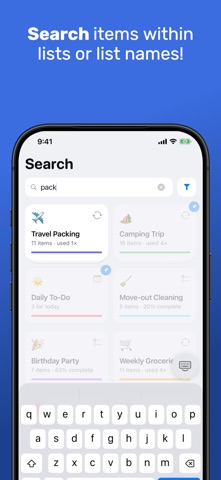
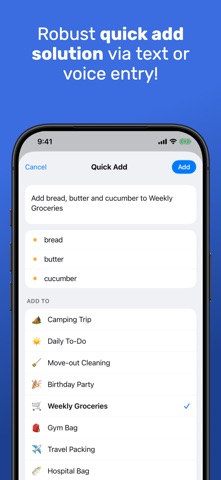
A cleaner look, the same app. • Reusable checklists are drawn as pads, so you can tell them from one-off lists at a glance • Rounded titles, easier-to-read small text, and capsule buttons (Liquid Glass on iOS 26) • Search has its own tab, beside the tab bar on iOS 26, and searches list names and what's inside them • The Library ends in a New Checklist tile; "Recent Lists" is now "Recents" • Reminders (Pro) moved to a swipe: swipe an item to the right, tap Remind, and add it to your Calendar or to Reminders. A bell shows only on items that have one • Notes on items: swipe an item to the right and tap Note to add a line under it, change it or remove it. Editing a reusable checklist now keeps the notes its items had • New installs start with a "Try Me List" whose items explain what a tap, a swipe or a hold does • Dark mode is a step lighter: tiles, rows and the pad now stand apart from the background • Quick Add (Pro) is simpler: one Add button that adds right away, a cleaner preview, and every list shown under "Add to" • Bug fixes and stability improvements
Price & rating history · US
Reconstructed from the listing changes AppTracker has observed in this storefront. A field is charted once it has changed more than once, and each line starts at the value it moved from.
Average rating · ★ 4.50 now · 7 changes on record
Ratings breakdown · US
The star breakdown behind this app's rating in this storefront.
In-app purchases · US
What this app sells inside itself, grouped by kind and priced for this storefront.
Screenshots






About
The same trip. The same gym bag. The same grocery run. Why rewrite the list every time? Checklist: Reusable Lists is built around one idea: make a checklist once and reuse it forever. Build the list, start a fresh run whenever you need it, and check it off. The original never changes. REUSABLE BY DESIGN • Build a checklist once: packing, groceries, gym, camping, chores, a go-bag • Start a clean run any time and tick items off with a satisfying tap • Your checklist stays pristine, ready for next time • Full history: see when each run was started and completed MAKE IT YOURS, FAST • Paste a whole list and every line becomes an item. On devices with Apple Intelligence, headings and quantities are read on your device, never sent anywhere • Group items into sections, add quantities ("chargers ×2") and put a note under any item • Swipe an item right for a reminder or a note; swipe left to delete it • Pin the lists you use most, reorder with a touch and hold, and give every list its own icon and color • Search finds lists by name and by what is inside them ONE-OFF LISTS TOO • Need a single, one-time list? Make a one-off and check it off in place • Reusable checklists and one-off lists live together in one simple library • New here? A "Try Me List" shows what a tap, a swipe or a hold does SHARE IN A TAP • Send any checklist to a friend as a link • They add it straight to their own library, no account needed • Great for trips, events and households CHECKLIST PRO One purchase, yours for good, shared with up to six people through Family Sharing: • Collaborate live: check off one list together and everyone sees every tap • iCloud Sync: the same library on your iPhone, iPad and Mac, through your own iCloud • Daily To-Do: a list for today whose unfinished items roll over on their own • Quick Add: type or dictate "add bread, butter and cucumber to groceries" and it lands in the right list • Reminders: add any item to your Calendar or to the Reminders app • Print or export any list ON iPHONE, iPAD AND MAC • Designed for the iPad's larger screen and runs on Apple silicon Macs • Put Checklist on the Action Button for one-press access PRIVATE BY DEFAULT • No account. No sign-up. Nothing to forget. • Works fully offline: pack on the plane, shop in the basement • Your lists stay on your device. Pro sync travels through your own iCloud, never a server of ours Want a head start? Browse free, ready-made templates (travel packing, moving, camping, hospital bag, groceries and more) at getchecklist.app/checklists and open them straight in the app. Stop starting from a blank page. Build it once. Reuse it forever. Checklist Pro is a one-time purchase of $16.99 (USD), charged to your Apple Account, with Family Sharing included. No subscription. Terms of Use: https://www.apple.com/legal/internet-services/itunes/dev/stdeula/ Privacy Policy: https://getchecklist.app/privacy
What's new · 1.5.0
A cleaner look, the same app. • Reusable checklists are drawn as pads, so you can tell them from one-off lists at a glance • Rounded titles, easier-to-read small text, and capsule buttons (Liquid Glass on iOS 26) • Search has its own tab, beside the tab bar on iOS 26, and searches list names and what's inside them • The Library ends in a New Checklist tile; "Recent Lists" is now "Recents" • Reminders (Pro) moved to a swipe: swipe an item to the right, tap Remind, and add it to your Calendar or to Reminders. A bell shows only on items that have one • Notes on items: swipe an item to the right and tap Note to add a line under it, change it or remove it. Editing a reusable checklist now keeps the notes its items had • New installs start with a "Try Me List" whose items explain what a tap, a swipe or a hold does • Dark mode is a step lighter: tiles, rows and the pad now stand apart from the background • Quick Add (Pro) is simpler: one Add button that adds right away, a cleaner preview, and every list shown under "Add to" • Bug fixes and stability improvements
Details