

RayCut Pro: Video Editor
Solueman Hussain · Photo & Video
Independent analytics for this App Store listing. AppTracker is not affiliated with Solueman Hussain.
Chart standing · US
What changed · US
Listing changes AppTracker has observed for this app in this storefront — new versions, price moves, rating shifts, and store copy.
Our biggest update yet: tell stories faster, edit like a pro. • Story Studio: make movie trailers from 9 themes, guided storyboards and Instant Movies from your clips. • Pro edits: insert, append, overwrite, connect and replace, plus In/Out ranges and a precision trim view. • Compound clips, auditions for alternate takes, and a searchable timeline index. • Change the focus of iPhone Cinematic videos after shooting. • Color wheels, Match Color and Auto Enhance. • Object tracking: pin titles and stickers to faces and moving subjects. • Voice Isolation, dialogue/music/effects roles and stem export. • Chapter markers in exported movies, with YouTube chapter timestamps. • FCPXML export for Final Cut Pro. • Split long clips automatically at every shot change. • Import Live Photos and animated GIFs as video. • iCloud project sync and Handoff between iPhone, iPad and Mac. • Duplicate projects and save snapshots. • Long exports pause and resume safely in the background. • Mac: pro keyboard shortcuts, skimming and a second-display viewer. • Smoother playback and timeline on older iPads, plus many fixes.
Screenshots

About
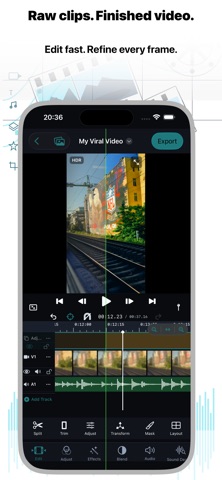
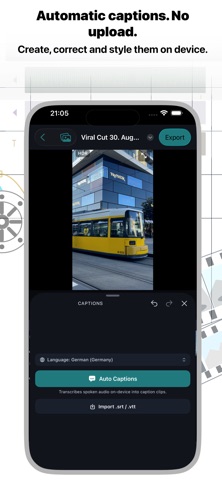
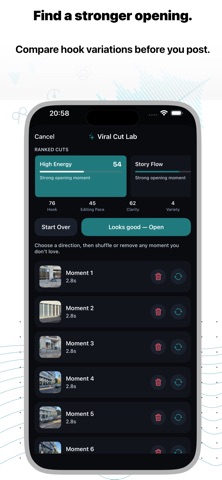
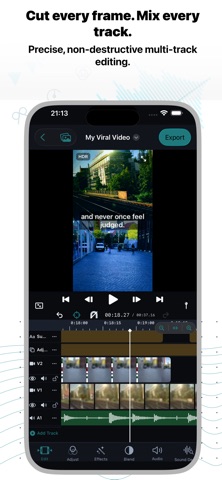
Edit like a pro on iPhone, iPad and Mac. No account. No uploads. RayCut Pro gives you a real multi-track timeline, automatic captions, cinematic color and 4K HDR export, and your footage stays on your own devices. NEW: STORY STUDIO • Movie trailers: pick one of 9 themed trailers, fill the shot list with your clips, add your title and credits. RayCut times the cuts, titles and music for you. • Storyboards: guided shot lists that tell you what to film, then assemble the edit. • Instant Movie: choose your clips and get a finished, music-timed movie you can keep editing. FINISH FASTER • Viral Cut and automatic edits that cut to the beat of your music, at the pace you choose. • Automatic captions with animated styles, word-by-word highlights and speaker labels. Search the transcript and jump to any word. • Remove silences, split long clips at every shot change, and detect beats in one tap. • Smart Reframe follows your subject so one project works vertical, square and landscape. A REAL PRO TIMELINE • Frame-accurate, multi-track and magnetic: insert, append, overwrite, connect and replace edits, In/Out ranges, ripple and roll trims, and a precision trim view. • Compound clips, multicam editing, auditions for alternate takes, markers and chapters, and a searchable timeline index. • Keyframes with smooth curves for position, scale, rotation, opacity and effects. • Speed ramps, smooth slow motion, reverse and freeze frames. MAKE IT LOOK CINEMATIC • Color wheels, curves, HSL, LUTs, Looks, Match Color and Auto Enhance. • Change the focus of iPhone Cinematic videos after you shot them. • Cut Out removes the background without a green screen. Plus chroma key, shape masks, object tracking with pinned titles and stickers, and stabilization. • Animated titles with neon, glitch and wave effects, 3D transitions and animated backgrounds. SOUND THAT HOLDS UP • Voice Isolation and Voice Enhance for clean dialogue, EQ and voice effects. • Music that follows your edit, a built-in sound library, auto-ducking under voice, voiceover recording and text-to-speech narration. • Dialogue, music and effects roles with per-role mute and stem export. IPHONE, IPAD AND MAC • Projects sync through your own iCloud. Start on iPhone, continue on Mac with Handoff. • On Mac: familiar pro keyboard shortcuts, skimming, and a full-screen viewer on a second display. • Export FCPXML to keep editing in Final Cut Pro. PRIVATE BY DESIGN • No RayCut account, no tracking, no RayCut cloud. • Captions, cutouts, reframing and beat analysis run on your device by default. • Sync uses your own iCloud, and you decide when and where a video is shared. EXPORT WITH CONFIDENCE • Up to 4K with HDR on supported media and devices, up to 60 fps. • Chapters in the exported movie, plus ready-to-paste YouTube chapter timestamps. • Save to Photos, AirDrop, Files or the share sheet. Long exports pause and resume safely. PLANS RayCut Pro is free to download and edit with. Exports from the free version end with a short RayCut Pro card; remove it once with Remove Watermark. Pro and Max subscriptions (monthly or yearly) unlock the advanced tools. Payment is charged to your Apple Account when you confirm the purchase. Subscriptions renew automatically unless cancelled at least 24 hours before the end of the current period. Manage or cancel them in your Apple Account settings. Terms of Use / EULA https://www.apple.com/legal/internet-services/itunes/dev/stdeula/
What's new · 26.4
Our biggest update yet: tell stories faster, edit like a pro. • Story Studio: make movie trailers from 9 themes, guided storyboards and Instant Movies from your clips. • Pro edits: insert, append, overwrite, connect and replace, plus In/Out ranges and a precision trim view. • Compound clips, auditions for alternate takes, and a searchable timeline index. • Change the focus of iPhone Cinematic videos after shooting. • Color wheels, Match Color and Auto Enhance. • Object tracking: pin titles and stickers to faces and moving subjects. • Voice Isolation, dialogue/music/effects roles and stem export. • Chapter markers in exported movies, with YouTube chapter timestamps. • FCPXML export for Final Cut Pro. • Split long clips automatically at every shot change. • Import Live Photos and animated GIFs as video. • iCloud project sync and Handoff between iPhone, iPad and Mac. • Duplicate projects and save snapshots. • Long exports pause and resume safely in the background. • Mac: pro keyboard shortcuts, skimming and a second-display viewer. • Smoother playback and timeline on older iPads, plus many fixes.
Details