

AI Certified Mechanic
CHRISTOPHER CLARKE · Utilities
Independent analytics for this App Store listing. AppTracker is not affiliated with CHRISTOPHER CLARKE.
Chart standing · US
What changed · US
Listing changes AppTracker has observed for this app in this storefront — new versions, price moves, rating shifts, and store copy.
Send manuals straight in from other apps. Got a PDF repair manual sitting in Google Drive, Dropbox, Files, or an email attachment? You no longer have to save it somewhere first and then go hunting for it. Share it to Service Bay and it lands in the vehicle you pick. Open the PDF wherever it already lives, tap Share, and choose Service Bay. The app opens with the title filled in and the file already typed as a repair manual — pick the vehicle, confirm, and it's filed in that car's document library, ready for the AI Mechanic to quote from (Premium). • Share PDFs and images into the app from Google Drive, Files, Mail, Dropbox, or AirDrop • Titles get tidied up automatically, and wiring diagrams, receipts, and torque specs are sorted by type • Works before you've added a car too — you can create the vehicle right from the import screen Questions or ideas? Tap Support in the app — we read everything.
In-app purchases · US
What this app sells inside itself, grouped by kind and priced for this storefront.
Screenshots




About
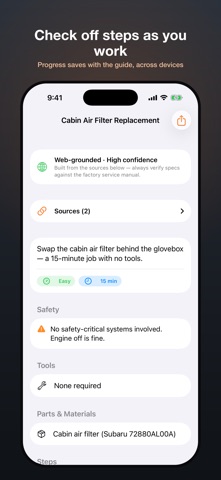
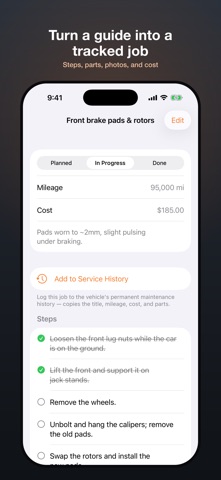
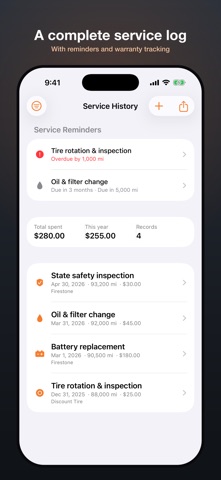
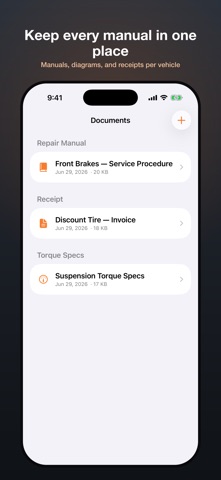
Service Bay is your garage, service logbook, and AI mechanic in one app. Add your vehicles, track every repair with checkable steps and parts, and get clear, step-by-step repair guides tailored to your exact year, make, and model. SCAN YOUR CHECK-ENGINE LIGHT • Connect a Wi-Fi or Bluetooth (BLE) OBD2 adapter and read your vehicle's diagnostic trouble codes — stored, pending, and permanent — with plain-English descriptions, right in the app. • It also reads the freeze-frame snapshot: the sensor values (coolant temp, RPM, fuel trim, and more) the computer captured the moment the code set. • Hand the codes and that data straight to the AI Mechanic for a real diagnosis — the likely causes, how to confirm each, and the fix — instead of a generic guess. • Clear codes and reset the light when the repair is done. Reading your codes is always free. THE AI MECHANIC • Ask how to do almost any job — "replace the front brake pads," "change the oil and filter" — and get an ordered guide with the tools, parts, estimated time, and safety notes. • Every guide is researched from real sources — your vehicle's manuals and the web — and shows the citations, so you can verify it instead of trusting a guess. • Turn any guide into a tracked project in one tap, then check off steps as you work. BUILT FROM REAL SOURCES, AND CITED • Generic AI guesses procedures and specs from a blurry internet average — and can invent figures for the wrong year or trim. The AI mechanic instead researches your repair on the web, builds the guide from what it finds, and shows the sources it used so you can check them. • Add your vehicle's own repair manuals and it grounds the guide in those too (Premium) — quoting exact specs and showing which sections it used. YOUR GARAGE & SERVICE HISTORY • Add every vehicle with its mileage, VIN, and notes. • Keep a complete, back-dated maintenance log for each car — date, mileage, cost, parts, and whether you or a shop did the work. • Get reminders for the next service by date or mileage, so you never miss an oil change, rotation, or inspection. • Track warranties to know what's still covered, and attach before-and-after photos to any job. • Turn a finished project into a logged service in one tap, and see what you've spent per vehicle and this year. DOCUMENT LIBRARY • Keep repair manuals, wiring diagrams, and receipts organized per vehicle, imported from Files or Photos. PRIVATE BY DESIGN • Your garage, projects, and documents stay on your device. No accounts, no ads, no tracking. • AI guides are generated in the cloud: they send just your request and the manual excerpts needed — never your full documents — and the AI searches the web to find and cite real sources. (A basic offline guide can be generated on-device on supported devices.) The AI mechanic is Premium, with a few free guides to start. Your garage, projects, service log, and document library are always free. AI-generated guidance can be incomplete or wrong — always verify against the factory service manual and use proper safety precautions. Consult a professional for safety-critical work. SUBSCRIPTION Premium is an auto-renewing subscription — Premium (Monthly) or Premium (Yearly), the latter with a free trial. Payment is charged to your Apple Account at confirmation of purchase. The subscription renews automatically unless cancelled at least 24 hours before the end of the current period; manage or cancel anytime in your App Store account settings. Prices are shown in the app. Terms of Use (EULA): https://www.apple.com/legal/internet-services/itunes/dev/stdeula/ Privacy Policy: https://mechanic.clarke.rocks/privacy.html
What's new · 1.8
Send manuals straight in from other apps. Got a PDF repair manual sitting in Google Drive, Dropbox, Files, or an email attachment? You no longer have to save it somewhere first and then go hunting for it. Share it to Service Bay and it lands in the vehicle you pick. Open the PDF wherever it already lives, tap Share, and choose Service Bay. The app opens with the title filled in and the file already typed as a repair manual — pick the vehicle, confirm, and it's filed in that car's document library, ready for the AI Mechanic to quote from (Premium). • Share PDFs and images into the app from Google Drive, Files, Mail, Dropbox, or AirDrop • Titles get tidied up automatically, and wiring diagrams, receipts, and torque specs are sorted by type • Works before you've added a car too — you can create the vehicle right from the import screen Questions or ideas? Tap Support in the app — we read everything.
Details